Ussage of Event XML field from Archived Event Schema in marketing campaign | Community
Skip to main content
Level 2
March 17, 2022
Solved

Ussage of Event XML field from Archived Event Schema in marketing campaign

  • March 17, 2022
  • 1 reply
  • 1501 views

Is there a way if we can use an event xml field data present under archived event schema, for our marketing campaign to use in Email template?

This post is no longer active and is closed to new replies. Need help? Start a new post to ask your question.
Best answer by Marcel_Szimonisz

Hello @himanshu-singh,

it is the basic  functionality of message centre


You can access the rt event data

<ctx>
  <firstName>Marcel</firstName>
</ctx>

In transactional email template  by :

<%=rtEvent.ctx.firstName%>

EDIT:

Just realized you are referring to  marketing campaign. Each rt event is linked to recipient you can enrich your targeting dimension by any rt event based on query selection. For example you want last transactional message of specific type?
In query or enrichment activity click on add data under the query select data linked to the targeting dimension --> data linked to the filtering dimension 

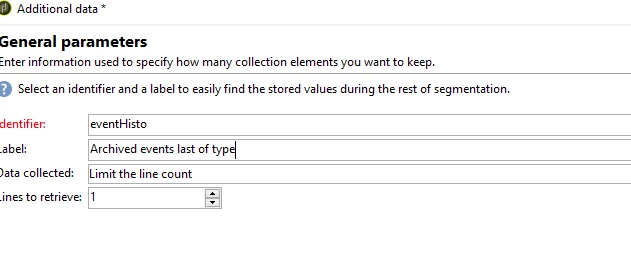
Select on add Archived events and fill up the form and set to retrieve 1 record
 

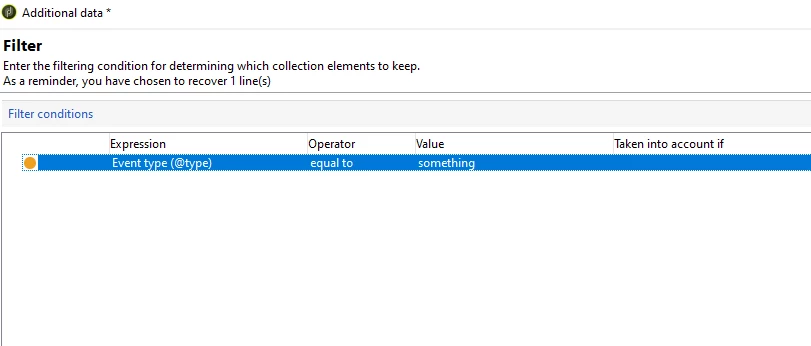
Add your criteria:
 

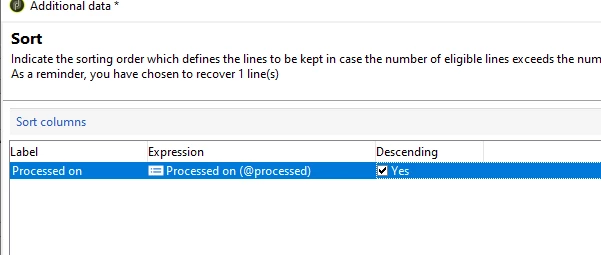
Sort by event date


click ok pull information such as event xml that can be accessed later in email

EDIT2:

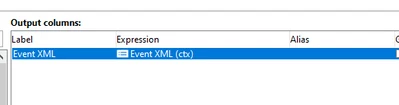
Event XML is not shown in field explorer you have to manually type ctx in the expression builder
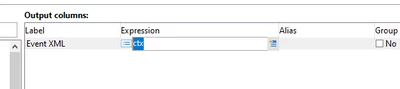
It will get recognized
 

Marcel

1 reply

Marcel_Szimonisz
Community Advisor
Marcel_SzimoniszCommunity AdvisorAccepted solution
Community Advisor
March 17, 2022

Hello @himanshu-singh,

it is the basic  functionality of message centre


You can access the rt event data

<ctx>
  <firstName>Marcel</firstName>
</ctx>

In transactional email template  by :

<%=rtEvent.ctx.firstName%>

EDIT:

Just realized you are referring to  marketing campaign. Each rt event is linked to recipient you can enrich your targeting dimension by any rt event based on query selection. For example you want last transactional message of specific type?
In query or enrichment activity click on add data under the query select data linked to the targeting dimension --> data linked to the filtering dimension 

Select on add Archived events and fill up the form and set to retrieve 1 record


Add your criteria:


Sort by event date


click ok pull information such as event xml that can be accessed later in email

EDIT2:

Event XML is not shown in field explorer you have to manually type ctx in the expression builder

It will get recognized


Marcel

Level 2
March 17, 2022

Hello @marcel_szimonisz ,


Thanks for your response!

When I have followed the steps mentioned by you in last steps after below step,

when going to next step to pull information I am not able to see event xml option which I could fetch.


Level 2
April 5, 2022

Hello @himanshu-singh ,

type ctx in expression builder it is not shown on the field explorer

but it gets recognized


Marcel


Hi @marcel_szimonisz ,


Thanks for the solution earlier as noticed the solution you mentioned was working before whereas today something very peculiar happened and the solution is not working anymore , I am attaching the screenshot for your reference of the error which i am getting,

Error:-

Also Wanted to know how can I fetch particular value from Event XML field as it is having multiple tags which are passed through ctx payload api.