Update Delivery template Properties | Community
Skip to main content
Level 3
July 26, 2022
Solved

Update Delivery template Properties

  • July 26, 2022
  • 2 replies
  • 1721 views

Hi All,


I need some help, if someone has done it please share thoughts or send me in right direction.


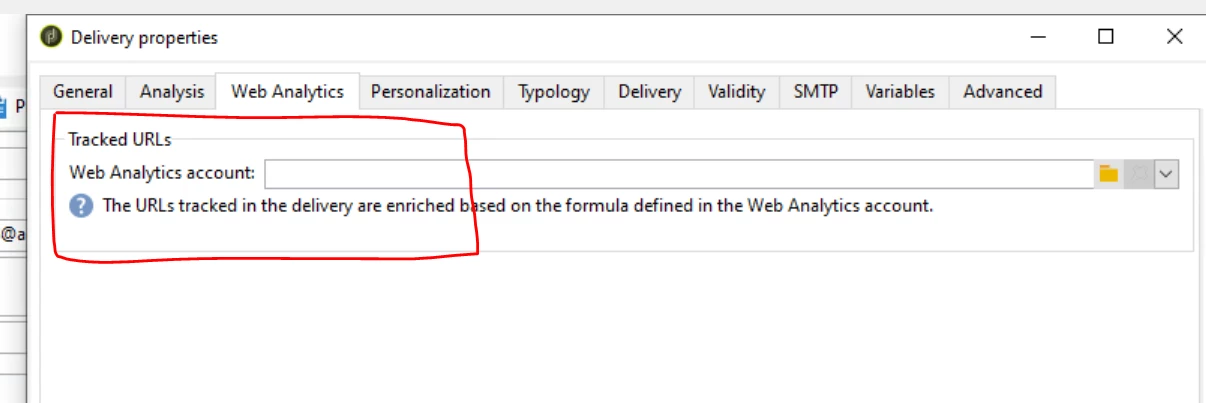
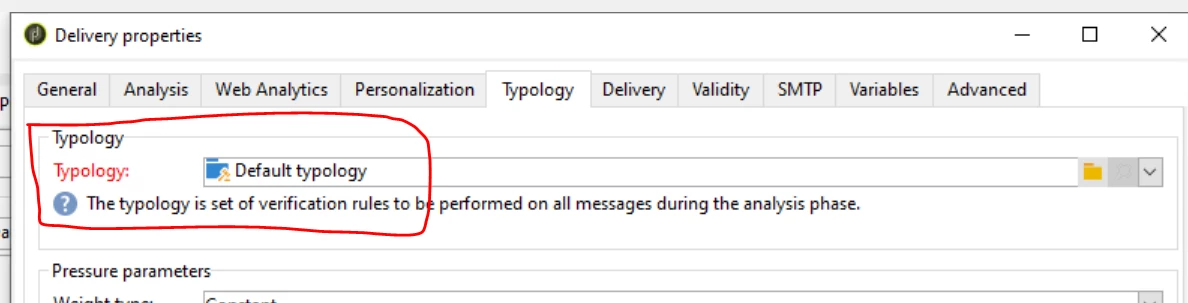
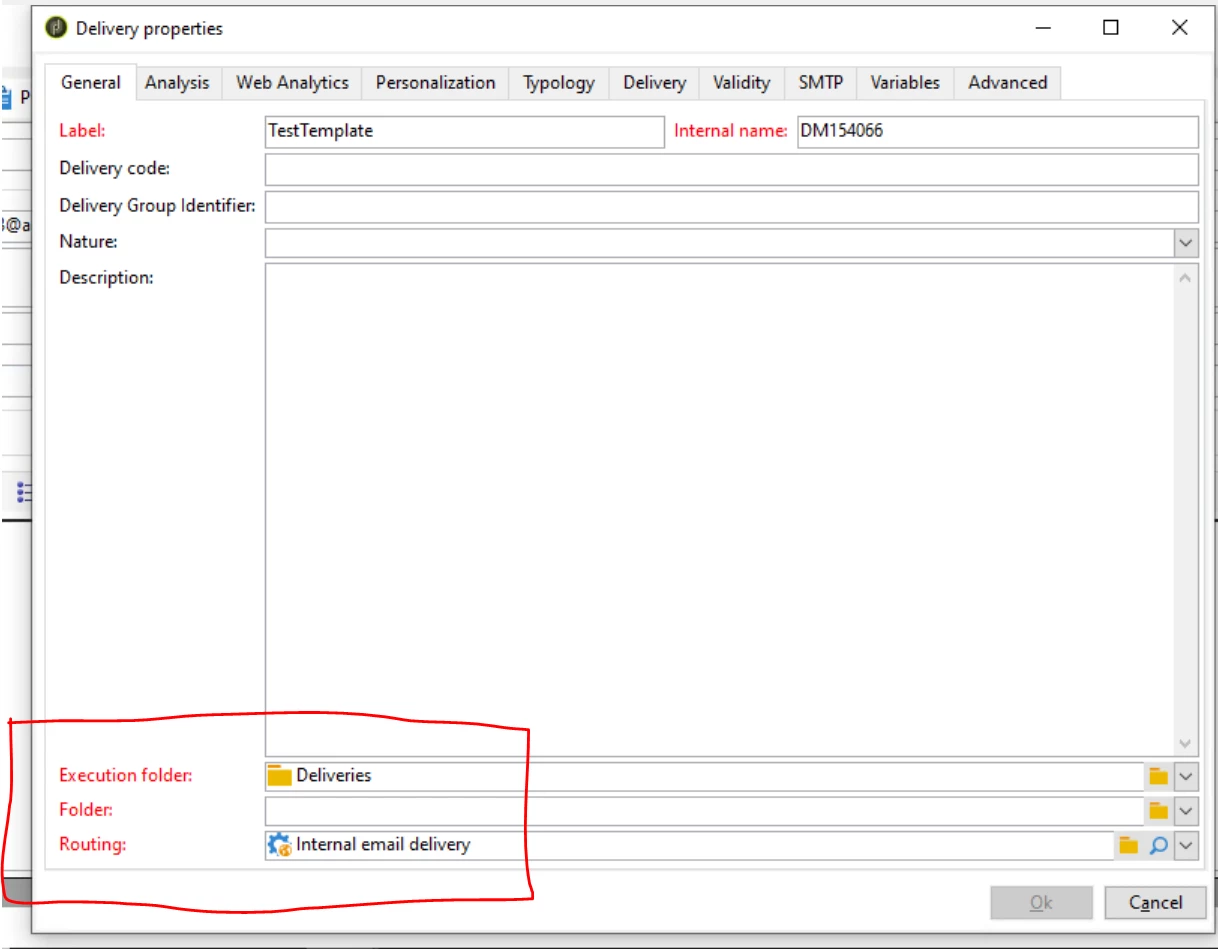
I have more than 100 Email Delivery templates for different brands and I have to make couple of change in the properties of these templates. Changes includes updating 'Execution Folder', 'Routing', 'Web Analytics Account' and 'Typology'. These properties already have value but I need them to update with new ones.


I have highlighted the updates I need to made in below example image:


can we achieve this through workflow or any other way?

Appreciate your help, Thanks!!
This post is no longer active and is closed to new replies. Need help? Start a new post to ask your question.
Best answer by David_Loyd

The javascript option @_manoj_kumar_ will work.

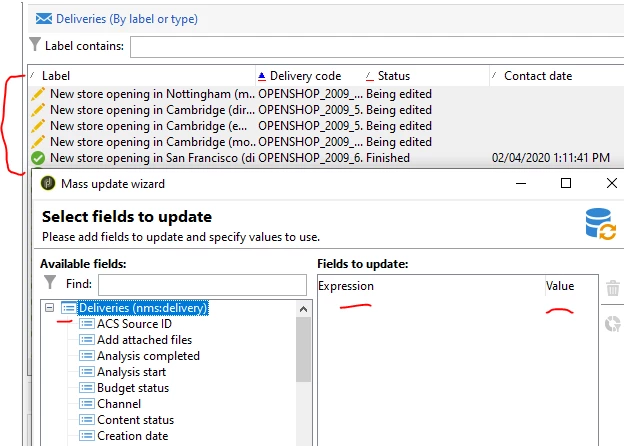
If you wanted a non scripting way to do you can navigate to your templates folder then filter for all the correct templates. Once you have the correct templates select them all.

Then right click -> Actions -> Mass Update of Selected Lines 

then the dialogue will allow you to enter what field and values should be populated.


This will update all the templates you've selected with the fields and values you specified.


2 replies

Manoj_Kumar
Community Advisor
Community Advisor
July 27, 2022

Hello @parmeshwarr3905 


You will have to write a javascript code to pull the deliveries and then update the ids. First get the primary keys of your routing, web analytics account, and execution folder and use this script to modify your details and use case.

var q = xtk.queryDef.create(
  <queryDef schema="nms:delivery" operation="select" >
    <select>
      <node expr="@id" alias="@id"/>         
    </select>      
   </queryDef>
);
var deliveries = q.ExecuteQuery();

for each(var d in deliveries){
   var delivery=nms.delivery.load(d.@id);
	delivery.deliveryProvider-id=123; // Routing primary key
	delivery.typology-id=123; // Typolofy primary key
	delivery.folderProcess-id=222; // execution primary key
	delivery.webAnalyticsAccount-id=123; //web analytics account primary key
	delivery.save();
}

Note: This script is an example only. You will have to change a few things according to your requirement.


Manoj  | https://themartech.pro
Level 3
July 27, 2022

@_manoj_kumar_ 


I have modified query by adding where condition to test it but it's throwing an error. Please let me know how can I update the script to resolve this 


David_Loyd
Adobe Employee
Adobe Employee
July 27, 2022

try taking the comments completely out

remove these

 // Routing primary key


David_Loyd
Adobe Employee
David_LoydAdobe EmployeeAccepted solution
Adobe Employee
July 27, 2022

The javascript option @_manoj_kumar_ will work.

If you wanted a non scripting way to do you can navigate to your templates folder then filter for all the correct templates. Once you have the correct templates select them all.

Then right click -> Actions -> Mass Update of Selected Lines 

then the dialogue will allow you to enter what field and values should be populated.


This will update all the templates you've selected with the fields and values you specified.