
Update Data Activity - incompatible error during updating fields between two tables with the same structure | Community
Skip to main content
acc_acs
Level 3
September 28, 2023
Solved

Update Data Activity - incompatible error during updating fields between two tables with the same structure

  • September 28, 2023
  • 2 replies
  • 1976 views

Hi there,

It's a simple task. I want to load from a source table to another table.

In this case I am making a query by Activity Query on a table (source table) and then using Activity Update Data to insert it into the <destination table>, which is empty.

The two tables have the same structure. But I still get an error that doesn't make sense:

WKF-560029 The document types of inbound events ('<source table>' and '<destination table>') are incompatible (step 'Update data 7'). Unable to perform the operation.

I've already done several tests. And so far I have no idea what could be causing this problem.

I believe it is a small detail. Because loading a table is a simple task. Someone outside the box help me see what I'm not seeing, please. Thanks!


Regards
This post is no longer active and is closed to new replies. Need help? Start a new post to ask your question.
Best answer by Parvesh_Parmar

Hello @acc_acs ,


The error message WKF-560029 in Adobe Campaign Classic means that there is some issue with the reconciliation key in the Update activity.


1. As I understood  first you used a query activity and read the data from source table.

Notes: Just make sure you have a primary key in your source  and destination table.

2. Then you use the update activity to insert the data in destination table.

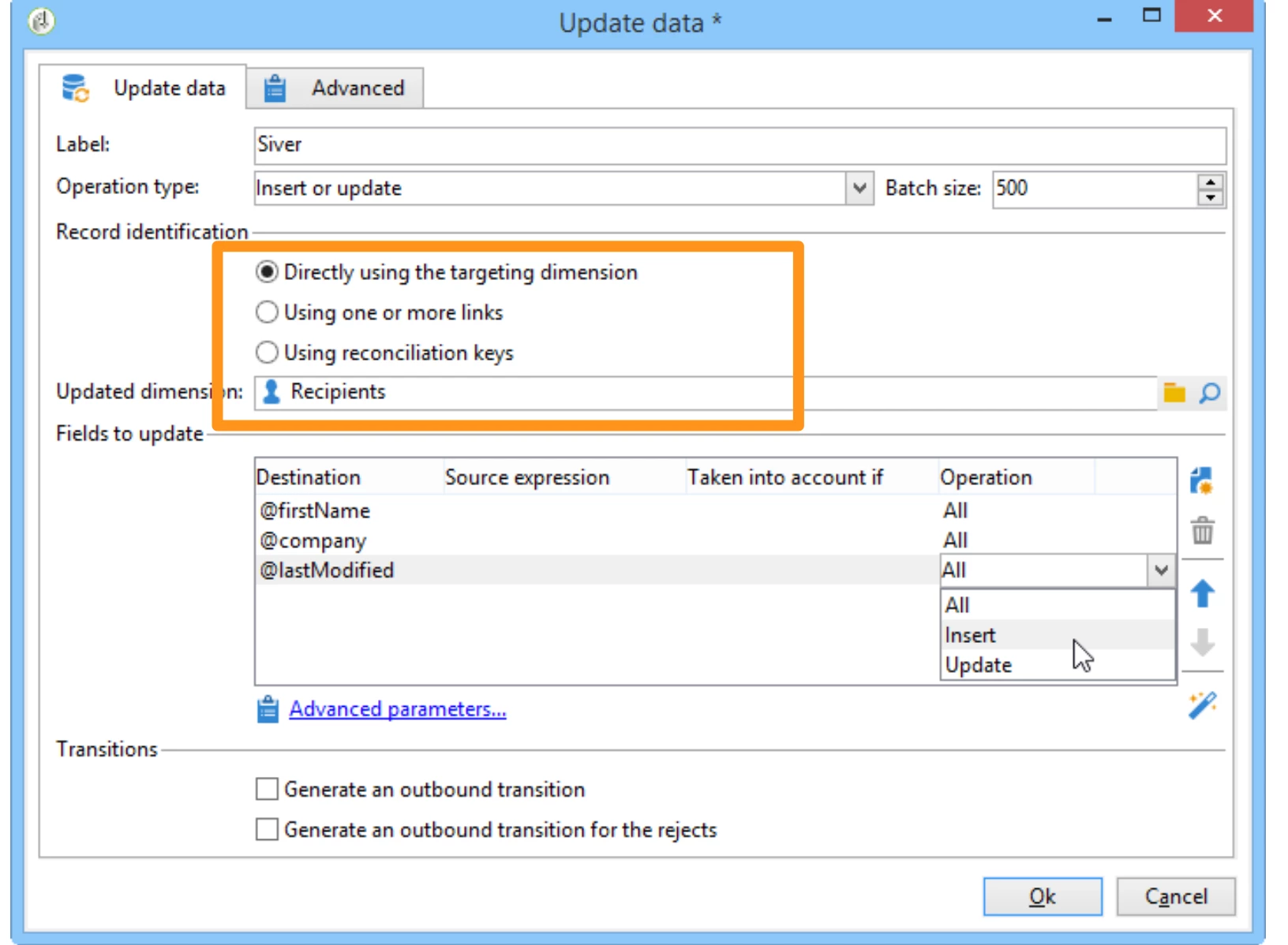
3. Please check what has been selected in reconciliation.


4. If you have used the first option as in this screenshot, then I would suggest you to select the third option "using reconciliation key"

5. Then select primary key of both source and destination table.

6. Make sure primary key of source and destination has same data type.

Normally it should be fix after that.


This error has been discussed on the below link also:

https://experienceleaguecommunities.adobe.com/t5/adobe-campaign-classic-questions/help-with-error-wkf-560029/m-p/353035


Hope it will help you.

Kr,

Parvesh


2 replies

Parvesh_Parmar
Community Advisor
Parvesh_ParmarCommunity AdvisorAccepted solution
Community Advisor
September 28, 2023

Hello @acc_acs ,


The error message WKF-560029 in Adobe Campaign Classic means that there is some issue with the reconciliation key in the Update activity.


1. As I understood  first you used a query activity and read the data from source table.

Notes: Just make sure you have a primary key in your source  and destination table.

2. Then you use the update activity to insert the data in destination table.

3. Please check what has been selected in reconciliation.


4. If you have used the first option as in this screenshot, then I would suggest you to select the third option "using reconciliation key"

5. Then select primary key of both source and destination table.

6. Make sure primary key of source and destination has same data type.

Normally it should be fix after that.


This error has been discussed on the below link also:

https://experienceleaguecommunities.adobe.com/t5/adobe-campaign-classic-questions/help-with-error-wkf-560029/m-p/353035


Hope it will help you.

Kr,

Parvesh


Parvesh Parmar – Adobe Community Advisor https://www.linkedin.com/in/parvesh-parmar/
LakshmiPravallika
Community Advisor
Community Advisor
September 29, 2023

Hi @acc_acs ,


Few times Insert/Update will not work for Empty Table, as there are no records to be Updated,


Hence , Please try with Insert Option as highlighted below inside your Update Data activity for the first run


From the next runs, you can use Insert/Update Option to Update the records.


Also it is the best practice to Update Data using reconcilation keys (3rd Option in Screenshot) for the right Updates to happen.


Regards,

Pravallika.


acc_acs
acc_acsAuthor
Level 3
September 29, 2023

Many thanks @parvesh_parmar and @lakshmipravallika !


Thanks for your answer! Yes. We can do it in several ways.
Sometimes when our heads are full of problems, we don't think things through.
And precisely with your help, this time using "using reconciliation keys", I managed to think better and solve the problem!

Have a nice weekend for us! 🤗🙏


Regards