You can use the @eventDate of the Recipient delivery log (nms:broadLogRcp) to estimate down to individual email records.
You can look at the following test i sent to my self and check the timeline on the timestamps
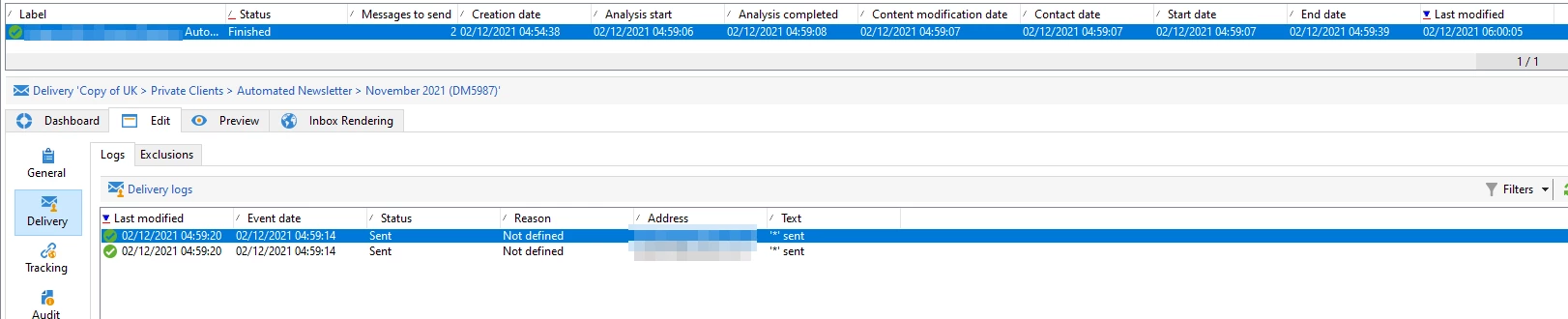
The latest event date on ACC is 02/12/2021 04:59:20 and I received the email in my inbox at Thu 02/12/2021 05:01
Looking at the email headers, it was handed over by Adobe's mail servers and received by Microsoft email servers between 04:59:20 and 05:01
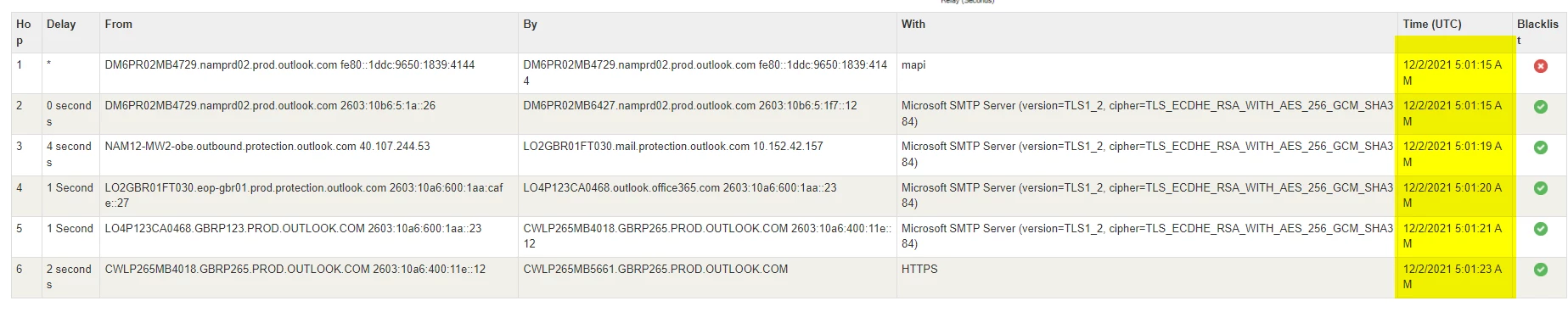
Due to throlling, bottlenecks, queues, message preparation, etc, if you have 100k emails to send, they will not all be sent at exactly the same time.
Here are the columns you can perform tests on to check for timestamps
  <select>
    <node _oldExpr="@label" colSize="35" expr="@label" label="Label"/>
    <node _oldExpr="@state" colSize="18" expr="@state" label="Status"/>
    <node _oldExpr="[properties/@toDeliver]" colSize="16" expr="[properties/@toDeliver]"
          label="Messages to send"/>
    <node _oldExpr="@created" colSize="20" expr="@created" label="Creation date"/>
    <node _oldExpr="@startDate" colSize="20" expr="@startDate" label="Analysis start"/>
    <node _oldExpr="@endDate" colSize="20" expr="@endDate" label="Analysis completed"/>
    <node _oldExpr="@contentModTime" colSize="25" expr="@contentModTime" label="Content modification date"/>
    <node _oldExpr="[scheduling/@contactDate]" colSize="20" expr="[scheduling/@contactDate]"
          label="Contact date"/>
    <node _oldExpr="[execution/@broadStartDate]" colSize="20" expr="[execution/@broadStartDate]"
          label="Start date"/>
    <node _oldExpr="[execution/@broadEndDate]" colSize="20" expr="[execution/@broadEndDate]"
          label="End date"/>
    <node _oldExpr="@lastModified" colSize="20" expr="@lastModified" label="Last modified"/>
  </select>