Unable to update the Recipient record using Javascript xtk.session.Write in WebApp using ACC V8 client console | Community
Skip to main content
Level 2
July 11, 2025
Solved

Unable to update the Recipient record using Javascript xtk.session.Write in WebApp using ACC V8 client console

  • July 11, 2025
  • 4 replies
  • 849 views

Hi Team,

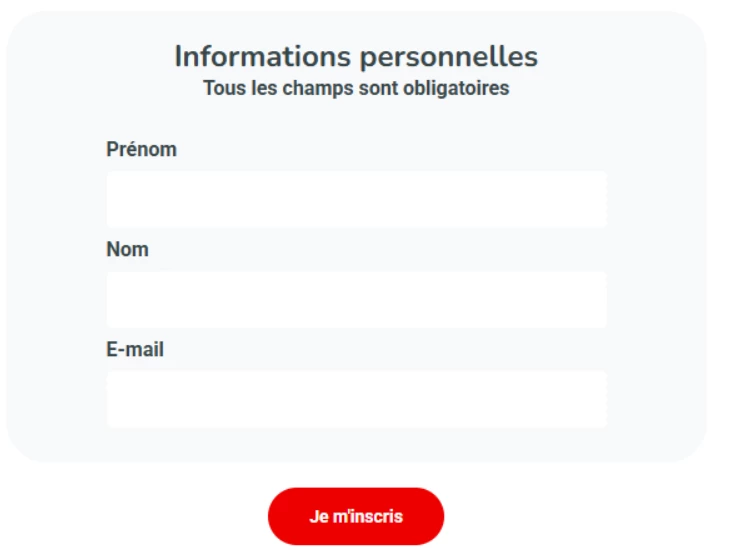
I have created WebApp with Input Form with FirstName, LastName, Email in 1st page. And some Check box inputs in 2nd page.

my WebApp workflow configured like below.

 

1st page Input Values should Update into Recipient schema. But its not working with below script.
 

// Update RCP Data

var id = ctx.recipient.@id;
var ID_PARTENAIRE = ctx.vars.bp_id;
var Business = ctx.vars.bp_Business;
var Entity = ctx.vars.bp_Entity;

var currentDate = formatDate(new Date(), "%4Y/%2M/%2D %02H:%02N:%02S");
xtk.session.Write(<recipient xtkschema="nms:recipient" operation="_update" _key="@id,@ID_PARTENAIRE,@Business,@Entity" firstName={ctx.vars.updfirstName} lastName={ctx.vars.updlastName} email={ctx.vars.updemail} lastModified={currentDate} />);


Getting below Error once submit the Button in Form, stating Unable to find the Key values for element Recipient.
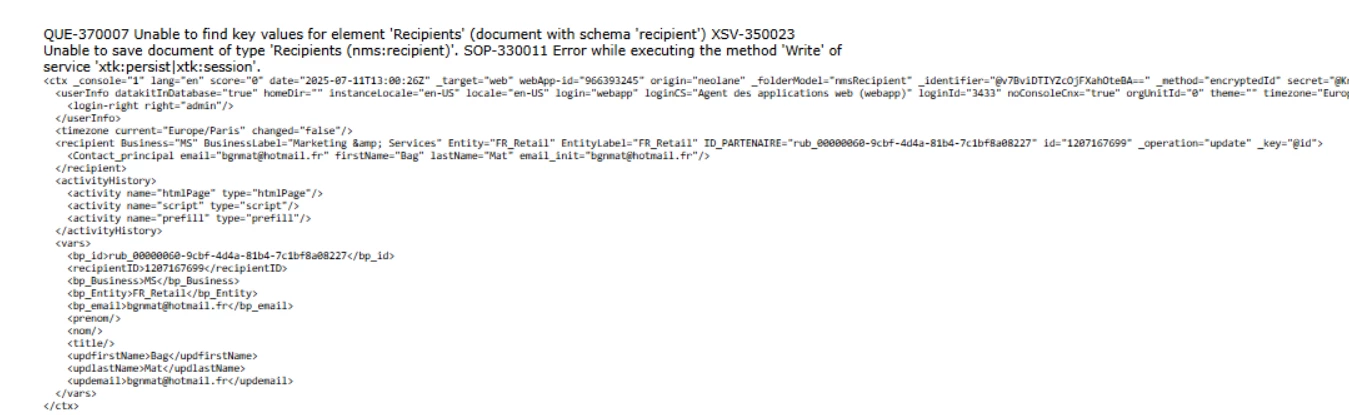
 

Note: we have Extended the nms: recipient schema and added custom columns as Keys. I am using those for Update or Insert Operations.

Other hand, same script inserting new record when I am trying without Key argument.


The Storage activity not helping to update, pre-loaded columns. 


Can anyone help me solve this error.


Thank you.


Best answer by Amine_Abedour

Hello @santoshku20 


When performing an update operation using xtk.session.Write, you should specify the attributes that correspond to the keys in the XML structure. This ensures that the update operation correctly identifies the recipient record you want to modify.

Here’s how you can modify your xtk.session.Write call to include the attributes explicitly:

// Update RCP Data var id = ctx.recipient.@id; var ID_PARTENAIRE = ctx.vars.bp_id; var Business = ctx.vars.bp_Business; var Entity = ctx.vars.bp_Entity; var currentDate = formatDate(new Date(), "%4Y/%2M/%2D %02H:%02N:%02S"); xtk.session.Write( <recipient xtkschema="nms:recipient" operation="_update" _key="@id,@ID_PARTENAIRE,@Business,@Entity" id={id} ID_PARTENAIRE={ID_PARTENAIRE} Business={Business} Entity={Entity} firstName={ctx.vars.updfirstName} lastName={ctx.vars.updlastName} email={ctx.vars.updemail} lastModified={currentDate} /> );


Br,

4 replies

Level 2
July 11, 2025

// Update RCP Data

var id = ctx.recipient.@id;
var ID_PARTENAIRE = ctx.vars.bp_id;
var Business = ctx.vars.bp_Business;
var Entity = ctx.vars.bp_Entity;

var currentDate = formatDate(new Date(), "%4Y/%2M/%2D %02H:%02N:%02S");

xtk.session.Write(<recipient xtkschema="nms:recipient" _operation="insertOrUpdate" _key="@id,@ID_PARTENAIRE,@Business,@Entity" firstName={ctx.vars.updfirstName} lastName={ctx.vars.updlastName} email={ctx.vars.updemail} lastModified={currentDate} />);


Level 2
July 15, 2025

Hi @santoshku20 

Can you please check whether the ctx.vars.updfirstName and  other ctx variable have the value .

Eg:logInfo("Value of updfirstName: " + ctx.vars.updfirstName);

And Pass them like below 

var firstname = ctx.vars.updfirstName;

And in the xtk.write method,

Change into firstName={fristname} do the same for lastname and email

Level 2
July 15, 2025

Hi @santoshku20 ,

Please try this below code and let me know whether its works

var xml = '<recipient xtkschema="nms:recipient" _operation="Update" _key="@id,@ID_PARTENAIRE,@Business,@Entity" ' +
'firstName="' + ctx.vars.updfirstName + '" ' +
'lastName="' + ctx.vars.updlastName + '" ' +
'email="' + ctx.vars.updemail + '" ' +
'lastModified="' + currentDate + '"' +

'/>';

xtk.session.Write(xml);

Amine_Abedour
Community Advisor
Amine_AbedourCommunity AdvisorAccepted solution
Community Advisor
July 17, 2025

Hello @santoshku20 


When performing an update operation using xtk.session.Write, you should specify the attributes that correspond to the keys in the XML structure. This ensures that the update operation correctly identifies the recipient record you want to modify.

Here’s how you can modify your xtk.session.Write call to include the attributes explicitly:

// Update RCP Data var id = ctx.recipient.@id; var ID_PARTENAIRE = ctx.vars.bp_id; var Business = ctx.vars.bp_Business; var Entity = ctx.vars.bp_Entity; var currentDate = formatDate(new Date(), "%4Y/%2M/%2D %02H:%02N:%02S"); xtk.session.Write( <recipient xtkschema="nms:recipient" operation="_update" _key="@id,@ID_PARTENAIRE,@Business,@Entity" id={id} ID_PARTENAIRE={ID_PARTENAIRE} Business={Business} Entity={Entity} firstName={ctx.vars.updfirstName} lastName={ctx.vars.updlastName} email={ctx.vars.updemail} lastModified={currentDate} /> );


Br,

Amine ABEDOUR
Level 2
July 21, 2025

Hi @amine_abedour ,

Thanks Amine. Its worked for me. I forgot to include those Keys.