Transactional Message template | Community
Skip to main content
This post is no longer active and is closed to new replies. Need help? Start a new post to ask your question.

3 replies

LakshmiPravallika
Community Advisor
Community Advisor
March 12, 2024

Hi @vijaymvj ,


Could you also provide us the error logs screenshot by going to Home--> Monitoring-->Processes List -->  web@default--> Open the log Journal and select todays date and give us the logs.


Sample log screen as shown below:


Regards,

Pravallika.


VijayMvjAuthor
Level 2
March 12, 2024

Hi @lakshmipravallika , thanks for your response!

Here is the log journal :


LakshmiPravallika
Community Advisor
Community Advisor
March 12, 2024

Hi @vijaymvj ,


From the error Logs ,it looks like the connection for "mc" user is not valid.


To check the external account used in your Template, Please go to the Delivery Template Properties-> Routing and check the External Account being used there.


Below is the sample External account for Execution Instance.


Could you Please check the  "Message Center execution instance " External account  under "/Administration/Platform/External Accounts/" and "Test the connection" for "mc" Account used there.


This issue will occur for all the other Transactional Templates also if used the same Routing.


The fix for this would be to reset the mc Account password if the connection is not successful.


Regards,

Pravallika.


AkshayAnand
Community Advisor
Community Advisor
March 13, 2024

Hi @vijaymvj 


Based on the error message you provided, the issue is related to the LogonToRemoteInstance method of the nms:extAccount service. This method is responsible for logging into an external account, which is used by the workflow to connect to a third-party system or external application.

Here are a few steps you can try to resolve the issue:

  1. Make sure that the username and password used to log in to the external account are correct. Also, check if the account is still active and not locked out.

  2. Verify that the endpoint URL used to connect to the external account is correct and reachable. You can try accessing the URL directly from a browser or using a tool like Postman to make sure that the connection is working.

  3. Review the server logs to see if there are any errors related to the nms:extAccount service or the LogonToRemoteInstance method. This may help you identify the root cause of the issue.

  4. Check the message center workflow configuration: Ensure that the Message Center workflow is configured correctly with the correct External Account ID and other relevant details.

If the above steps do not resolve the issue, you may need to contact Adobe Support.

You can also take reference to the solved thread regarding a similar issue.


Thanks

Akshay

VijayMvjAuthor
Level 2
March 14, 2024

Hi @akshayanand

I tried the above steps which you provided to resolve the issue. 


I checked the username, password, and external account, which is also active, and saw that the external account test connection was also successful.


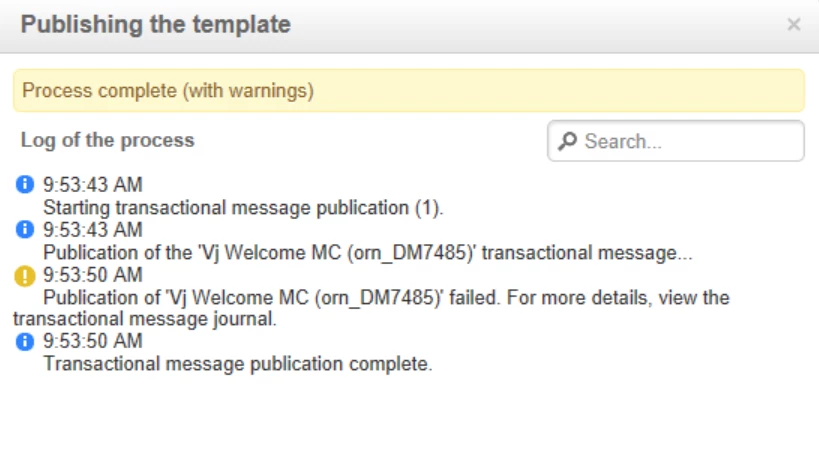
while publishing the template getting this warning :


FYI- I'm using soapUI for testing the messages.


Thanks!

isahore
Community Advisor
Community Advisor
March 14, 2024

Hi @vijaymvj,

Check if the sender/reply/error address configured in your Transactional email template is whitelisted on the message center instance.


BR,

Ishan

VijayMvjAuthor
Level 2
March 18, 2024

Hi @isahore , 

yeah, I checked that as well! the addresses are configured correctly.