To configure at least 2 purchases from the purchase history Table | Community
Skip to main content
Level 4
April 9, 2024
Solved

To configure at least 2 purchases from the purchase history Table

  • April 9, 2024
  • 1 reply
  • 841 views

Hi 

I could able to filter the purchase history with some period of time

But i want filter from this who have made purchase atlease 2 times in the time period

For Eg:

 

This is the time period i have given to get the purchase history 
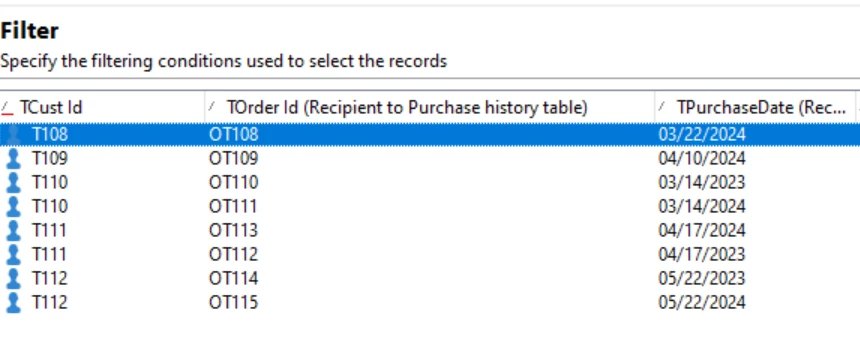
 

Getting records in preview tab Like this and here cust id T110, T111 and T112 made purchase twice 

So in this case as a out pound transition i need to get only 3 records as T110, T111 and T112

Can anyone kindly guide me for this 

Thanks in advance!

This post is no longer active and is closed to new replies. Need help? Start a new post to ask your question.
Best answer by ParthaSarathy

Hi @vani97 ,

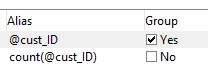
In Query, use the same filtering condition, and navigate to Query > edit additional data > in output column, add the below 2 fields alone

  • @cust_id
  • Count(@cust_id)

Enable the 'Group' checkbox for @cust_id in output column.

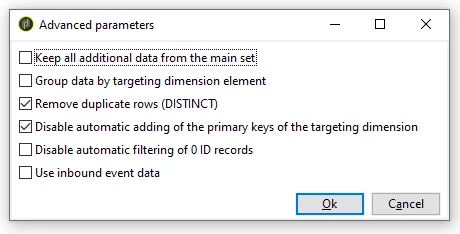
Then, Advanced Parameters > Enable 'disable automatic adding of primary keys of the targeting dimension' checkbox

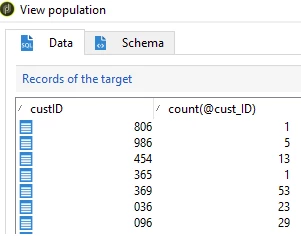
So, when you run the workflow, the output if the query will state how many counts a customer id had done a transaction.


After query, use a split and configure filtering condition as count(@cust_ID) greater than or equal to 2


1 reply

ParthaSarathy
Community Advisor
ParthaSarathyCommunity AdvisorAccepted solution
Community Advisor
April 9, 2024

Hi @vani97 ,

In Query, use the same filtering condition, and navigate to Query > edit additional data > in output column, add the below 2 fields alone

  • @cust_id
  • Count(@cust_id)

Enable the 'Group' checkbox for @cust_id in output column.

Then, Advanced Parameters > Enable 'disable automatic adding of primary keys of the targeting dimension' checkbox

So, when you run the workflow, the output if the query will state how many counts a customer id had done a transaction.


After query, use a split and configure filtering condition as count(@cust_ID) greater than or equal to 2


~  ParthaSarathy S~  Click here to join ADOBE CAMPAIGN USER GROUP for Quarterly In-person | Hybrid | Virtual Meetups
vani97Author
Level 4
April 9, 2024

Thanks a lot Its working fine to me