The Campaign workflow cannot be started | Community
Skip to main content
Level 3
March 5, 2021
Solved

The Campaign workflow cannot be started

  • March 5, 2021
  • 3 replies
  • 2147 views

The campaign workflow cannot be started in the Adobe Campaign classic environment: After I click the start button after created a campaign workflow, it will not run, only in the "Start as soon as possible" status, all the process control buttons are gray.
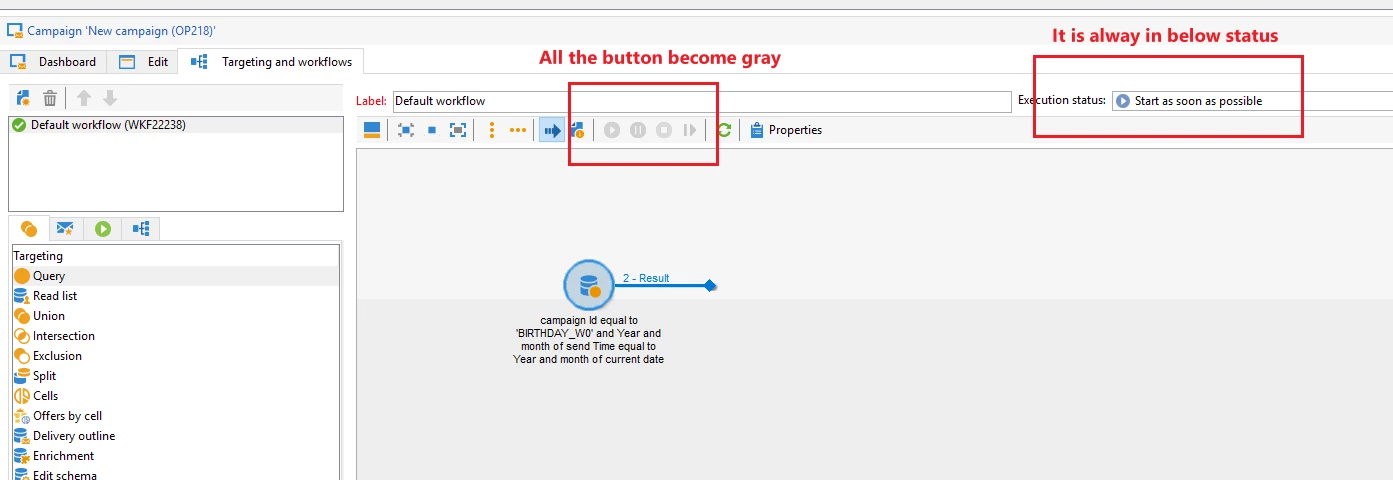
I've checked the log, it shows "Command 'Wake up' applied on workflow" after I click the "START" button. 

 

But I can start the workflow outside of a campaign workflow, for example the find the workflow in a view of technical workflow folder, after I click the Start, it will run as normally.


Is there any one know the reason of the issue?

This post is no longer active and is closed to new replies. Need help? Start a new post to ask your question.
Best answer by DebTr

Hi @felixsongfei ,

Please check "operationMgt" workflow. If is is in paused or finished state you need to start it.

It is responsible for execution of campaign workflows.

Thanks,

Deb

3 replies

DebTrAccepted solution
Level 6
March 5, 2021

Hi @felixsongfei ,

Please check "operationMgt" workflow. If is is in paused or finished state you need to start it.

It is responsible for execution of campaign workflows.

Thanks,

Deb

Level 2
January 18, 2024

Hi @debtr ,
I faced the similar issue in campaign workflow and when i checked the "operationMgt" workflow it is up and running fine . No error seen the logs .

then what could be possible root cause for such issue ? any idea ?


Thanks!!!

Pradyumn

akashaj7696
Level 3
March 9, 2021

Ask the admin to run the workflow from "All Workflows" section in Adobe campaign. Which will force this workflow to get started. Thanks!

Sukrity_Wadhwa
Community Manager
Community Manager
March 10, 2021

Hi @felixsongfei,

Were you able to resolve this query with any of the given solutions or do you still need more help here? Do let us know.

Thanks!

Sukrity Wadhwa