Styling a sentance inside targetdata used in if else statement | Community
Skip to main content
Level 2
April 1, 2024
Solved

Styling a sentance inside targetdata used in if else statement

  • April 1, 2024
  • 3 replies
  • 796 views

Hi All,


Can anyone let me know how to highlight the sentence in, if else statement while using targetdata to fetch the value from the custom schema.


I have added the screenshot for the reference.
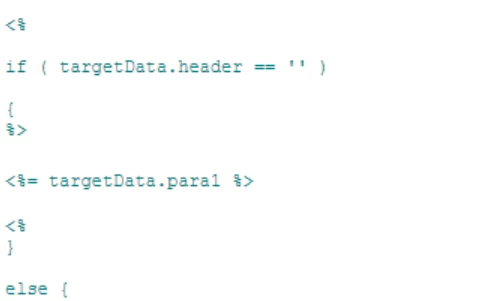
In this above code i need to bold the values in targetdata.para1

@parthasarathy 


Thanks

Hariprasanth


This post is no longer active and is closed to new replies. Need help? Start a new post to ask your question.
Best answer by ParthaSarathy

Hi @haricharan ,

Go to source tab in delivery, and add <strong> before the start of targetData JS and </strong> after the targetData JS.

<strong><%=targetData.para %></strong>

The HTML <strong> tag is used semantically to emphasize importance, conveying meaning to both sighted and screen readers. In contrast, the <b> tag is solely for visual presentation, making text bold without conveying significance.

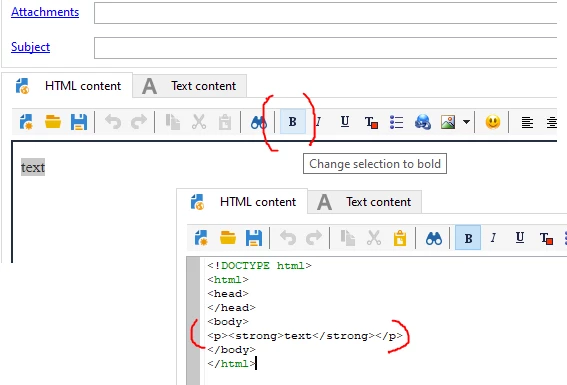
In Delivery HTML tab, you can see B icon. when you select this to make a text as bold, it will generate <strong><strong/> in source tab.

3 replies

LakshmiPravallika
Community Advisor
Community Advisor
April 1, 2024

Hi @haricharan ,


Please try below


<%if(targetData.header=="") {%>
<b><%=targetData.para %></b>

<%}
else
{ %>

<%=targetData.para2 %>
<%}%>


Regards,

Pravallika.

ParthaSarathy
Community Advisor
ParthaSarathyCommunity AdvisorAccepted solution
Community Advisor
April 1, 2024

Hi @haricharan ,

Go to source tab in delivery, and add <strong> before the start of targetData JS and </strong> after the targetData JS.

<strong><%=targetData.para %></strong>

The HTML <strong> tag is used semantically to emphasize importance, conveying meaning to both sighted and screen readers. In contrast, the <b> tag is solely for visual presentation, making text bold without conveying significance.

In Delivery HTML tab, you can see B icon. when you select this to make a text as bold, it will generate <strong><strong/> in source tab.

~  ParthaSarathy S~  Click here to join ADOBE CAMPAIGN USER GROUP for Quarterly In-person | Hybrid | Virtual Meetups
Sukrity_Wadhwa
Community Manager
Community Manager
April 17, 2024

Hi @haricharan,

Were you able to resolve this query with the help of the given solutions or do you still need more help here? Do let us know. In case the given solutions were helpful, then kindly choose the one that helped you the most as the 'Correct Reply'.
Thanks!

Sukrity Wadhwa