Specify "Period" parameter when generating report export using xtk.report | Community
Skip to main content
Level 2
August 3, 2022
Question

Specify "Period" parameter when generating report export using xtk.report

  • August 3, 2022
  • 3 replies
  • 2778 views

Hello!

I'm automating some Message Center reports, using this as a basis:

https://experienceleague.adobe.com/docs/campaign-classic/using/automating-with-workflows/use-cases/monitoring/sending-a-report-to-a-list.html?lang=en

I'm specifically looking at the "Message Center Service Level" report, and I'm getting a basic PDF generated using this code:

var reportName = "messageCenterQualityOfService"; var path = "/home/customers/specsavers/incoming/Temp/mcqos.pdf"; var exportFormat = "PDF"; var _ctx = <ctx _context="global" _reportContext="messageCenterQualityOfService" /> var isAdhoc = 0; xtk.report.export(reportName, _ctx, exportFormat, path, isAdhoc);

This generates a report based on the default parameters, "Channel", "Execution Instance" and "Period".

Can someone help me set the "_ctx" parameter so that I can generate the report for different "Periods". e.g. "1 week view" via JavaScript?
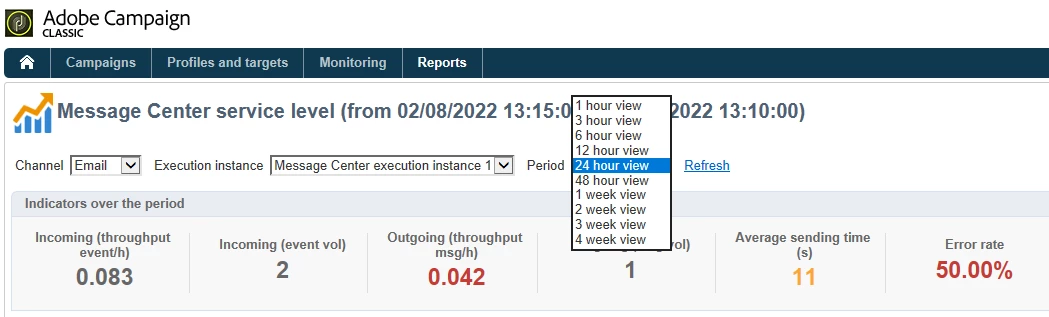
Thank you!

This post is no longer active and is closed to new replies. Need help? Start a new post to ask your question.

3 replies

Adobe Employee
August 3, 2022

Hello,


Is it possible to check the debug view to see the context elements/attributes (and so parameters/values) available?

Level 2
August 5, 2022

Thank you, imicu.


I'm so sorry, how do I see the debug view of the report? It's an out-of-the-box report:

Many thanks!

Level 2
August 24, 2022

I believe it is suppose to be 

ctx.vars.period = 336;

without underscore.


Hi and thanks for your help!


This causes the workflow to fail with the error:

24/08/2022 15:54:51	JST-310000 Error while compiling script 'WKF69644/js' line 7: ctx is not defined.

Any thoughts?

Sukrity_Wadhwa
Community Manager
Community Manager
August 18, 2022

Hi @iainollerenshaw,

Were you able to resolve this query with the help of the given solutions or do you still need more help here? Do let us know. In case the given solutions were helpful, then kindly choose the one that helped you the most as the 'Correct Reply'.
Thanks!

Sukrity Wadhwa
Level 2
August 24, 2022

No luck, unfortunately. I'm following this guide which makes use of a JavaScript activity. According to the documentation, there is no "ctx" object that I can use in this activity, yet that seems to be the recommended solution. I'm very new to this aspect of Campaign, so struggling a bit!

Level 2
September 1, 2022

Any help here? I haven't been able to get any further with this.