queryDef select memo type field in javascript acitivity | Community
Skip to main content
Level 4
November 29, 2022
Solved

queryDef select memo type field in javascript acitivity

  • November 29, 2022
  • 1 reply
  • 2177 views

Hi! 

I am attempting to simply select memo type field from a schema, but the javascript activity keeps throwing an error that "@description" is undefined. It seems to be related to the type of the attribute rather than a syntax error. 

Can anyone point me in the direction of how to solve this? Thank you very much in advance! 🙂


Error: 

29/11/2022 11:37:25 SOP-330011 Error while executing the method 'ExecuteQuery' of service 'xtk:queryDef'.
29/11/2022 11:37:25 XTK-170036 Unable to parse expression '@description'.
29/11/2022 11:37:25 Attribute 'description' unknown (see definition of schema 'Series (kap:series)').

Schema: 

<element desc="Series" label="Series" labelSingular="Series" name="series"> <dbindex name="sId" unique="true"> <keyfield xpath="@sId"/> </dbindex> <key internal="true" name="sId"> <keyfield xpath="@sId"/> </key> <attribute desc="The alphanumeric ID of the series." label="Id" name="sId" type="string"/> <attribute desc="The title of the series." label="Title" length="150" name="title" type="string"/> <element desc="A longer description." label="Descripton" name="descripton" type="memo"/> <attribute desc="The channel this series was broadcast on." label="Channel Code" length="100" name="channelCode" type="string"/> <attribute desc="URL for the information of the series" label="URL" length="400" name="url" type="string"/> <attribute desc="Series Image URL" label="Series Image URL" length="400" name="mediaLocationUri" type="string"/> <attribute default="GetDate()" label="InsertOrUpdatedDateinAdobe" name="InsertOrUpdatedDateinAdobe" type="datetime"/> </element>


Code: 

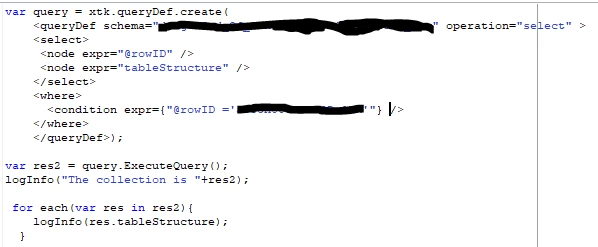
var query = xtk.queryDef.create( <queryDef schema="kap:series" operation="select"> <select> <node expr="@url"/> <node expr="@description"/> </select> <where> <condition expr={"[@description] IS NOT NULL" }/> </where> </queryDef> ) var result = query.ExecuteQuery(); logInfo(result); for each(var res in result){ logInfo(res.@description); }
 

This post is no longer active and is closed to new replies. Need help? Start a new post to ask your question.
Best answer by AkshayAnand

Hi! I checked all the above. The db structure has been updated, and the adobe generated name is "description". Hmmm. 


Hi @sorendp 


Still the issue persists? This is weird. 

Apologies for the typo in the code .

var query = xtk.queryDef.create(   
<queryDef schema="kap:series" operation ="select">     
<select>           
<node expr="@url"/>            
<node expr="description"/>        
</select>        
<where>
  <condition expr={"description IS NOT NULL" }/>  
</where>   
</queryDef>

I am pasting a sample code which i used to retrieve a memo field. Please have a look.


Regards

1 reply

AkshayAnand
Community Advisor
Community Advisor
November 29, 2022

Hi @sorendp 


Memo Fields will not be accessed by giving  '@' because when try to see the display advanced field you won't be able to see '@' instead it just gives the name. Hence you can try the below code.

var query = xtk.queryDef.create(   
<queryDef schema="kap:series" operation ="select">     
<select>           
<node expr="@url"/>            
<node expr="description"/>        
</select>        
<where>
  <condition expr={"[description] IS NOT NULL" }/>  
</where>   
</queryDef>
    )
var result = query.ExecuteQuery(); logInfo(result); for each(var res in result){ logInfo(res.description); }

Regards

SorenDPAuthor
Level 4
November 29, 2022

Thanks for the answer! Unfortunately I still get the exception: 

29/11/2022 12:49:48 SCR-160012 Javascript&colon; error while evaluating script 'PWKF5224/js'.
29/11/2022 12:49:48 SOP-330011 Error while executing the method 'ExecuteQuery' of service 'xtk:queryDef'.
29/11/2022 12:49:48 XTK-170036 Unable to parse expression 'description'.
29/11/2022 12:49:48 Element 'description' unknown (see definition of schema 'Series (kap:series)').

SorenDPAuthor
Level 4
November 29, 2022

Hi @sorendp 


Could you please check if the schema has been committed to the database through Update DataBase Structure?

Also in the structure tab of your schema, you may find 3 dots on right hand side below corner

, please click on that and see what's the name adobe has generated for the desired memo field. (I guess it should be description, but please check for confirmation.)


Regards


Hi! I checked all the above. The db structure has been updated, and the adobe generated name is "description". Hmmm.