
Query not working in webApp | Community
Skip to main content
Heku_
Level 5
October 13, 2023
Solved

Query not working in webApp

  • October 13, 2023
  • 3 replies
  • 1551 views

Hello everyone, I've been trying to query the service table via Javascript, but i don't get any records.
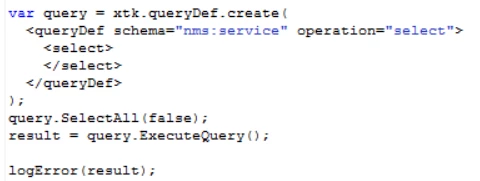
I've tried lots of querys and giving admin access to the webApp user, but nothing appears in the debugging page
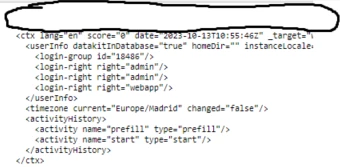
Any solution? Thank you in advance

This post is no longer active and is closed to new replies. Need help? Start a new post to ask your question.
Best answer by Marcel_Szimonisz

Hello @heku_ ,

i have never used select all tbh. You can print result with JSON.Stringify(). Can you skip that selectAll?. Have you tried something like:

var res = query.ExecuteQuery(); var services= res.getElementsByTagName("service"); logInfo(services.length); logInfo(JSON.Stringify(services));

 Do you have admin rights? Have you run the web app in admin mode? You can escalate admin rights for the query when you do not want to give admin rights to web app user.


Marcel Szimonisz

3 replies

AkshayAnand
Community Advisor
Community Advisor
October 13, 2023

Hi @heku_ 


In the <select> tag you aren't defining any <node> to select for the querydef. You can try giving nodes inside the select to get the results. Nodes are the parameters you want to query/get using the querydef function.

Example:- 

Hope this helps.


Regards

Akshay

Heku_
Heku_Author
Level 5
October 13, 2023

No, SelectAll adds all fields on the select part, so node isn't needed. I've tried it anyway but it didn't work...

AkshayAnand
Community Advisor
Community Advisor
October 13, 2023

Hi @heku_ 


Also your logs will not be visible in the debug mode, you can see your logs under Home>>Monitoring >> web@default >> Open log journal . There you can sort based on the dates and you will be able to see your lgs for webapps.


Regards

Akshay

Marcel_Szimonisz
Community Advisor
Marcel_SzimoniszCommunity AdvisorAccepted solution
Community Advisor
October 13, 2023

Hello @heku_ ,

i have never used select all tbh. You can print result with JSON.Stringify(). Can you skip that selectAll?. Have you tried something like:

var res = query.ExecuteQuery(); var services= res.getElementsByTagName("service"); logInfo(services.length); logInfo(JSON.Stringify(services));

 Do you have admin rights? Have you run the web app in admin mode? You can escalate admin rights for the query when you do not want to give admin rights to web app user.


Marcel Szimonisz

Sukrity_Wadhwa
Community Manager
Community Manager
October 26, 2023

Hi @heku_.,

Were you able to resolve this query with the help of the given solutions or do you still need more help here? Do let us know. In case the given solutions were helpful, then kindly choose the one that helped you the most as the 'Correct Reply'.
Thanks!

Sukrity Wadhwa