Problem attaching 3 data extraction in recurring delivery
Hi,
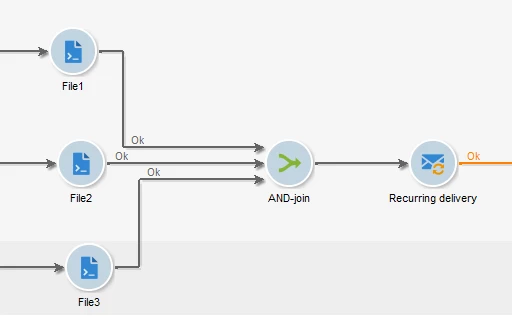
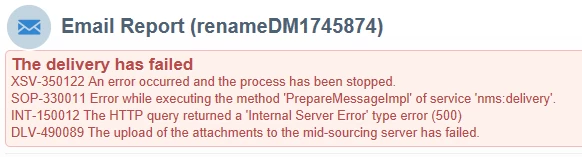
based on this post (https://experienceleaguecommunities.adobe.com/t5/adobe-campaign-classic-questions/how-to-add-2-attachment-coming-from-data-extraction-activity-in/m-p/702016) I'm trying to attach 3 attachments from three different data extractions to a recurring delivery but the delivery continues to fail like this, even though other deliveries with single extraction and attachment work correctly:
This is how I set up the workflow:
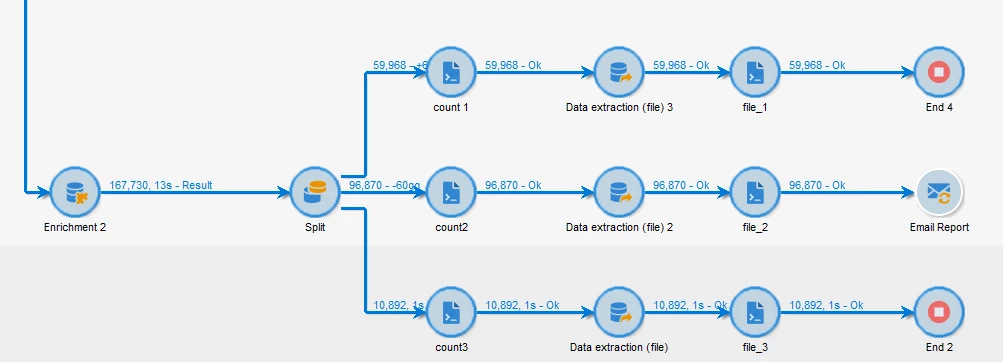
The first column of 3 javascript activities contain
instance.vars.count1 = vars.recCount;
instance.vars.count2= vars.recCount;
instance.vars.count3 = vars.recCount;
because in the email I send to my customer I also print the number of that outbound transition.
In the file_1, file_2 and file_3 javascript activities i put:
instance.vars.file_1 = vars.filename;
instance.vars.file_2 = vars.filename;
instance.vars.file_3 = vars.filename;
And in the Email report delivery script i put:
delivery.variables._var[0].stringValue=instance.vars.count1;
delivery.variables._var[1].stringValue=instance.vars.count2;
delivery.variables._var[2].stringValue=instance.vars.count3;
delivery.attachment.add(
<attachment compressMode="print" filterActive="false" label="my label"
nameScriptActive="false" type="normal" upload="false">
<name>{instance.vars.file_1}</name>
</attachment>);
delivery.attachment.add(
<attachment compressMode="print" filterActive="false" label="my label"
nameScriptActive="false" type="normal" upload="false">
<name>{instance.vars.file_2}</name>
</attachment>);
delivery.attachment.add(
<attachment compressMode="print" filterActive="false" label="my label"
nameScriptActive="false" type="normal" upload="false">
<name>{instance.vars.file_3}</name>
</attachment>);
delivery.hasAttachments = true
I can't understand why the recurring delivery fails. Is there something wrong with the workflow or the javascript code?
Thanks a lot,
Osvaldo