Priotarizing data in Deduplication activity | Community
Skip to main content
Level 2
September 14, 2022
Solved

Priotarizing data in Deduplication activity

  • September 14, 2022
  • 4 replies
  • 2142 views

Hi,


I want to priotarise the data using deduplication activity. Below should be the order of priotarization.


1. State = "Maharashtra" and City="Mumbai"

2. State = "Maharashtra" and City="Pune"

3. State = "Maharashtra" and City="Nashik"

4. State = "Karnataka" and City="Bangalore"

5. State = "Karnataka" and City="Udupi"


Please help.
 

This post is no longer active and is closed to new replies. Need help? Start a new post to ask your question.
Best answer by ParthaSarathy

Hi @tejashri12 

Instead of using AND operator, try below way in 'Following a list of values'

Consider we have person_ID, state and city column in CSV file.

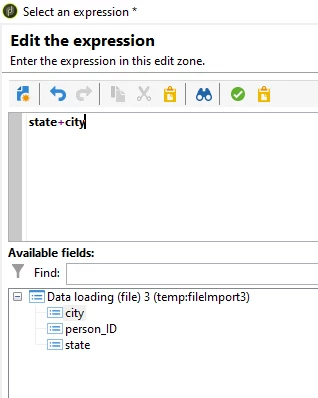
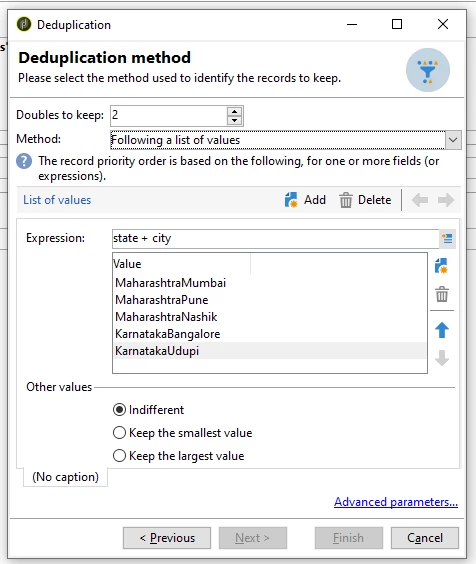
Method: Following a list of values > in Expression, Advance selection > Edit formula using expression > state+city > Finish

In Values, enter the state and city value concatenated in priority order (Refer 1st Screenshot)

example: MaharashtraMumbai, MaharashtraPune, MaharashtraNashik, KarnatakaBangalore, KarnatakaUdupi


Regards,

ParthaSarathy


4 replies

AkshayAnand
Community Advisor
Community Advisor
September 14, 2022

Hi @tejashri12 


You can try the method "Following a list of values" and then define the set of values you want to prioritize. 


Do let me know if you need any further help.


Regards

Level 2
September 14, 2022

@akshayanand 


I tried with "Following a list of values" method but not sure how to add "AND"  operator in the expression.

Here I want State = "Maharashtra" AND City="Mumbai"


Thanks in advance.


Adobe Employee
September 14, 2022

Hi @tejashri12 

Build an additional data to bind your rules to an integer value, using a series of Iif condition, then use the additional data into the dedup and sue smallest or highest depending on the order you've given...

Thanks

Denis

Level 2
September 14, 2022

Hi @costa_n11 


Could you please show how to do it?


Thanks,


ParthaSarathy
Community Advisor
ParthaSarathyCommunity AdvisorAccepted solution
Community Advisor
September 14, 2022

Hi @tejashri12 

Instead of using AND operator, try below way in 'Following a list of values'

Consider we have person_ID, state and city column in CSV file.

Method: Following a list of values > in Expression, Advance selection > Edit formula using expression > state+city > Finish

In Values, enter the state and city value concatenated in priority order (Refer 1st Screenshot)

example: MaharashtraMumbai, MaharashtraPune, MaharashtraNashik, KarnatakaBangalore, KarnatakaUdupi


Regards,

ParthaSarathy


~  ParthaSarathy S~  Click here to join ADOBE CAMPAIGN USER GROUP for Quarterly In-person | Hybrid | Virtual Meetups
ParthaSarathy
Community Advisor
Community Advisor
September 14, 2022

Tried the same with below sample file (Highlighted in green are the expected output if we keep 2 results for each identifier)

And the Output:


~  ParthaSarathy S~  Click here to join ADOBE CAMPAIGN USER GROUP for Quarterly In-person | Hybrid | Virtual Meetups
Sukrity_Wadhwa
Community Manager
Community Manager
September 28, 2022

Hi @tejashri12,

Were you able to resolve this query with the help of the given solutions or do you still need more help here? Do let us know. In case the given solutions were helpful, then kindly choose the one that helped you the most as the 'Correct Reply'.
Thanks!

Sukrity Wadhwa