Preloading values not reflected in front end webapp checkbox | Community
Skip to main content
Adobe Employee
January 13, 2021
Question

Preloading values not reflected in front end webapp checkbox

  • January 13, 2021
  • 2 replies
  • 2015 views
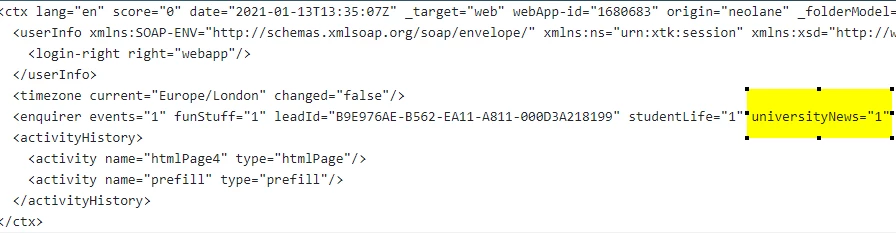
Has anyone had a similar problem when preloading a record on a webapp, the context shows the correct value, but this is not reflected in the html object? I am using the new page activity:


_debug shows ctx context preloaded with flag correctly


On the webapp frontend the checkbox is not checked.....



Input form syntax:
 
<input id="uni_news" type="checkbox" checked="checked" data-nl-bindto="xpath" data-nl-xpath="@universityNews" />
This post is no longer active and is closed to new replies. Need help? Start a new post to ask your question.

2 replies

Manoj_Kumar
Community Advisor
Community Advisor
January 13, 2021

Hello @david-garcia ,


Yes, I was facing a similar issue.


I solved it by updating the checkbox value with javascript


Here is a sample code

<% if(ctx.vars.value=="1"){ %> <Script> document.getElementById("checkbox").checked = true; </script> <% }% >


Thanks,

Manoj


Manoj     Find me on LinkedIn
Adobe Employee
January 13, 2021
I can see this issue only affects when using a custom schema, I am testing another webapp which preloads data from the recipient table and the data preloads just fine.
Adobe Employee
January 13, 2021

Hi Manoj, I can't seem to reply to you, I am also inclined to use that approach as I had spent the last 24 hours troubleshooting the issue to no avail, does that mean this is an actual bug?