PN delivery through script in ACC | Community
Skip to main content
Level 4
June 15, 2025
Solved

PN delivery through script in ACC

  • June 15, 2025
  • 1 reply
  • 629 views

Hi Everyone,


I'm trying to send a push notification delivery to Android devices using the script below in a workflow. However, I'm facing two issues:

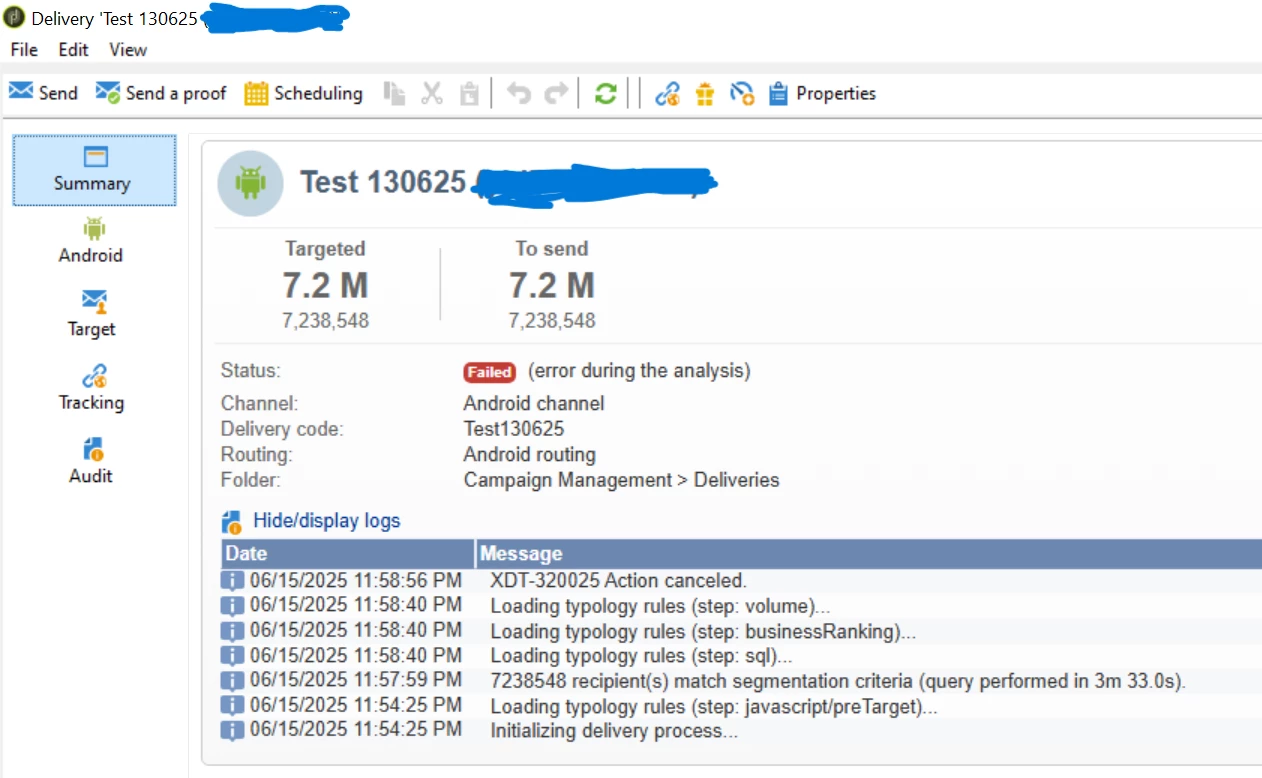
  1. In the first case, the delivery is targeting everyone instead of just me.

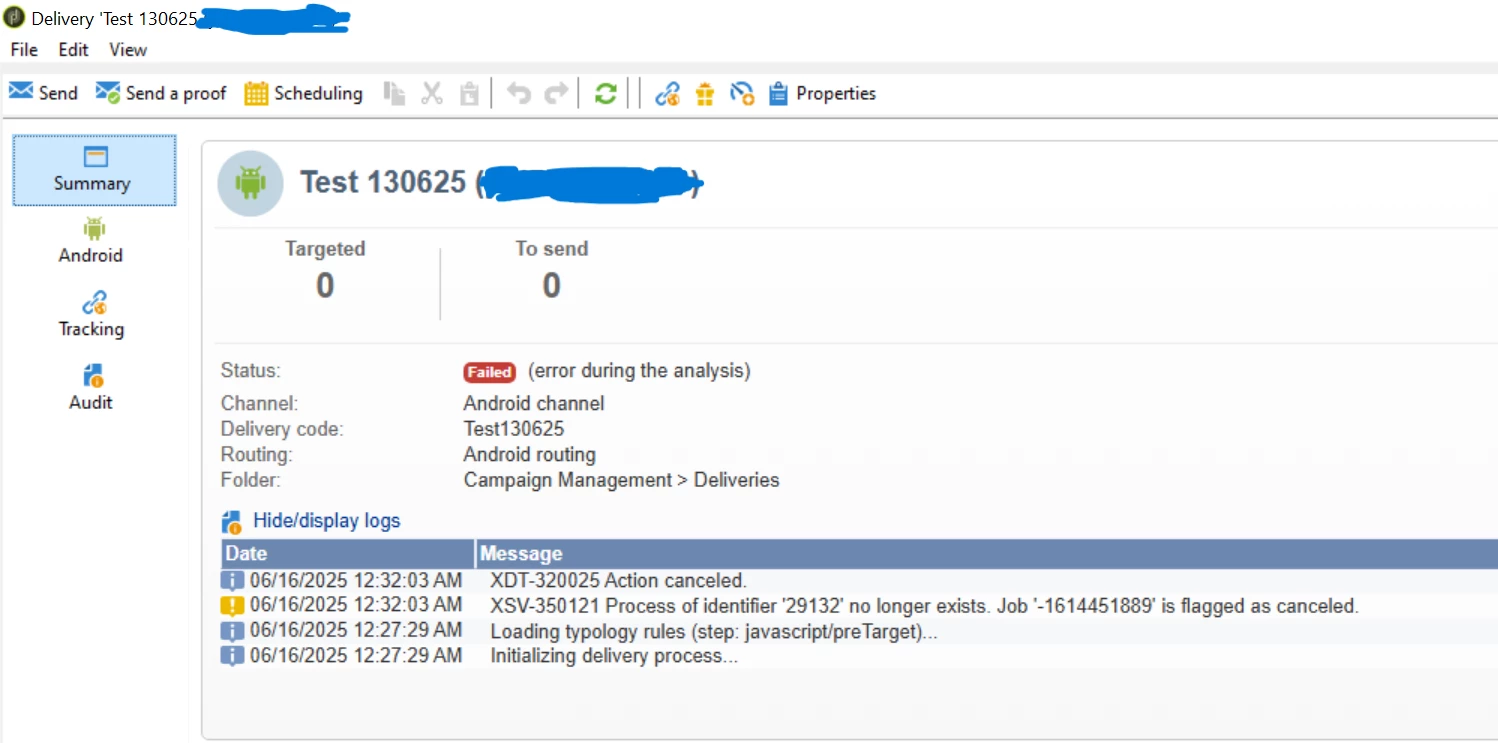
  2. In the second case, the JavaScript activity runs for a long time, but nothing seems to happen.

Am I missing something or doing anything wrong in the process? I'm specifically trying to trigger this for an Android delivery.

Any guidance would be appreciated.


My first script:
var token = 'my_regis_token';
var uuid= 'android_uuid';
var xmlTargeting = <delivery> <targets> <deliveryTarget> <targetPart exclusion='false' ignoreDeleteStatus='false'> <where filterName="androidMobileApplication" filteringSchema="nms:appSubscriptionRcp"> <condition expr={"@registrationToken = '" + token + "'"}/> <condition boolOperator="AND" expr={"[mobileApp/@uuid] = '" + uuid + "'"}/> </where> </targetPart> </deliveryTarget> </targets> </delivery>; var template = 'delivery_template_internal_name'; var finalDev = nms.delivery.CreateFromModel(template, xmlTargeting); // Delivery Template internal name var deliv = nms.delivery.create(finalDev); deliv.scheduling.delayed = 0; deliv.scheduling.validationMode = "auto"; deliv.save(); logInfo('Trying to execute delivery : ' + deliv.id); try{ nms.delivery.PrepareFromId(deliv.id); logInfo('Execution success : ' + deliv.id); } catch (e){ logInfo('Error occured : ' + e); }
 
I can see that all records are being targeted in the audit logs.


 My second script:

var token = 'my_regis_token';
var uuid= 'android_uuid';
var deliveryId = nms.delivery.SubmitDelivery("delivery_template_internal_name ",<delivery> <targets > <deliveryTarget> <targetPart exclusion='false' ignoreDeleteStatus='false'> <where> <condition expr={"@registrationToken = '" + token + "'"}/> <condition boolOperator="AND" expr={"[mobileApp/@uuid] = '" + uuid + "'"}/> </where> </targetPart> </deliveryTarget> </targets> </delivery>); logInfo(deliveryId);

There is no progress here.
 

Regards,

Sujith kumar
Best answer by SushantTrimukheD

@sushanttrimukhed ,


The condition works fine but when I use submit delivery, same issue is happening. Js activity is running for long time. No progress here. Kindly let me know if you have any work around for this


Regards,

Sujith kumar 


Hi @sujith_02kumar,

I was able to use the below script and when the delivery was created it was only created for one recipient.
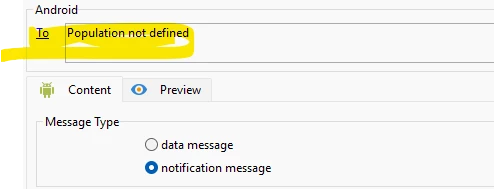
Use the below script and also check one more important thing inside the template which you are using should not have anything inside the "To" Population it should be empty if this is empty then it will pull only the record which you are filtering see the screenshot below:


Script which I used.

// Query to fetch records from nms:appSubscriptionRcp var token = 'a947'; // Replace with actual token var uuid = '4a3'; // Replace with actual UUID var mobileApp = 114; // Replace with actual mobileApp var query = xtk.queryDef.create( <queryDef schema="nms:appSubscriptionRcp" operation="select"> <select> <node expr="@id"/> <node expr="@registrationToken"/> <node expr="[mobileApp/@id]"/> <node expr="[mobileApp/@uuid]"/> </select> <where> <condition expr={"@registrationToken = '" + token + "'"}/> //<condition boolOperator="AND" expr={"[mobileApp/@uuid] = '" + uuid + "'"}/> //<condition boolOperator="AND" expr={"[mobileApp/@id] = '" + mobileApp + "'"}/> </where> </queryDef> ); // Execute query var results = query.ExecuteQuery(); logInfo("Total records found: " + results.length); // Loop through each record and log details for each (var record in results.appSubscriptionRcp) { logInfo("Record ID: " + (record.@id || "NULL") + ", Registration Token: " + (record.@registrationToken || "NULL") + ", Mobile App UUID: " + (record.mobileApp && record.mobileApp.@uuid ? record.mobileApp.@uuid : "NULL") + ", Mobile App ID: " + (record.mobileApp && record.mobileApp.@id ? record.mobileApp.@id : "NULL")); } // Define targeting XML var xmlTargeting = <delivery> <targets> <deliveryTarget> <targetPart exclusion='false' ignoreDeleteStatus='false'> <where filteringSchema="nms:appSubscriptionRcp"> <condition expr={"@registrationToken = '" + token + "'"}/> <condition boolOperator="AND" expr={"[mobileApp/@uuid] = '" + uuid + "'"}/> <condition boolOperator="AND" expr={"[mobileApp/@id] = " + mobileApp}/> </where> </targetPart> </deliveryTarget> </targets> </delivery>; logInfo("Targeting XML: " + xmlTargeting.toXMLString()); var template = 'DM75'; // Replace with actual template name try { var finalDev = nms.delivery.CreateFromModel(template, xmlTargeting); logInfo("Delivery created from template: " + finalDev.toXMLString()); var deliv = nms.delivery.create(finalDev); deliv.scheduling.delayed = 0; deliv.scheduling.validationMode = "auto"; deliv.save(); logInfo("Delivery saved with ID: " + deliv.id); nms.delivery.PrepareFromId(deliv.id); logInfo("Delivery prepared successfully: " + deliv.id); } catch (e) { logError("Error in delivery process: " + e); }


Thanks
Sushant Trimukhe


1 reply

SushantTrimukheD
Level 4
June 16, 2025

Hi @sujith_02kumar,

First, may I ask why you want to use a script to create this push notification? This can typically be handled using standard workflow activities unless there’s a specific requirement that cannot be met by the default workflow activities. Could you clarify if that’s the case?

Also, please review the script below and confirm if it works as expected.

Ensure that the token and UUID values exactly match the records in the nms:appSubscriptionRcp schema.

var token = 'my_regis_token'; // Replace with actual token var uuid = 'android_uuid'; // Replace with actual UUID var xmlTargeting = <delivery> <targets> <deliveryTarget> <targetPart exclusion='false' ignoreDeleteStatus='false'> <where filteringSchema="nms:appSubscriptionRcp"> <condition expr={"@registrationToken = '" + token + "'"}/> <condition boolOperator="AND" expr={"[mobileApp/@uuid] = '" + uuid + "'"}/> </where> </targetPart> </deliveryTarget> </targets> </delivery>; var template = 'delivery_template_internal_name'; // Replace with actual template name var finalDev = nms.delivery.CreateFromModel(template, xmlTargeting); var deliv = nms.delivery.create(finalDev); deliv.scheduling.delayed = 0; deliv.scheduling.validationMode = "auto"; logInfo("Targeting XML: " + xmlTargeting.toXMLString()); deliv.save(); logInfo('Delivery created with ID: ' + deliv.id); try { nms.delivery.PrepareFromId(deliv.id); logInfo('Delivery prepared successfully: ' + deliv.id); } catch (e) { logError('Error preparing delivery: ' + e); }

 
Thanks

Sushant Trimukhe

Level 4
June 16, 2025

Hi @sushanttrimukhed ,


Thank you for your response.

Due to a specific use case, we would like to trigger push notifications through a web app. I tried using the actual token and UUID as configured in nms:appSubscriptionRcp, but the issue still persists.


Could you please check if there's any issue with my code?


Regards,

Sujith kumar 

SushantTrimukheD
Level 4
June 16, 2025

Hi @sujith_02kumar,

I tried running the original code, but it displayed all records—possibly due to an issue with the WHERE condition or something else. So, I modified the code as shown below to fetch and display the records correctly, and it worked. Therefore, you should first retrieve the token and UUID by displaying all records, identify the required result, and then use that specific record in the script with the WHERE condition applied. Once this works, you can use the earlier shared code to create and send the delivery.

// Query to fetch records from nms:appSubscriptionRcp var token = 'a9b3'; // Replace with actual token var uuid = '4a3'; // Replace with actual UUID var mobileApp = 114; // Replace with actual mobileApp ID var query = xtk.queryDef.create( <queryDef schema="nms:appSubscriptionRcp" operation="select"> <select> <node expr="@id"/> <node expr="@registrationToken"/> <node expr="[mobileApp/@id]"/> <node expr="[mobileApp/@uuid]"/> </select> <where> <condition expr={"@registrationToken = '" + token + "'"}/> //<condition boolOperator="AND" expr={"[mobileApp/@uuid] = '" + uuid + "'"}/> //<condition boolOperator="AND" expr={"[mobileApp/@id] = '" + mobileApp + "'"}/> </where> </queryDef> ); // Execute query var results = query.ExecuteQuery(); logInfo("Total records found: " + results.length); // Loop through each record and log details for each (var record in results.appSubscriptionRcp) { logInfo("Record ID: " + (record.@id || "NULL") + ", Registration Token: " + (record.@registrationToken || "NULL") + ", Mobile App UUID: " + (record.mobileApp && record.mobileApp.@uuid ? record.mobileApp.@uuid : "NULL") + ", Mobile App ID: " + (record.mobileApp && record.mobileApp.@id ? record.mobileApp.@id : "NULL")); }

 
Thanks

Sushant Trimukhe