Personalize csv files in delivery attachment for each recipient | Community
Skip to main content
Level 4
April 2, 2024
Solved

Personalize csv files in delivery attachment for each recipient

  • April 2, 2024
  • 2 replies
  • 1471 views

Hi everyone,

I'm trying to figure out if there's any way to add personalized attachments in email deliveries.

I have 5 recipients, and for each recipient, a file will be created separately. I need to attach the file to my email delivery.
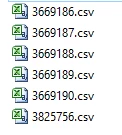


The files have been created, and I need to attach them to my delivery.
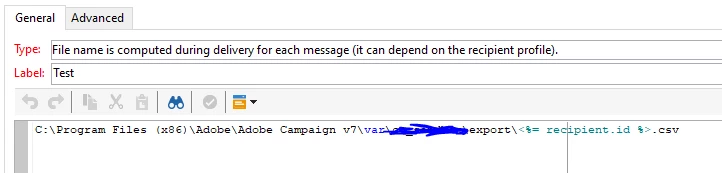
 

I'm not receiving the test. Am I doing anything wrong here?

Even when I use targetData.CsvPath as personalization, I'm getting the error "targetData is not defined" in the audit logs.

Can someone help me with this?


Thanks & Regards,

Sujith Kumar


This post is no longer active and is closed to new replies. Need help? Start a new post to ask your question.
Best answer by Sujith_02kumar

Hello @sujith_02kumar 

Could you please share the screenshot of actual code used there?


Hi @_manoj_kumar_ ,


Thanks for your reply. It is solved using file class and publishing file to public resources through script 

2 replies

Manoj_Kumar
Community Advisor
Community Advisor
April 3, 2024

Hello @sujith_02kumar 


These files should be available on the Adobe Server for this to work. It won't pick from your local machine.

Manoj     Find me on LinkedIn
Level 4
April 4, 2024

@_manoj_kumar_ ,


We are picking from server only the above one is only for example.

Manoj_Kumar
Community Advisor
Community Advisor
April 4, 2024

Hello @sujith_02kumar 

Could you please share the screenshot of actual code used there?

Manoj     Find me on LinkedIn
Sukrity_Wadhwa
Community Manager
Community Manager
May 2, 2024

Hi @sujith_02kumar,

Were you able to resolve this query on your own or do you still need help here? Do let us know.

Thanks!

Sukrity Wadhwa
Level 4
July 18, 2024

@sukrity_wadhwa 


Thanks for helping. It is solved in my own.


Regards,

Sujith Kumar 

Sukrity_Wadhwa
Community Manager
Community Manager
July 18, 2024

Thanks for sharing that! 🙂

Sukrity Wadhwa