New 32bit PK attribute (that references NmsBroadLogId sequence) on an nms:broadLogEventHisto schema, but does not overwrite the current field @id (int64) | Community
Skip to main content
Level 2
February 27, 2021
Solved

New 32bit PK attribute (that references NmsBroadLogId sequence) on an nms:broadLogEventHisto schema, but does not overwrite the current field @id (int64)

  • February 27, 2021
  • 1 reply
  • 2284 views

I am feeding ACC nms:broadLogEventHisto data to a legacy system which cannot accept primary keys that are larger than 32 bit integers, but needs a unique value to represent the records. The reason for this can be ignored for this use case.


It turns out, all broadLog tables, with the exception of those related to message center, have a 32 bit integer PK incrementing via the NmsBroadLogId sequence:
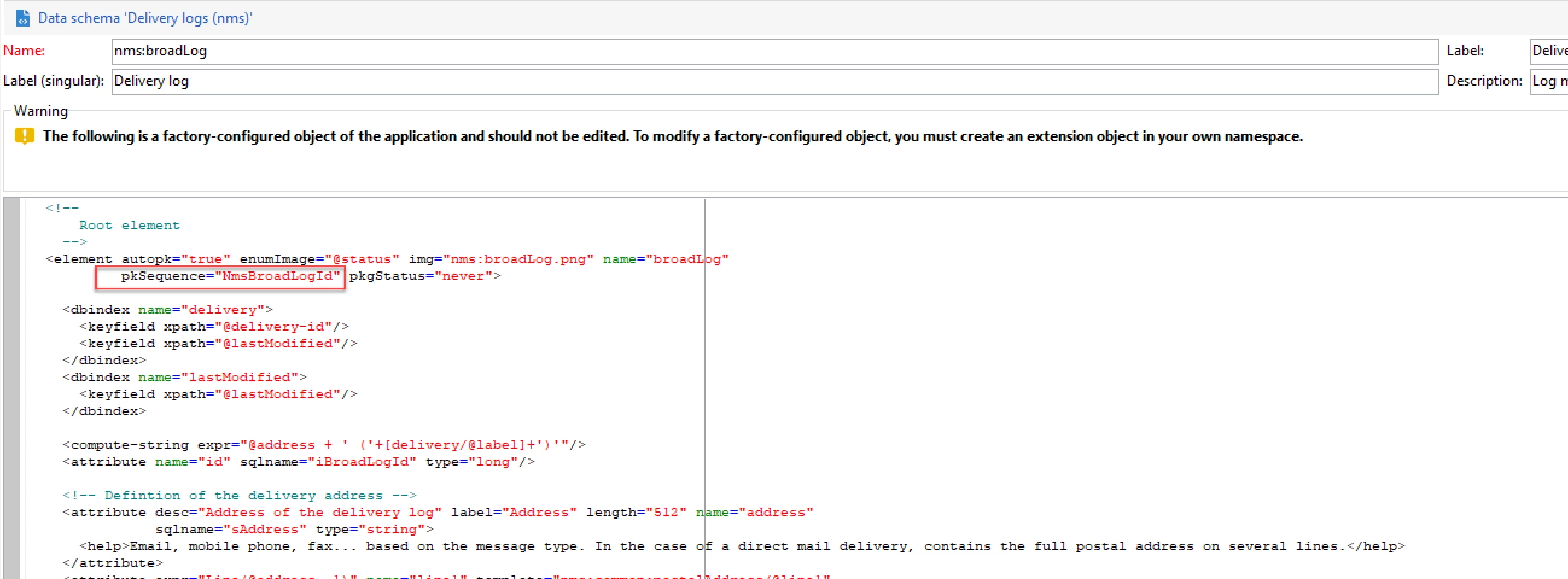
I would like to retain the @id field in the broadLogEventHisto schema (without changing the internal name), since the OOTB message center workflow process references and updates data via the name of that attribute, while also adding an additional unique attribute (name = "broadLogEventHistoId32bit") that will run on the same sequence as what is used for  the id for tables built off nms:broadLog and auto-increment -- i.e. @id in nms:broadLogRcp. However, extending this table and declaring: autopk="true" pkSequence="NmsBroadLogId", automatically adds a key field with the name @id, which is already taken by the PK in broadLogEventHisto that i wanted to retain. Additionally, i have explored using a counter, but i am unsure how to make the value restart at 0 once all 32bit integer values are consumed. Essentally, i want this new attribute to operate in the same exact manner as @id in nms:broadLogRcp


So my questions are:

1) Where is it decided what autopk="true" names the auto-created PK value?

2) How can i add a value that mimics @id in nms:broadLogRcp within nms:broadLogEventHisto, while retaining the current int64 bit field @id.


FYI - @jonathon_wodnicki 

This post is no longer active and is closed to new replies. Need help? Start a new post to ask your question.
Best answer by Jonathon_wodnicki

Hi,


The nms:broadLogEventHisto/@id col is populated by mcSynch_local workflow, which sets it to:

$int64(vars/@CELL_OFFSET)*$long(vars/@cellId) + @ID

  • vars/@CELL_OFFSET = '72057594037927936' (string since js doesn't go up that high, 2**52)
  • vars/@cellId = xtk:option NmsExecutionInstanceId
  • @ID= nms:broadLogRtEvent/@id


If you only have 1 exec instance, set its execution id to 0 in Deployment wizard, it'll get rid of the offset, no further work needed.


If you have >1 exec instances, you'll need the offset- it's what keeps the logs from colliding when they're collated on the control instance.

To fix (seems like how it should work ootb?):

  1. Rename the existing @1716897 col to @idExec or something else
  2. Change the mcSynch_local workflow to write to renamed id col
  3. Make an ordinary autopk col called @1716897 with its own pkSequence so as not to consume XtkNewId


Thanks,

-Jon

1 reply

Jonathon_wodnicki
Community Advisor
Jonathon_wodnickiCommunity AdvisorAccepted solution
Community Advisor
February 27, 2021

Hi,


The nms:broadLogEventHisto/@id col is populated by mcSynch_local workflow, which sets it to:

$int64(vars/@CELL_OFFSET)*$long(vars/@cellId) + @ID

  • vars/@CELL_OFFSET = '72057594037927936' (string since js doesn't go up that high, 2**52)
  • vars/@cellId = xtk:option NmsExecutionInstanceId
  • @ID= nms:broadLogRtEvent/@id


If you only have 1 exec instance, set its execution id to 0 in Deployment wizard, it'll get rid of the offset, no further work needed.


If you have >1 exec instances, you'll need the offset- it's what keeps the logs from colliding when they're collated on the control instance.

To fix (seems like how it should work ootb?):

  1. Rename the existing @1716897 col to @idExec or something else
  2. Change the mcSynch_local workflow to write to renamed id col
  3. Make an ordinary autopk col called @1716897 with its own pkSequence so as not to consume XtkNewId


Thanks,

-Jon

lee_cavAuthor
Level 2
February 27, 2021
Thanks Jon! What’s the best way to rename the column without dropping it and creating new? Also do you think i can use the broadlog sequence or should definitely create new? I would like to replicate that same sequence if you have the code for it