
Message Center logon to get session token | Community
Skip to main content
RodneyLewis
Level 2
October 22, 2020
Solved

Message Center logon to get session token

  • October 22, 2020
  • 3 replies
  • 8063 views

Hello, Thanks in advance for your help. I've been using Campaign classic for 1 year for regular email but have never used Message Center.


I would like to use message center to send a real time "Thank you" email on our website. Is this possible? (User enters email address on a form and instantly receives an email with special instructions.)


I'm following the help article but cannot create the session token or get the mc credentials to work. I also don't know when to use the rt server vs the regular campagin url. The documentation mentions using http://hostname/nl/jsp/schemawsdl.jsp?schema=nms:rtEvent for accessing the schema and other articles on this forum mention using https://hostname/nl/jsp/soaprouter.jsp.


The documentation link I'm using is here: https://docs.adobe.com/content/help/en/campaign-classic/using/transactional-messaging/introduction/event-description.html

Also using this link: https://docs.adobe.com/content/help/en/campaign-classic/using/configuring-campaign-classic/api/web-service-calls.html


I believe I've followed all steps but still having trouble with.


1: "To retrieve the session token, perform a logon SOAP call, then a get token followed by a logoff."

Q: Is there a sample or snipper for how to login and actually retrieve the token?


2: Using Wizdler or SOAPUI, I can POST using my ACC credentials instead of the MC/xxxx password provided by support. (They provided mc creds and tracking creds and neither worked here.)

Q: How can I use this in HTML on my website (already whitelisted)? Is there a sample code for reaching the ACC API from another website form?
This post is no longer active and is closed to new replies. Need help? Start a new post to ask your question.
Best answer by DavidKangni

Hi Rodney,


You need to get the xtk:session WSDL too.


URL syntax for generating the session and rtEvent WSDL's.

  1. Generate session token WSDL http://hostname/nl/jsp/schemawsdl.jsp?schema=xtk:session
  2. Generate rtEvent WSDL http://hostname/nl/jsp/schemawsdl.jsp?schema=nms:rtEvent

Then you can use the session WSDL first to request the logon method

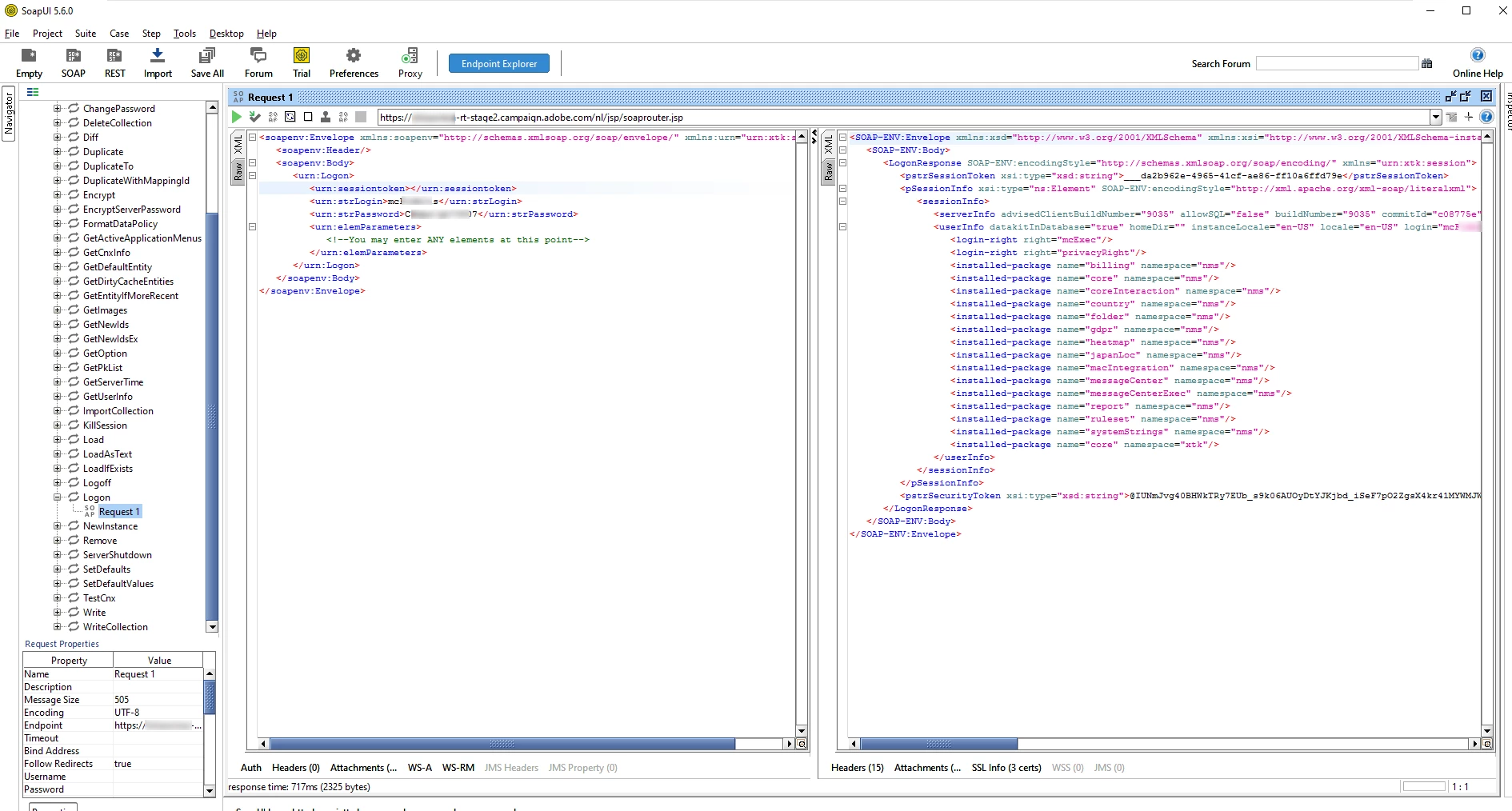
Once you log in, you will need two information for your rtEvent call header: sessionToken and SecurityToken (pstrSessionToken and pstrSecurityToken from your logon response)

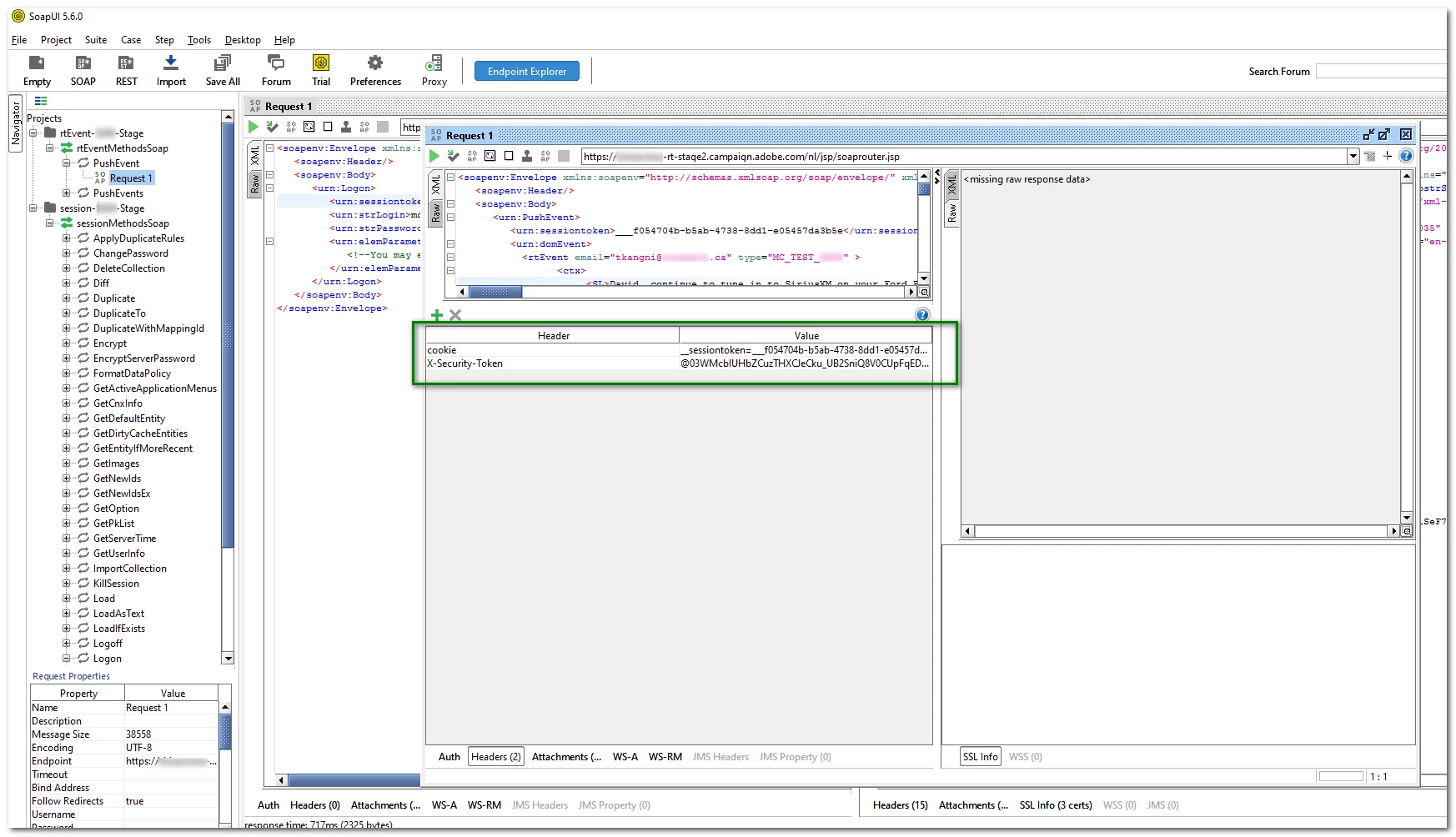
Add the header as in the screenshot below

  1. cookie  __sessiontoken={pstrSessionToken}
  2. X-Security-Token {pstrSecurityToken} 


Just a reminder, you need some pre requirements in ACC to make the successfully. 

  1. create an event Type that will be used as type in your payload
  2. create and publish a template using your event type

Thanks

David


3 replies

October 22, 2020

Hi @rodneylewis ,


1: "To retrieve the session token, perform a logon SOAP call, then a get token followed by a logoff." Q: Is there a sample or snipper for how to login and actually retrieve the token?

a. You can use xtk:session#Logon method available in the WSDL downloaded from http://hostname/nl/jsp/schemawsdl.jsp?schema=nms:rtEvent. Import the WSDL into SOAPUI and use credentials to send SOAP call.


2: Using Wizdler or SOAPUI, I can POST using my ACC credentials instead of the MC/xxxx password provided by support. (They provided mc creds and tracking creds and neither worked here.) Q: How can I use this in HTML on my website (already whitelisted)? Is there a sample code for reaching the ACC API from another website form?

a. You've to use xtk:session#Logon method to get session token

b. Then you've to use the WSDL created to make SOAP call from the website to the https://localhost/nl/jsp/soaprouter.jsp.


RodneyLewis
Level 2
October 22, 2020

Hi, I'm VERY new to APIs. The part I'm not sure about is where to use xtk:session#Logon. Does it go inside the <PushEvent xmlns="urn:nms:rtEvent"> before or after the <sessiontoken>user/pass</sessiontoken>?


I'm pretty sure that would be before the domevent, right?


Any way you can post a full example or steps?


I have this so far.

<Envelope xmlns="http://schemas.xmlsoap.org/soap/envelope/">
<Body>
<PushEvent xmlns="urn:nms:rtEvent">
<sessiontoken>user/pass</sessiontoken>
<domEvent>
<!-- Any elements -->
</domEvent>
</PushEvent>
</Body>
</Envelope>


RodneyLewis
Level 2
October 22, 2020

ok. I just tried adding the following BEFORE the sessiontoken and and it seems I'm getting closer. <xtk:session#Logon></xtk:session>


Now I'm seeing the following result: 

<faultcode>SOAP-ENV:Client</faultcode>
<faultstring xsi:type='xsd:string'>SOP-330010 The XML SOAP message is invalid (service 'PushEvent', method 'nms:rtEvent').</faultstring>

<detail xsi:type='xsd:string'>(4:25) : Expected an attribute name
XML-110018 Error while parsing XML string..


Is this a good sign? 

DavidKangni
Community Advisor
DavidKangniCommunity AdvisorAccepted solution
Community Advisor
October 23, 2020

Hi Rodney,


You need to get the xtk:session WSDL too.


URL syntax for generating the session and rtEvent WSDL's.

  1. Generate session token WSDL http://hostname/nl/jsp/schemawsdl.jsp?schema=xtk:session
  2. Generate rtEvent WSDL http://hostname/nl/jsp/schemawsdl.jsp?schema=nms:rtEvent

Then you can use the session WSDL first to request the logon method

Once you log in, you will need two information for your rtEvent call header: sessionToken and SecurityToken (pstrSessionToken and pstrSecurityToken from your logon response)

Add the header as in the screenshot below

  1. cookie  __sessiontoken={pstrSessionToken}
  2. X-Security-Token {pstrSecurityToken} 


Just a reminder, you need some pre requirements in ACC to make the successfully. 

  1. create an event Type that will be used as type in your payload
  2. create and publish a template using your event type

Thanks

David


David Kangni
RodneyLewis
Level 2
October 23, 2020
THANK YOU! I am finally getting somewhere! 🙂