Mass update on certain fields | Community
Skip to main content
Level 4
December 14, 2023
Solved

Mass update on certain fields

  • December 14, 2023
  • 1 reply
  • 1037 views

Hello!

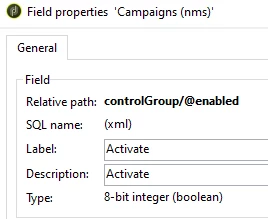
I would need to make a mass update on this field:
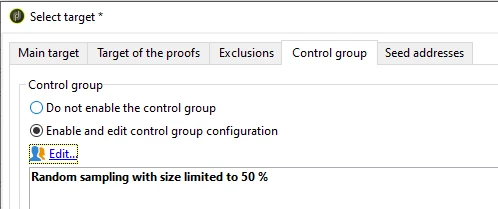
When trying to do a mass update on selected lines I cannot see/select that field:
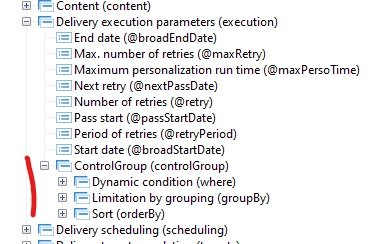
I've tried to do it in a wkf with an update data but same there, it doesn't work.

I cannot sort the attribute either in that table view.


I'm guessing I need to change something at data schema level. Do you guys have some input? Is this possible to achive?


This post is no longer active and is closed to new replies. Need help? Start a new post to ask your question.
Best answer by Marcel_Szimonisz

Hello @a_b_se ,

those are saved as XML document so I suppose you would need to load the delivery template in JS activity with NLWS.nmsDelivery.load(pk) and try to amend that xml part.

My tip would be to print that XML to console. Take that part amend manually or programatically as string and save it back to the delivery template object with delivery.save()


var delivery, allMyDeliveryTemplates = [{id:1111},{id:1112}]; for(var i = 0;i<allMyDeliveryTemplates.length;i++){ delivery = NLWS.nmsDelivery.load(allMyDeliveryTemplates.id); //change what you need delivery.execution.xx delivery.execution.controlGroup.xx delivery.save(); }


Marcel Szimonisz

1 reply

Marcel_Szimonisz
Community Advisor
Marcel_SzimoniszCommunity AdvisorAccepted solution
Community Advisor
December 15, 2023

Hello @a_b_se ,

those are saved as XML document so I suppose you would need to load the delivery template in JS activity with NLWS.nmsDelivery.load(pk) and try to amend that xml part.

My tip would be to print that XML to console. Take that part amend manually or programatically as string and save it back to the delivery template object with delivery.save()


var delivery, allMyDeliveryTemplates = [{id:1111},{id:1112}]; for(var i = 0;i<allMyDeliveryTemplates.length;i++){ delivery = NLWS.nmsDelivery.load(allMyDeliveryTemplates.id); //change what you need delivery.execution.xx delivery.execution.controlGroup.xx delivery.save(); }


Marcel Szimonisz

A_B_SEAuthor
Level 4
December 18, 2023

Hello Marcel, thank you.


Do you think is possible to just load the whole 

delivery.execution.controlGroup

from a specific delivery and insert that data to a group of deliveries?

Marcel_Szimonisz
Community Advisor
Community Advisor
December 18, 2023

Hello @a_b_se yes sure.