Make a certain input fields read only, based on drop down values | Community
Skip to main content
October 16, 2024
Solved

Make a certain input fields read only, based on drop down values

  • October 16, 2024
  • 1 reply
  • 524 views

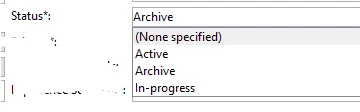
I have an input form, where I have a drop down field. If the value of this drop down is Archive, I want to make the form read only upon saving the form.

Also, if the value is Active, then I want to make a few fields on the input form read only. For example, if the Status is Archive, then make the Message Code field Read Only. 


This post is no longer active and is closed to new replies. Need help? Start a new post to ask your question.
Best answer by ccg1706

Hi @madhukarma2,


You can manage your request by using JS to control de behaviour of the input form based on the value selected in the drop down-field.

An approach that you can follow is inside your script inserting a custom disableAllFields() function, that acts like a 'lock' button. It passes through all  the fields in the form and turns them read-only when the  selected value in the dropdown is 'Archive'. So, once 'Archive' is chosen, no one should not be able to make changes to the form.


On the other hand, for the "Active " Status, you can use the setAttribute method to disable specific fields, like locking certain parts of the form while leaving others editable.


Lastly, I share with you useful documentation links, that can help you:

Set attribute method 

Document: forms property 

FormElement 

JavaScript scripts and templates 


¡Hope it helps you!


Regards,

Celia
 

1 reply

ccg1706
Community Advisor
ccg1706Community AdvisorAccepted solution
Community Advisor
October 20, 2024

Hi @madhukarma2,


You can manage your request by using JS to control de behaviour of the input form based on the value selected in the drop down-field.

An approach that you can follow is inside your script inserting a custom disableAllFields() function, that acts like a 'lock' button. It passes through all  the fields in the form and turns them read-only when the  selected value in the dropdown is 'Archive'. So, once 'Archive' is chosen, no one should not be able to make changes to the form.


On the other hand, for the "Active " Status, you can use the setAttribute method to disable specific fields, like locking certain parts of the form while leaving others editable.


Lastly, I share with you useful documentation links, that can help you:

Set attribute method 

Document: forms property 

FormElement 

JavaScript scripts and templates 


¡Hope it helps you!


Regards,

Celia
