Loop through linked data in delivery/personalization block | Community
Skip to main content
Level 2
November 12, 2020
Solved

Loop through linked data in delivery/personalization block

  • November 12, 2020
  • 2 replies
  • 4923 views

Hello,


We have table which links to the recipients table with a 1 to many relationship (1 recipient may have many records in the 2nd table). We are trying to list data from all linked records in the 2nd table for each recipient. For example, in an email to John Doe we would like a bulleted list of ID1, ID2, ID3, etc. where ID1, ID2, ID3 are the linked records from the 2nd table.

We are wondering:

a) if personalization blocks are capable of handling queries & making API calls or if this is only possible within activities in the workflow via Javascript.

b) If there are any other ideas or solutions anybody has come across which can accomplish this scenario.


Here is the code we have tried writing into a personalization block. We see something similar being used from this site, which led us to attempting to use the personalization block approach: https://blog.floriancourgey.com/2018/08/use-querydef-the-database-toolkit-in-adobe-campaign 

var query = NLWS.xtkQueryDef.create( {queryDef: {schema: "cus:Consumer_Ids", operation: "select", select: { node: [{expr: "@company"}, {expr: "@Id"}] }, where: { condition: [{expr: "@contactId= '" + recipient.contactId +"'"}] } }}) var res = query.ExecuteQuery()

 When attempting to loop through a personalization block, we are receiving this error.: "Error while compiling script. NLWS is not defined." Any insights or ideas are greatly appreciated. Thanks!


Austin Bowen
This post is no longer active and is closed to new replies. Need help? Start a new post to ask your question.
Best answer by DavidKangni

Hi Austin,

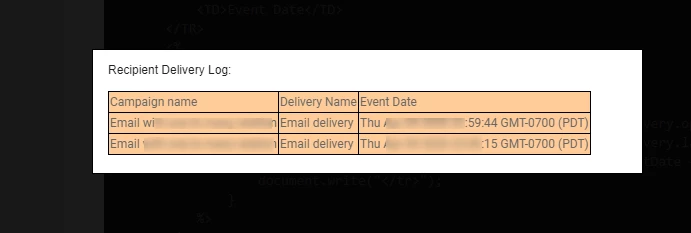
See and example of code below. I used broadLogRcp as it has a 1-N relationship with recipient schema. So for every recipient I want to show all the emails sent

In your case, replace broadLog by the name of your 2nd table.


<TABLE> <TBODY> <TR> <TD>Campaign name</TD> <TD>Delivery Name</TD> <TD>Event Date</TD> </TR> <% for(var i = 0 ; i<recipient.broadLog.length; i++) { document.write("<tr>"); document.write("<td>" + recipient.broadLog[i].delivery.operation.label + "</td>"); document.write("<td>" + recipient.broadLog[i].delivery.label + "</td>"); document.write("<td>" + recipient.broadLog[i].eventDate + "</td>"); document.write("</tr>"); } %> </TR> </TBODY> </TABLE>


Here is the result

Thanks,

David


2 replies

DavidKangni
Community Advisor
DavidKangniCommunity AdvisorAccepted solution
Community Advisor
November 13, 2020

Hi Austin,

See and example of code below. I used broadLogRcp as it has a 1-N relationship with recipient schema. So for every recipient I want to show all the emails sent

In your case, replace broadLog by the name of your 2nd table.


<TABLE> <TBODY> <TR> <TD>Campaign name</TD> <TD>Delivery Name</TD> <TD>Event Date</TD> </TR> <% for(var i = 0 ; i<recipient.broadLog.length; i++) { document.write("<tr>"); document.write("<td>" + recipient.broadLog[i].delivery.operation.label + "</td>"); document.write("<td>" + recipient.broadLog[i].delivery.label + "</td>"); document.write("<td>" + recipient.broadLog[i].eventDate + "</td>"); document.write("</tr>"); } %> </TR> </TBODY> </TABLE>


Here is the result

Thanks,

David


David Kangni
BowenausAuthor
Level 2
November 13, 2020
Thanks David. Just to confirm, you're able to just use this kind of dot notation for any tables linked to the recipient table without needing a query? We will give it a shot today to see if it will be possible with our scenario where we have a foreign key on the recipient record which links to a foreign key on the 2nd custom table. Thank you for your suggestion!
Sukrity_Wadhwa
Community Manager
Community Manager
November 17, 2020

Hi @bowenaus,

Were you able to resolve this query with the given solution or do you need more help? Do let us know.

Thanks!

Sukrity Wadhwa
BowenausAuthor
Level 2
November 17, 2020

Hi @sukrity_wadhwa, Thank you for checking. I am able to get David's code below to work fine. However, when I use the custom table which "recipient" links to, I keep getting an error. I've tried using different variations of the table name (it actually gets generated as recipient.Consumers_contact.fieldName when I choose a field from the dropdown list of available fields). Similar error each time: "Error while evaluating document JST-310000 Error while compiling script 'content htmlContent' line 5: recipient.Consumers is undefined. SCR-160012 Javascript&colon; error while evaluating script 'content htmlContent'."