Logon method on Messaging Center | Community
Skip to main content
Level 3
November 11, 2019
Solved

Logon method on Messaging Center

  • November 11, 2019
  • 4 replies
  • 8088 views

Hi,

I was trying to use Logon method instead of static token (MC/password) provided by Adobe for messaging center, I got the 403 Forbidden and XSV-350012 Invalid login or password when I use SOAP UI for the testing.

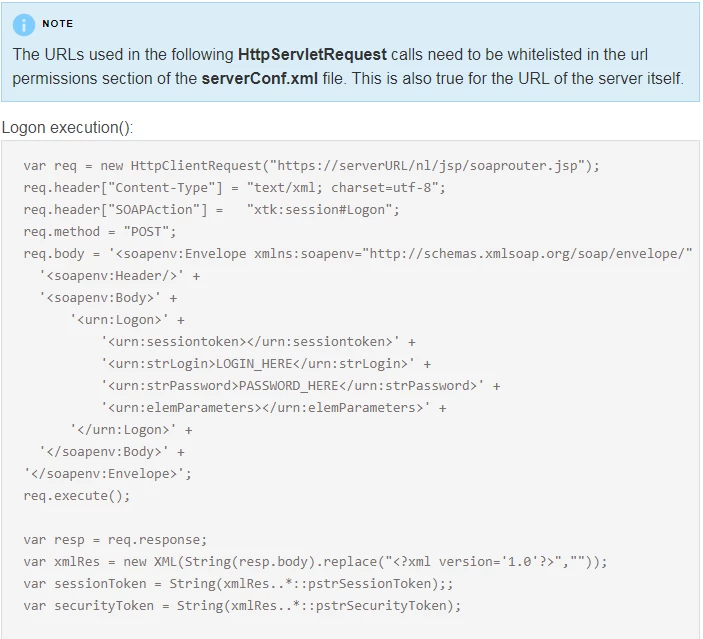
According the Adobe document below, it seems like the server URL https://serverURL/nl/jksp/soaprouter.jsp needs to be white-listed in the url permissions section of the serverconf.xml file. I am confused, I thought my computer IP need to be white-listed in the security zone area in serverconf.xml file. Can anyone clarify which IP or URL need to be whitelisted and send me the sample code to be added to serverConf.xml?

Thanks,
Best answer by Jyoti_Yadav

You need to whitelist your server URL:

http://serverURL/nl/jsp/soaprouter.jsp​.

Also, error which you are getting seems like your username and password combination is not correct. Please reset new password and then use the same to connect to Adobe Campaign.

You can also check logs in your Adobe campaign environment:

Home --> Monitoring --> Web log Journal

If you can see some log in your web then connection is established else your request is not able to reach to Adobe Campaign.

Thanks.

4 replies

Raj_Ganta-1
Level 5
November 11, 2019

Hi,

I think you can find answers to your questions here

IP Whitelisting for Instance Access

Adobe Campaign Help | Instance settings

Jyoti_Yadav
Jyoti_YadavAccepted solution
Level 8
November 12, 2019

You need to whitelist your server URL:

http://serverURL/nl/jsp/soaprouter.jsp​.

Also, error which you are getting seems like your username and password combination is not correct. Please reset new password and then use the same to connect to Adobe Campaign.

You can also check logs in your Adobe campaign environment:

Home --> Monitoring --> Web log Journal

If you can see some log in your web then connection is established else your request is not able to reach to Adobe Campaign.

Thanks.

Venu_Reddy
Level 6
November 12, 2019

Hi

Please make sure to re check the below points:

1. Re-check the username and password

2. Make sure you need to white list your computer IP Address. You need to reach out to Adobe if you don't have access to whitelist the IP.

3. Check the end point url properly while triggering SOAP.

4. You should trigger the SOAP with in the network which was white-listed.

Level 3
November 12, 2019

Thanks everyone.

1. My server is on-premise, won't have access to the control panel.

2. I created an user account from client console and added my computer IP to the "list of trusted IP mask" under Security setting", do I still need to whitelist my computer IP in serverConf.xml?

3. I think jyotiy43907700 is right, I need to whitelist my server URL in this URL http://serverURL/nl/jsp/soaprouter.jsp.

This is the sample code I found online, does anyone know if the below code needs to be modified?

<urlPermission action="warn" debugTrace="true">

  <url dnsSuffix="abc.company1.com" urlRegEx=".*" />

  <url dnsSuffix="def.partnerA_company1.com" urlRegEx=".*" />

  <url dnsSuffix="xyz.partnerB_company1.com" urlRegEx=".*" />

</urlPermission>

  • Blocking : all URLs that do not belong to the whitelist are blocked, with an error message. This is the default mode after a postupgrade.
  • Permissive : all URLs that do not belong to the whitelist are allowed.
  • Warning : all non-white URLs are allowed, but the JS interpreter emits a warning, so that the administrator can collect them. This mode adds JST-310027 warning messages.

Thanks,

Jay