Local Host Install Error. Windows + ACCV7 | Community
Skip to main content
David_Loyd
Adobe Employee
Adobe Employee
November 12, 2021
Solved

Local Host Install Error. Windows + ACCV7

  • November 12, 2021
  • 1 reply
  • 3204 views
This post is no longer active and is closed to new replies. Need help? Start a new post to ask your question.
Best answer by David_Loyd

Seems like you have missing services?


Can you run the following command

nlserver monitor -missing

Apache doesnt seem to be running?


More troubleshooting commands on this doc https://experienceleague.adobe.com/docs/campaign-classic/using/monitoring-campaign-classic/production-procedures/usual-commands.html?lang=en


I was able to resolve this. The documentation on the first start of the has you start then stop tomcat. And I never restarted tomcat after that. Simply running nlserver start web did the trick for http://localhost. Which then I was able to go in and create my other instances.

1 reply

Darren_Bowers
Level 9
November 12, 2021

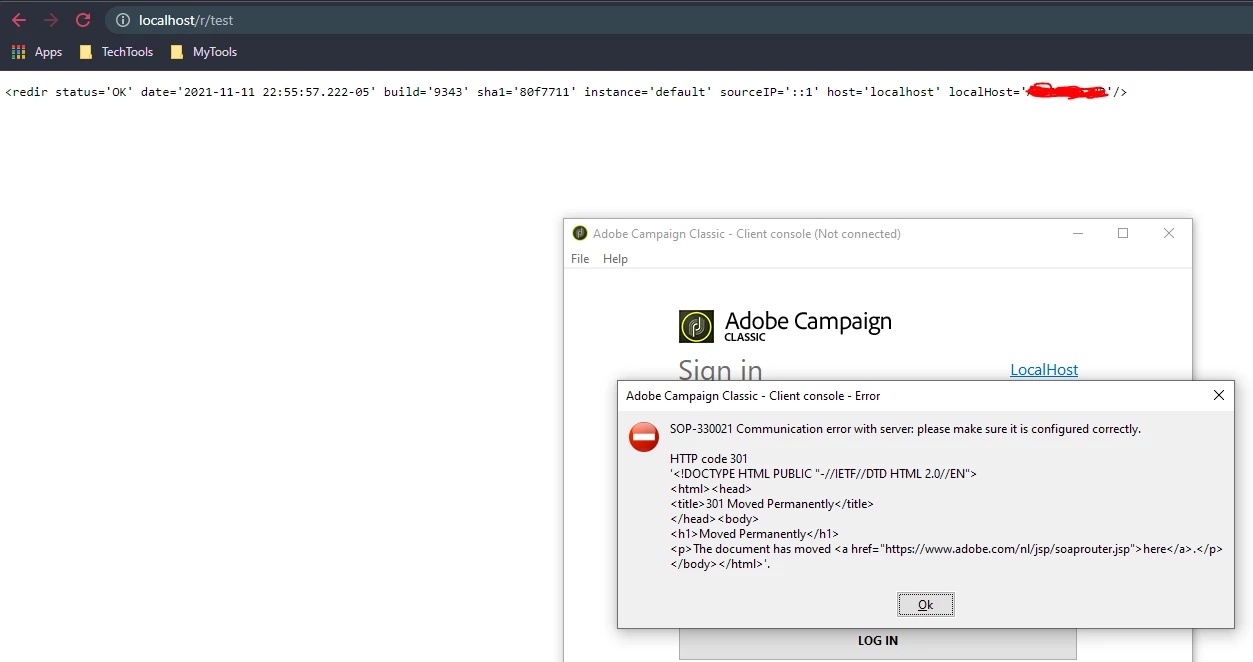
Hi@david_loyd - check the URL you have set up in the client (click LocalHost in the login window). The error is trying to access "https://www.adobe.com/nl/jsp/soaprouter.jsp" - so your URL on your connection is likely set to "www.adobe.com"
The URL should be pointing to your localhost instance or 127.0.0.1

Cheers

Darren

David_Loyd
Adobe Employee
Adobe Employee
November 12, 2021

Im not sure where www.adobe.com is coming from. my instance name is "default". neither my serverConfig or config-default have that adobe.com url. 


I tried 127.0.0.1 and got this error.

INT-150012 The HTTP query returned a 'Internal Server Error' type error (500)
------
SOP-330021 Communication error with server: please make sure it is configured correctly.

HTTP code 500
'WEB-530007 Error relaying '/nl/jsp/soaprouter.jsp' to URL 'http://localhost:8080/nl/jsp/soaprouter.jsp'.'.
------

Darren_Bowers
Level 9
November 15, 2021

@david_loyd Your original post in this thread showed that your localhost is running on port 80 (http://localhost/r/test) - try removing the port 8080 in your client connection

Cheers