Limit rows in each group using Split | Community
Skip to main content
naveenj10058761
August 30, 2019
Solved

Limit rows in each group using Split

  • August 30, 2019
  • 9 replies
  • 12178 views

Hi,

I am trying to use split activity to limit each of the data group to 2 rows.

I am getting the following error

XTK-170036 Unable to parse expression ' AND [temp:extract-grp:@internalRank]<=2'.

XTK-170037 'AND' is a binary operator. At least one operand is missing.

Executing extraction 'Subset' (step 'Split')

I have three fields in my table - Delivery, URL, Counts

I would like to get the top 2 rows in the group of each Delivery, URL

For example:

Delivery     URL     count

D1          abc         5

D1          abc1       3

D1          ABC3     2

D2           pqr        7

D2          pqr1       6

D3          pqr2       5

Expected output:

Delivery     URL     count

D1               abc       5

D1               abc1     3

D2               pqr       7

D2               pqr1     6

I am using the following documentation to perform the limit.

https://docs.campaign.adobe.com/doc/AC/en/WKF_Targeting_activities_Split.html#Limiting_the_number_of_subset_records_by_data_grouping

Can you please suggest what could have caused this issue.

Thanks a lot

Naveen

This post is no longer active and is closed to new replies. Need help? Start a new post to ask your question.
Best answer by Anita_punmiya

Thanks Naveen for sharing it.

I have tried the same approach and it worked for me. The only difference is ,I have selected : limitations by group value (2) .

-Anita

9 replies

Anita_punmiya
September 4, 2019

Hi Naveen,

Can you please help with the condition you have used in the split activity.

Meanwhile, you can try below approach :

Limit the selected records -> Keep only the first records -> Sort on the basis of "count" column from your table -> limit by grouping -> use the columns to group from your table -> limitations by grouping value (Enter 2)

Please ensure to add the additional columns in your initial query activity which you will be using in the split for sorting or grouping.

Let me know if this helps.

Thanks ,
Anita

naveenj10058761
September 4, 2019

Hi Anita,

Thanks for the response.

I have followed your notes and getting the same error.

XTK-170036 Unable to parse expression ' AND [temp:extract-grp:@internalRank]<=2'.
XTK-170037 'AND' is a binary operator. At least one operand is missing.
Executing extraction 'Subset' (step 'Split')

My method is given below which is giving me the same error.

Limit the selected records -> Keep only the first records -> Sort on the basis of All three columns (Delivery, URL, Counts) -> limit by grouping -> use the columns to group from your table (Delivery, URL) -> limitations by grouping value (Enter 2)

Thanks a lot

Naveen

saikatk2447661
September 4, 2019

Hi Naveen,

You can do this in the first query block using window function.

You have to create an additional attribute as RowNum(PartitionBy(Delivery), OrderBy(Desc(count)))

Then you can create a filter in refine target as line Number <= 2

Thanks,

Saikat

Anita_punmiya
September 5, 2019

Hi Naveen,

Thanks for checking.

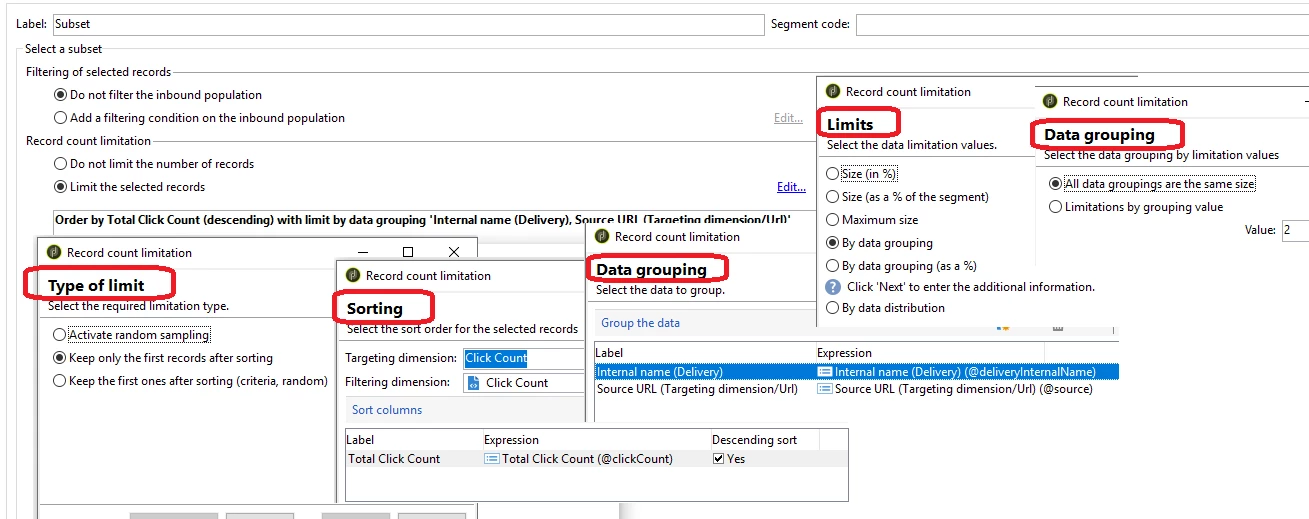
But it would be great if you can share the screenshot of split activity as just the error text is not really helping to understand the issue.

Also, if you want the top 2 records , I believe sorting on just the counts can help you get the required output.

Thanks,
Anita

naveenj10058761
September 5, 2019

Hi Anita,

I am pasting the screenshots of split activity below.

naveenj10058761
September 5, 2019

Hi Saikat,

Thanks for the suggestion. It worked for me.

However, I still would love to know how to do it using split activity.

Cheers...

Naveen

Anita_punmiya
Anita_punmiyaAccepted solution
September 6, 2019

Thanks Naveen for sharing it.

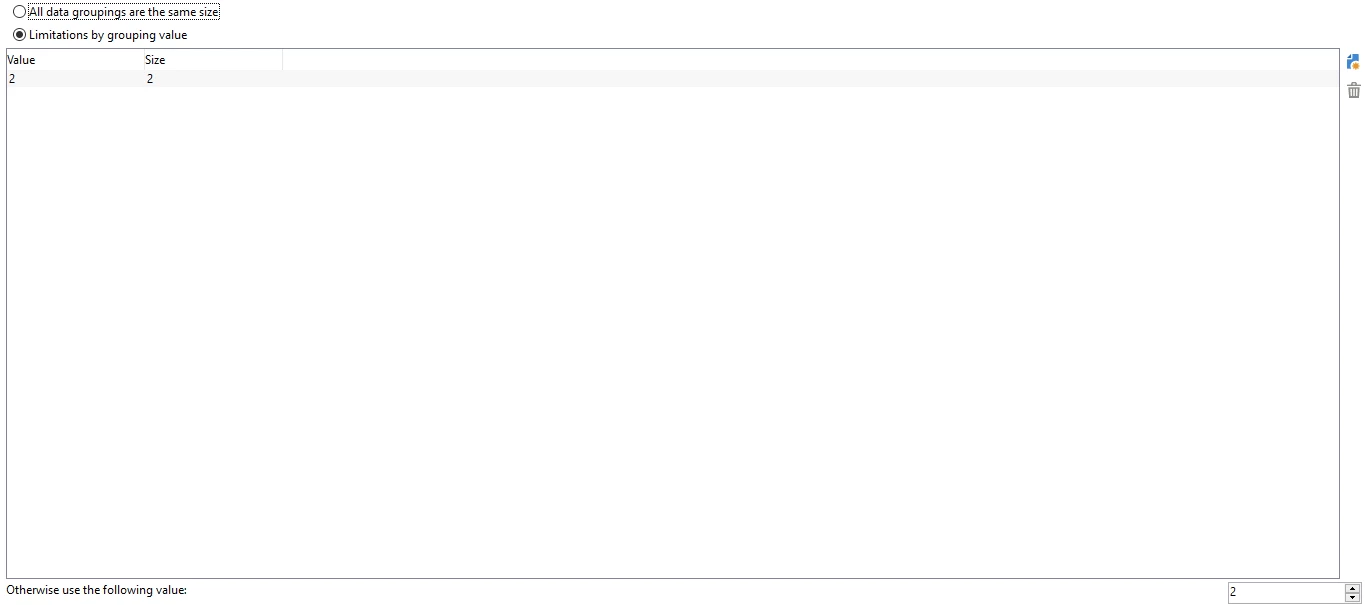
I have tried the same approach and it worked for me. The only difference is ,I have selected : limitations by group value (2) .

-Anita

naveenj10058761
September 10, 2019

Hi Anita,

Can you please share a screenshot of the 'limitations by group value (2)' screen.

Cheers...

Naveen

Anita_punmiya
September 10, 2019

Hi Naveen,

Here you go:

Thanks,

Anita