Keep only 7 days of data: memo field not recognized?
I've a tablet with data from 2 years ago, up to today. I've been tasked to remove all records, except for the last 7 days.
So my approache is:
1.- Create table (toy table to store last 7 days records).
2.- Query the original table, lets call it "A", to filter all records based on the created column that were created on 21/11 and after.
3.- Use an Update Activity to copy those records to toy table "abc", let's called it "B" .
4.- Truncate A, just to keep the headers.
5.- Copy data from B back to A, so it only has the last 7 days records.
This is the original XML schema from A:
<?xml version='1.0'?>
<schema _cs="Pipeline Event (acx)" created="2020-11-23 18:03:44.362Z" createdBy-id="1055"
        desc="Trigger data coming from Analytics through pipeline" entitySchema="xtk:schema"
        img="" implements="" label="Pipeline Event" lastModified="2023-11-14 13:48:28.230Z"
        mappingType="sql" md5="860DFE30574D2300D59CC3EC7B0FFF63" modifiedBy-id="2762680"
        name="pipelineEvent" namespace="acx" xtkschema="xtk:schema">
  <element autopk="true" desc="Trigger data coming from Analytics through pipeline"
           label="Pipeline Events" name="pipelineEvent" pkSequence="acxPipelineEventId"
           sqltable="AcxPipelineEvent">
    <compute-string expr="@id"/>
    <dbindex name="declared_id">
      <keyfield xpath="@declared_id"/>
    </dbindex>
    <dbindex name="timeGMT">
      <keyfield xpath="@timeGMT"/>
    </dbindex>
    <dbindex name="created">
      <keyfield xpath="@created"/>
    </dbindex>
    <dbindex name="id" unique="true">
      <keyfield xpath="@id"/>
    </dbindex>
    <key internal="true" name="id">
      <keyfield xpath="@id"/>
    </key>
    <dbindex name="recipientId">
      <keyfield xpath="@recipient-id"/>
    </dbindex>
    <attribute desc="Internal primary key" label="Primary key" name="id" sqlname="iPipelineEventId"
               type="long"/>
    <attribute desc="time the event was created in Campaign" label="Creation date"
               name="created" sqlDefault="GetDate()" sqlname="tsCreated" type="datetime"/>
    <attribute desc="last the event was modified in Campaign" label="Modification date"
               name="lastModified" sqlname="tsLastModified" type="datetime"/>
    <attribute desc="time of the original event, coming from Analytics, in the timeGMT attribute"
               label="timeGMT" name="timeGMT" sqlname="tsTimeGMT" type="datetime"/>
    <attribute desc="customer identifier, coming from Analytics, in a eVar" label="declared_id"
               length="32" name="declared_id" sqlname="sDeclared_id" type="string"/>
    <attribute desc="type of trigger, coming from the pipeline, in the triggerId attribute"
               length="50" name="triggerType" sqlname="sTriggerType" type="string"/>
    <attribute advanced="true" desc="full payload of the pipeline event" label="Trigger Data"
               name="data" sqlname="mData" type="memo"/>
    <element label="Recipient" name="recipient" pkgStatus="never" revCardinality="single"
             revLink="pipelineEvent" target="nms:recipient" type="link">
      <join xpath-dst="@id" xpath-src="@recipient-id"/>
    </element>
    <attribute advanced="true" label="Foreign key of the link 'Recipient' (field 'id')"
               name="recipient-id" sqlname="iRecipientId" type="long"/>
    <element advanced="true" integrity="neutral" label="Current operator" name="currentOperator"
             revLink="_NONE_" target="xtk:operator" type="link">
      <join xpath-dst="@id" xpath-src="$(loginId)"/>
    </element>
    <element integrity="neutral" label="Delivery being analyzed" name="currentDelivery"
             revLink="_NONE_" target="nms:delivery" type="link" visibleIf="NodeValue('/ignored/@currentDeliveryId')!=''">
      <join xpath-dst="@id" xpath-src="$long(@currentDeliveryId)"/>
    </element>
    <element applicableIf="HasPackage('nms:interaction')" integrity="neutral" label="Offer being processed"
             name="currentOffer" revLink="_NONE_" target="nms:offer" type="link"
             visibleIf="NodeValue('/ignored/@currentOfferId')!=''">
      <join xpath-dst="@id" xpath-src="$long(@currentOfferId)"/>
    </element>
    <element applicableIf="HasPackage('nms:centralLocal') and (@namespace!='nms' or @2175539!='delivery')"
             integrity="neutral" label="Current order" name="currentOrder" revLink="_NONE_"
             target="nms:localOrder" type="link" visibleIf="NodeValue('/ignored/@currentOrderId')!=''">
      <join xpath-dst="@id" xpath-src="$long(@currentOrderId)"/>
    </element>
  </element>
</schema>
Table B: XML: I just created the fields not the indexes since I don't need those... I think.
<srcSchema _cs="abc (cus)" created="2023-11-29 04:36:16.768Z" createdBy-id="0" entitySchema="xtk:srcSchema"
           img="xtk:schema.png" label="abc" lastModified="2023-11-29 04:52:48.015Z"
           mappingType="sql" md5="E3213537CADFEE06FE5232BE532B2A35" modifiedBy-id="0"
           name="abc" namespace="cus" xtkschema="xtk:srcSchema">
  <createdBy _cs="Omar Gonzales (ogonzales)"/>
  <modifiedBy _cs="Omar Gonzales (ogonzales)"/>
  <element autopk="true" label="abc" name="abc" pkSequence="cusAbcId">
    <attribute desc="time the event was created in Campaign" label="Creation date"
               name="created" sqlDefault="GetDate()" type="datetime"/>
    <attribute desc="last the event was modified in Campaign" label="Modification date"
               name="lastModified" type="datetime"/>
    <attribute desc="time of the original event, coming from Analytics, in the timeGMT attribute"
               label="timeGMT" name="timeGMT" type="datetime"/>
    <attribute desc="customer identifier, coming from Analytics, in a eVar" label="declared_id"
               length="32" name="declared_id" type="string"/>
    <attribute desc="type of trigger, coming from the pipeline, in the triggerId attribute"
               length="50" name="triggerType" type="string"/>
    <attribute advanced="true" desc="full payload of the pipeline event" label="Trigger Data"
               name="data" type="memo"/>
  </element>
</srcSchema>
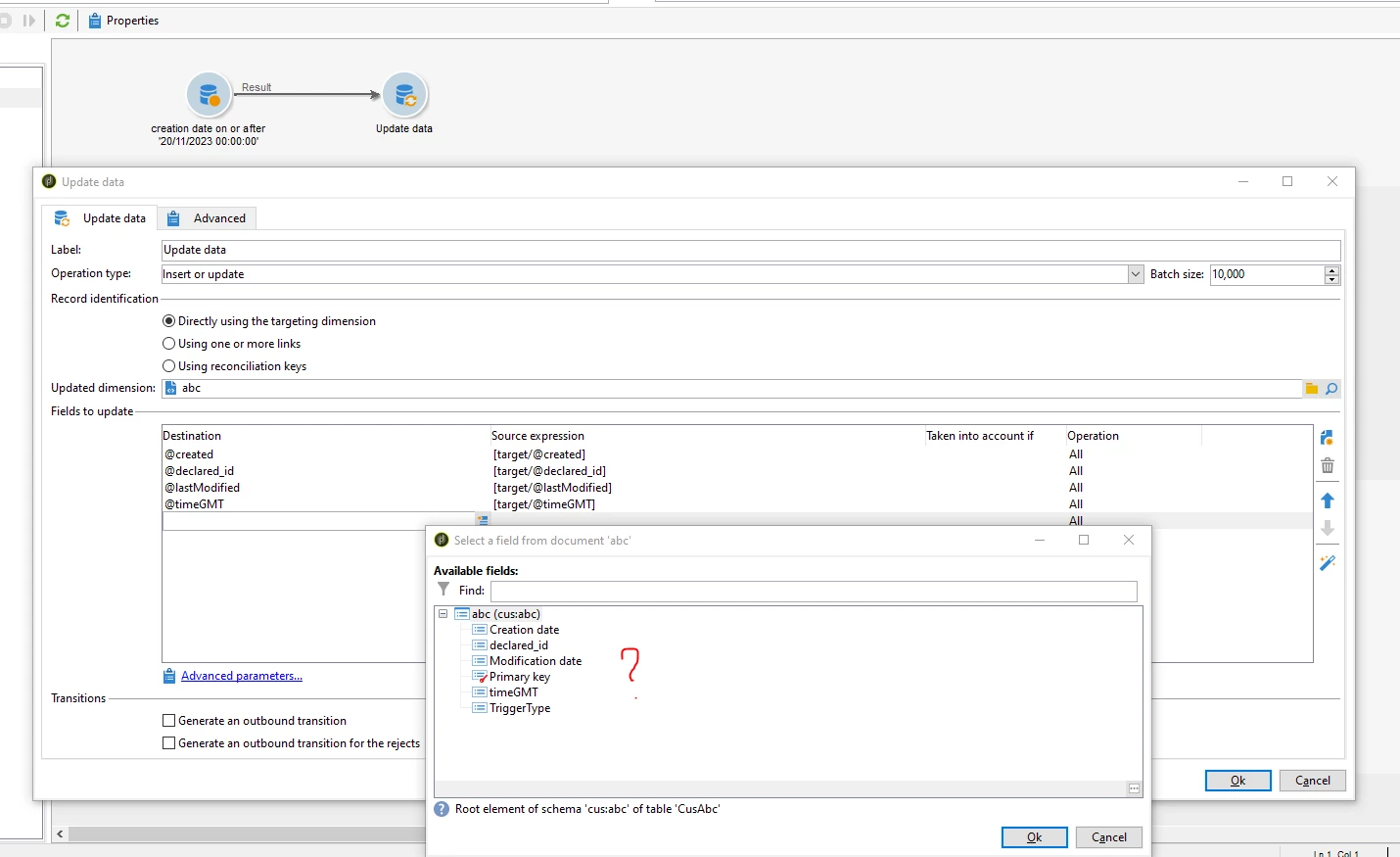
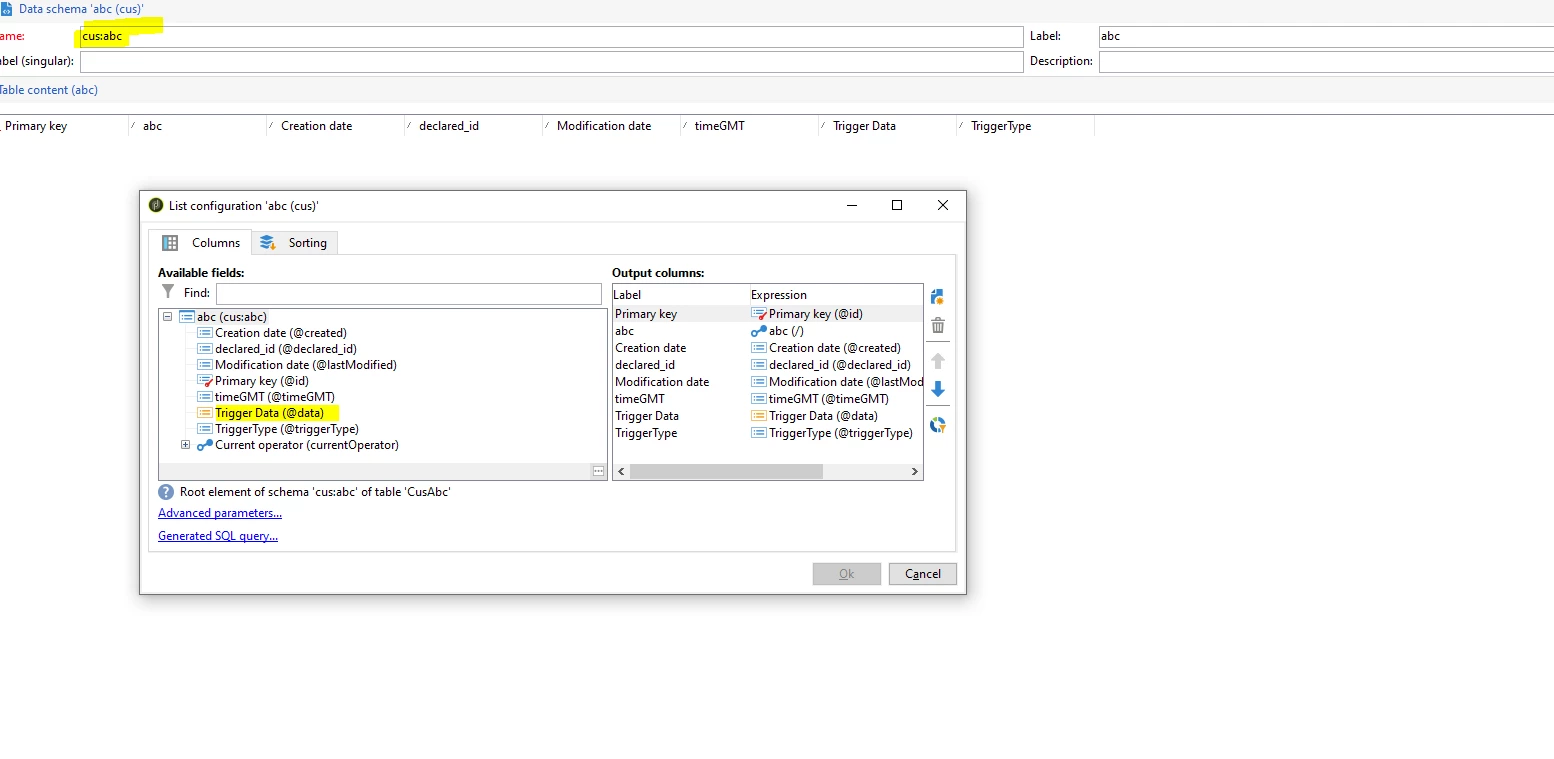
However, in my Update activity for the workflow that will query A and keep only 7 days results, then update those to B... I cannot use the memo type column called: "Trigger Data @data)"... even when I see it in the structure of B (and of course A), I don't see it in the Update activity, not in the Destination field or the Source field.
Why?