Instance or local variables in WebApps | Community
Skip to main content
Level 2
November 21, 2022
Solved

Instance or local variables in WebApps

  • November 21, 2022
  • 2 replies
  • 4252 views

Hello, 

I would like to know if there is a way to use a local or an instance variable in my WebApp. I want some variables to communicate between different activities in my webApp with no access or read only access from the client side. I'm already using the context variables (ctx.vars) but those are Global and are exposed to the public and can be easily changed from the browser (These variables are used server side only and there is no need for them to be displayed elsewhere) .

Thank you.
This post is no longer active and is closed to new replies. Need help? Start a new post to ask your question.
Best answer by Marcel_Szimonisz

Hello @dhfw ,

I have one little (hack) trick to achieve what you want, it is not official and could stop working anytime (works for years). Also works (for years) in workflows. This way I do not have to stringify objects but move then between activities and access them as objects everywhere else:

How to?

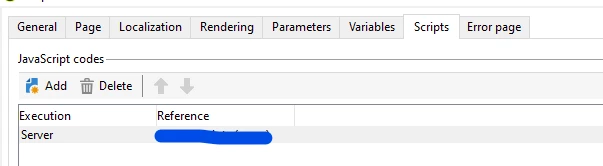
  • Add java script library to your web app

  • JS Script library contains simple object declaration. I called it DL like data layer don't ask me why 🙂 
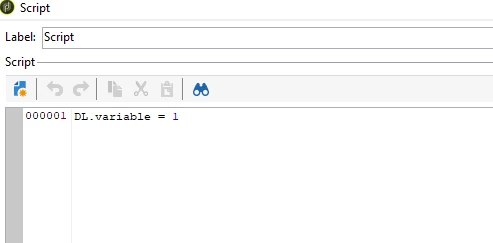
 var DL:{}


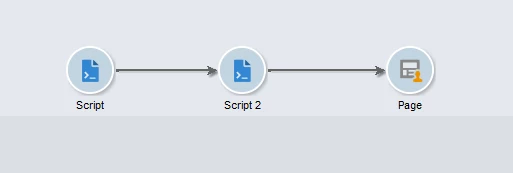
  • Lets move variable between Script and Script 2.


  • define your variable in Script activity

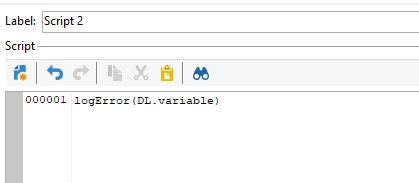
  • read and display in Script 2


  • result


Also it works in page activity and in every other activity that uses JSSP inside web app

<%=DL.variable%>


Marcel Szimonisz

MarTech Consultant
for more tips visit my blog
https://www.martechnotes.com/

2 replies

AkshayAnand
Community Advisor
Community Advisor
November 22, 2022

Hi @dhfw 


To avoid SQL injections, use bound parameters with $(). 

Eg. 

sqlGetInt( "select iRecipientId from NmsRecipient where sEmail = $(sz) limit 1", request.getParameter('email'));

sqlExec("UPDATE "+vars.tableName+" SET sEmail=$(sz) WHERE iId=$(l)", cleanedEmail, record.$id);

For more information click.

Also there's a Blog which you can go through.

Documentation of binding the parameter.


Also the variables that is defined in the variables tab under properties of WebApps, flows throughout the WebApp and can be used anytime in any of the activity.


Regards

dhfwAuthor
Level 2
November 22, 2022

Hi @akshayanand 


Thank you for your response but this is not really what I need. What I need is an instance variables similar to the variables used in workflows  like described Here to send data between different activities like a JS activity and a Test activity.

instance.vars.foo = "bar1"
vars.foo = "bar2"
task.vars.foo = "bar3"

I am aware of there variables tab under properties of WebApps but those variables are in the Global context. As I mentioned above, i'm already using the global ctx.vars to communicate between the client side and the server side of the WebApp. What I need is a secure way to communicate between different activities server side exclusively.

I hope my description was clearer this time. 


Thank you.

Regards.

AkshayAnand
Community Advisor
Community Advisor
November 22, 2022

Hi @dhfw 


Thank you for your explanation. As mentioned in my previous comment, you can use bound parameters with $() for secure transfer as instance variables can't be used. (instance.vars.x or vars.x will throw undefined error).

Repasting the links :-

Documentation of binding the parameter.

For more information click.

Also there's a Blog which you can go through.


Regards

Marcel_Szimonisz
Community Advisor
Marcel_SzimoniszCommunity AdvisorAccepted solution
Community Advisor
November 27, 2022

Hello @dhfw ,

I have one little (hack) trick to achieve what you want, it is not official and could stop working anytime (works for years). Also works (for years) in workflows. This way I do not have to stringify objects but move then between activities and access them as objects everywhere else:

How to?

  • Add java script library to your web app

  • JS Script library contains simple object declaration. I called it DL like data layer don't ask me why 🙂 
 var DL:{}


  • Lets move variable between Script and Script 2.


  • define your variable in Script activity

  • read and display in Script 2


  • result


Also it works in page activity and in every other activity that uses JSSP inside web app

<%=DL.variable%>


Marcel Szimonisz

MarTech Consultant
for more tips visit my blog
https://www.martechnotes.com/

dhfwAuthor
Level 2
November 28, 2022

Thank you @marcel_szimonisz, this seems like the closest solution to what I need. 

Do you I think I can create multiple objects with a randomly generated name for each user instance to avoid conflicts and destroy these objects at the end of my webApp workflow as to not overload the server with useless variables ? 

Marcel_Szimonisz
Community Advisor
Community Advisor
November 28, 2022

Hello @dhfw.

sure you can create as many variables, and objects (arrays what not) this way. Give it a try and let me know how it went 

Marcel