Increasing delivery logs | Community
Skip to main content
Level 3
January 7, 2020
Solved

Increasing delivery logs

  • January 7, 2020
  • 1 reply
  • 5162 views

Hi,


I need to increase delivery log's aging data deletion to 400 days.


To do that, i remember somewhere in the Adobe campaign classic tool, there will be

an option 'aging data deletion: delivery logs: [180 d]' like that. where can i find this in the tool.

please guide me to find this.


Thanks and regards,

Sarathy.
This post is no longer active and is closed to new replies. Need help? Start a new post to ask your question.
Best answer by Florian_Courgey

Hi,

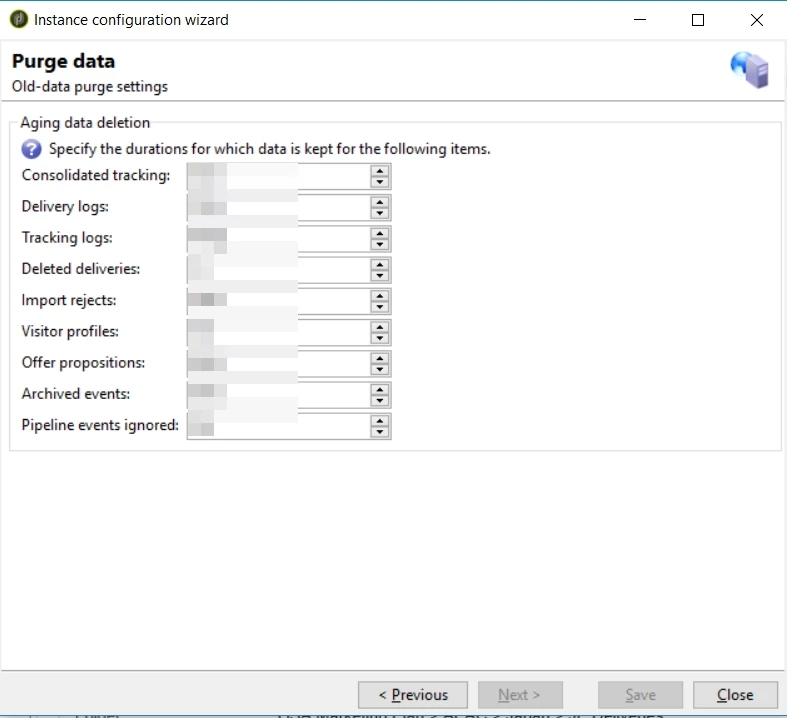
You may go to the Toolbar > Tools > Advanced > Deployment wizard. Hit next until the "Purge data" screen. HEre, you can edit the "Delivery logs" option:

 Alternatively, you can edit the "NmsCleanup_BroadLogPurgeDelay" option

See https://docs.adobe.com/content/help/en/campaign-classic/using/monitoring-campaign-classic/data-processing/database-cleanup-workflow.html for details

1 reply

Florian_CourgeyAccepted solution
Level 4
January 7, 2020

Hi,

You may go to the Toolbar > Tools > Advanced > Deployment wizard. Hit next until the "Purge data" screen. HEre, you can edit the "Delivery logs" option:

 Alternatively, you can edit the "NmsCleanup_BroadLogPurgeDelay" option

See https://docs.adobe.com/content/help/en/campaign-classic/using/monitoring-campaign-classic/data-processing/database-cleanup-workflow.html for details

Partha18Author
Level 3
January 17, 2020

Hi @florian_courgey 


Thanks for your reply. I have changed the log there in deployment wizard to 400d. For testing purpose I had sent a email delivery and using update data activity I changed its @lastModified date to current date minus 400 days in nms:broadLogRcp and in nms:delivery schema. but it is not getting deleted from this tables. What should I need to do for testing purpose?  


Thanks and Regards,

Partha.