Inbound population on sub workflows | Community
Skip to main content
December 4, 2019
Solved

Inbound population on sub workflows

  • December 4, 2019
  • 8 replies
  • 12032 views

I'm attempting to create a handful of re-usable workflow blocks by using sub-workflow, but have come across a stumbling block when trying to pass a targeting dimension to the sub-workflow.

Main workflow:

Eligible Recipients query finds list of potential targets, then calls "Suppression Filter" workflow.

Suppression Sub-workflow:

Intention is for the Suppression Check to filter the inbound population based on re-usable suppression rules, save the excluded targets (in this test case, just to a text file) and then return to the main workflow with a reduced recipient list.
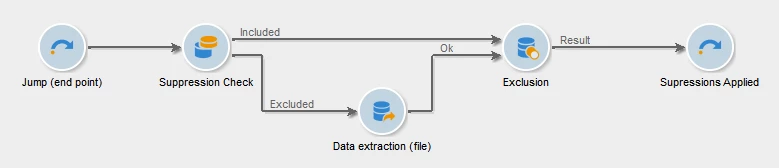
This is all very good in theory, but how do I go about making the inbound population schema available to the sub-workflow?

The documentation at Sub-workflow alludes to being able to pass a table and schema into the sub-workflow, but doesn't elaborate on how to refer to an input table and schema within the sub workflow. Is this even possible?

This post is no longer active and is closed to new replies. Need help? Start a new post to ask your question.
Best answer by kapilKochar

Hi Mark,

In first jump activity , go to advanced tab and write below code

logInfo("Test previous content " + activity)

you will get some XML as an output, now what you need to do is to traverse this XML and build a logic around this . Like what all information you need from main workflow to Subworkflow.

Thanks,

Kapil

8 replies

Manoj_Kumar
Community Advisor
Community Advisor
December 4, 2019

Hello Mark,

Whatever you are fetching from the Eligible Recipient will be available for the Sub-workflow to use. Did you try running this workflow ?

It should work properly.

Thanks,

Manoj

Manoj  | https://themartech.pro
Raj_Ganta-1
Level 5
December 4, 2019

Hi,

What is the stumbling block?

December 4, 2019

I think I've found a resolution, but here's the process that I went through, and my resolution - either for future reference for others in the same position, or for someone to correct me with a better way to achieve this.

In the sub-workflow, the transition from the incoming jump point, does not have a table or a schema. This sort of makes sense, because the Jump in itself doesn't have a schema defined, and the sub-workflow can't know where it's going to be called from.

On the "Suppression Check" split, if I try to use the Temporary schema from the Jump, I get the following error, which again is not unexpected, because the Jump doesn't have a defined schema.

But I can use the nms recipient schema, and build my filtering query successfully:

Even though the Suppression split is using Recipients for the Target and Filtering dimensions, the output transition still shows no schema:

And of course this then means that there is no schema defined for the Data extraction step:

So what I've done is create a Query on the recipient table as well as an enrichment to get the linked attributes that I'm after. This results in me being presented with a list of available fields in my data extraction format:

And finally, put the workflow back to how it should be, and disable the Query:

kapilKochar
kapilKocharAccepted solution
Level 6
December 4, 2019

Hi Mark,

In first jump activity , go to advanced tab and write below code

logInfo("Test previous content " + activity)

you will get some XML as an output, now what you need to do is to traverse this XML and build a logic around this . Like what all information you need from main workflow to Subworkflow.

Thanks,

Kapil

December 5, 2019

It looks like LogInfo just wants to tell me there is an object, but does not expand out the XML content.

kapilKochar
Level 6
December 5, 2019

Yes, that's what i said in above comment. Once you have the object from your previous workflow now you can play with that object and parse this using XML.

e.g activity.extension.schema will give you all the node values !!

kapilKochar
Level 6
December 5, 2019

I believe you do not have to do this additional steps. As i have done the same using above method which i mentioned in my previous comment and that is working fine. 

Jyoti_Yadav
Level 8
December 6, 2019

Hi Mark,

Your subworkflow will have all the data passed through your actual workflow.

For testing purpose, whether you have designed subworkflow correctly or not: You can place one query instead of first jump, passing data which you are passing to your subworkflow.

Once it is tested, you can replace your query with jump and make it as a subworkflow.

Thanks.