how to store Landing page response into custom schema columns and Recipient Schema in Adobe campaign v8 using Web UI | Community
Skip to main content
Level 2
May 15, 2025
Solved

how to store Landing page response into custom schema columns and Recipient Schema in Adobe campaign v8 using Web UI

  • May 15, 2025
  • 2 replies
  • 614 views

Hi Team,

I am using Adobe campaign V8 Web UI for configuring Landing page/WebApp for Registration Form with some Input Fields, Radio button [Yes/No] etc.

The problem is, while using Campaign V8 Web UI, the storage by default pointing out to Recipient Schema.

Can you anyone help me on this how I can store some input values into custom Schemas in Web UI.

Regards,
Santosh.
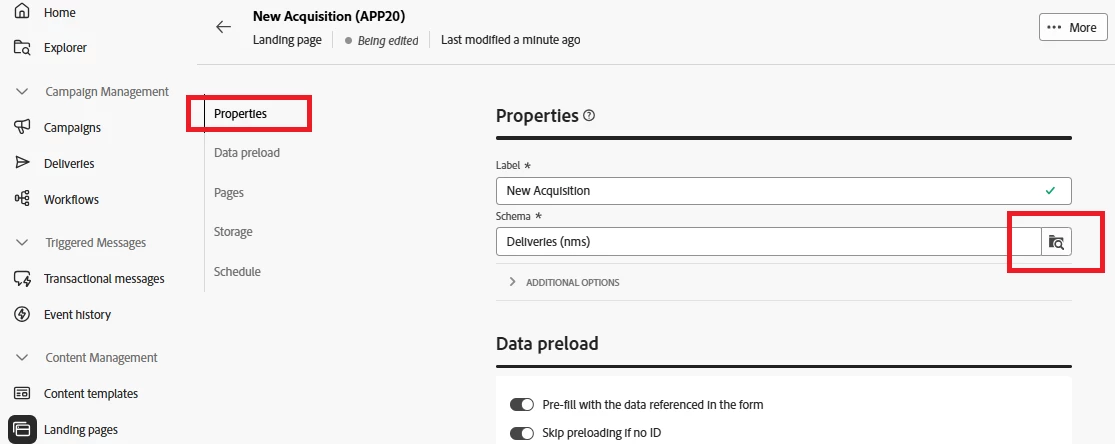
Best answer by ParthaSarathy

Hi @santoshku20 ,

You can select custom schema in web UI Landing page > Property > Schema

2 replies

SushantTrimukheD
Level 4
May 15, 2025

Hi @santoshku20,

In the V8 Client Console, you can modify the webapp properties to change the storage type to a different schema. Alternatively, you can use a JavaScript activity and apply xtk.session.Write to perform the update.

Try using the Client Console or check the Web UI to see if you can view the properties and change the storage type. I believe the process should be similar in the Web UI as well.


ParthaSarathy
Community Advisor
ParthaSarathyCommunity AdvisorAccepted solution
Community Advisor
May 16, 2025

Hi @santoshku20 ,

You can select custom schema in web UI Landing page > Property > Schema

~  ParthaSarathy S~  Click here to join ADOBE CAMPAIGN USER GROUP for Quarterly In-person | Hybrid | Virtual Meetups
Level 2
May 19, 2025

Hi @parthasarathy,

Thanks for your reply.

This is helps me.

Can you please help me on another question,

if I want to store Input form Value into multiple schemas, how we can do that.?

Thank you.