How to split inbound transition data into different segments using JavaScript? | Community
Skip to main content
Level 2
February 12, 2025
Solved

How to split inbound transition data into different segments using JavaScript?

  • February 12, 2025
  • 1 reply
  • 721 views

Dear community

@parthasarathy 


How to split inbound transition data into small segments and send those segments on different dates using JavaScript.

Example: Around 100,000 recipients are coming from an inbound transition. I want to target these audiences on different dates.

Day 1: 8,000, Day 2: 9,000, Day 3: 12,000, Day 4: 15,000, Day 5: 25,000, etc.
Best answer by ParthaSarathy

Hi @chandanasa ,

JavaScript functions has some count limitations. Lets say QueryDef by default can process 10000 records at a run. We can increase the counts by syntax such as forceNoLineCount. But due to performance issue this is not advisable to use for huge counts.

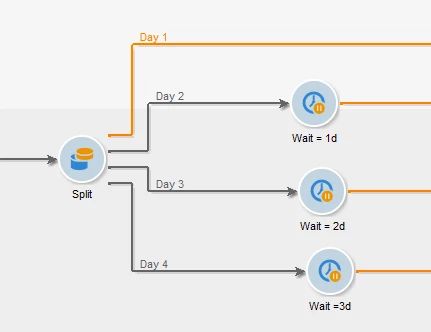
So, you can either plan by sending multiple waves or by using split activity as below,

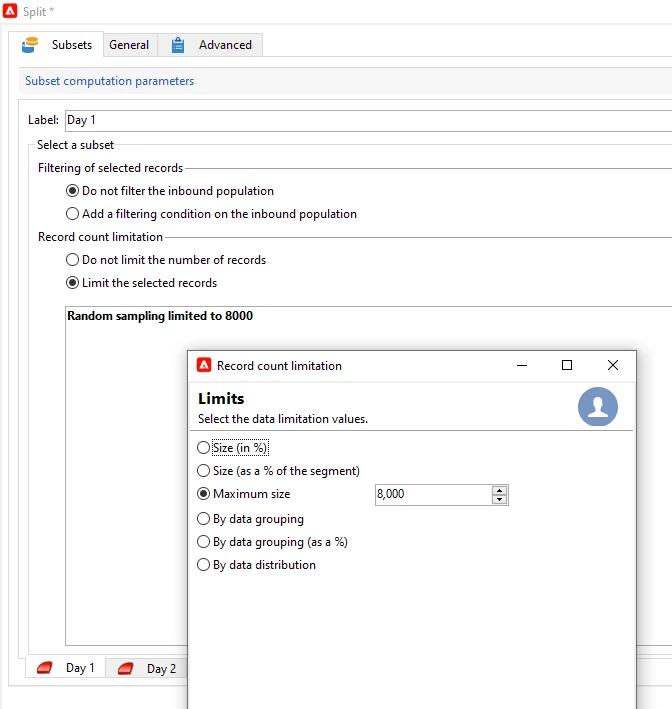
In Split's subset1 > Limit the count to 8000 as below screenshot.

And add another subset and label as Day 2 and Limit the count as per your requirement. Repeat the same for other days by adding subsets.

After split, add wait activity next to each transition and wait period as 1d for day2 transition, then 2d, 3d etc for other wait activities..

1 reply

ParthaSarathy
Community Advisor
Community Advisor
February 12, 2025

Hi @chandanasa ,

Go to Delivery > Property > Delivery tab > Enable 'Send using multiple waves' > select 'schedule waves according to a calendar' > and give value in start as 0s, 1d, 2d, 3d and so on.. and size values as per your requirement.

 ~  ParthaSarathy S~  Click here to join ADOBE CAMPAIGN USER GROUP for Quarterly In-person | Hybrid | Virtual Meetups
Level 2
February 12, 2025

Hi @parthasarathy 


Thank you for your response, but I need to solve this issue using a JavaScript activity instead of using multiple waves in the delivery. Can you please help me if you have time?

ParthaSarathy
Community Advisor
ParthaSarathyCommunity AdvisorAccepted solution
Community Advisor
February 13, 2025

Hi @chandanasa ,

JavaScript functions has some count limitations. Lets say QueryDef by default can process 10000 records at a run. We can increase the counts by syntax such as forceNoLineCount. But due to performance issue this is not advisable to use for huge counts.

So, you can either plan by sending multiple waves or by using split activity as below,

In Split's subset1 > Limit the count to 8000 as below screenshot.

And add another subset and label as Day 2 and Limit the count as per your requirement. Repeat the same for other days by adding subsets.

After split, add wait activity next to each transition and wait period as 1d for day2 transition, then 2d, 3d etc for other wait activities..

 ~  ParthaSarathy S~  Click here to join ADOBE CAMPAIGN USER GROUP for Quarterly In-person | Hybrid | Virtual Meetups