How to get the value of the variable obtained by JS in the body of the Recurring delivery. | Community
Skip to main content
Level 2
January 20, 2021
Solved

How to get the value of the variable obtained by JS in the body of the Recurring delivery.

  • January 20, 2021
  • 2 replies
  • 2871 views

Hello.


I want to know, How to get the value of the variable obtained by JS in the body of the Recurring delivery.

For example, get the date. It into the Email body.

Email is a Text Email.

It is not a HTML Email.


JS

instance.vars.yearTest = formatDate (new Date(), "%Y")

logInfoz("yearTest = [" + instance.vars.yearTest + "]");


Recurring delivery

<%= $(instance/vars/@yearTest) &>


This will give an XFR-180000 error.

I don't think I understand correctly...


Thanks.
This post is no longer active and is closed to new replies. Need help? Start a new post to ask your question.
Best answer by ParthaSarathy

Hi @uz2020 ,

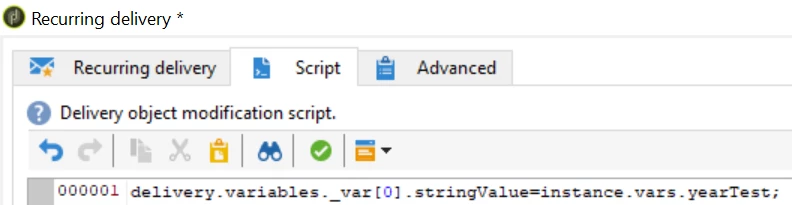
Step 1: Right click recurring delivery > open > in script tab add this below code

delivery.variables._var[0].stringValue=instance.vars.yearTest;


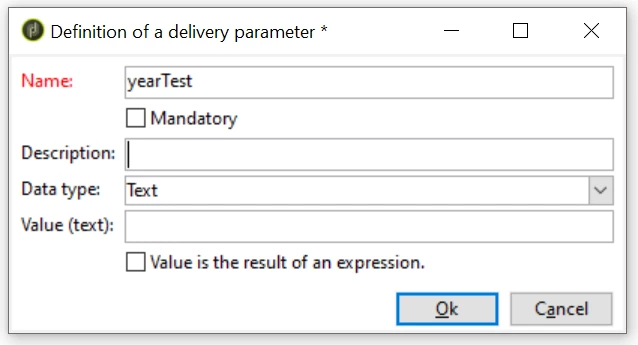
Step 2: In delivery property 'Variable' tab, Add > Define Name and dataType alone 

(for eg, Name = yearTest and Data type = Text) and save the delivery.

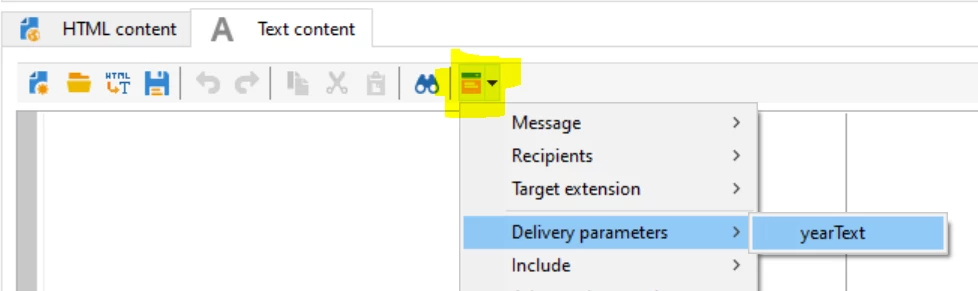
Step 3: Go to your text content tab, you can select your variable as shown below,


Regards,

ParthaSarathy S

2 replies

ParthaSarathy
Community Advisor
ParthaSarathyCommunity AdvisorAccepted solution
Community Advisor
January 20, 2021

Hi @uz2020 ,

Step 1: Right click recurring delivery > open > in script tab add this below code

delivery.variables._var[0].stringValue=instance.vars.yearTest;


Step 2: In delivery property 'Variable' tab, Add > Define Name and dataType alone 

(for eg, Name = yearTest and Data type = Text) and save the delivery.

Step 3: Go to your text content tab, you can select your variable as shown below,


Regards,

ParthaSarathy S

~  ParthaSarathy S~  Click here to join ADOBE CAMPAIGN USER GROUP for Quarterly In-person | Hybrid | Virtual Meetups
uz2020Author
Level 2
January 29, 2021
@parthasarathy Hello, I haven't solved it yet, but the cause of the error seems to be the lack of target mapping. Thank you for your help!
Sukrity_Wadhwa
Community Manager
Community Manager
January 27, 2021

Hi @uz2020,

Were you able to resolve this query or do you still need more help here? Do let us know.

Thanks!

Sukrity Wadhwa