How to get the value of a task variable? | Community
Skip to main content
Level 3
October 27, 2021
Solved

How to get the value of a task variable?

  • October 27, 2021
  • 2 replies
  • 3747 views

Hi there, 

I am using Adobe Campaign Classic. And when I use activity Update Data, I found that this activity updated an task variable. How to get this number?

I tried get this value in Advanced -> Initialization script, but failed. And also tried to get the value in next activity, failed.
This post is no longer active and is closed to new replies. Need help? Start a new post to ask your question.
Best answer by _Shubham_Goyal

Hi @xliu 


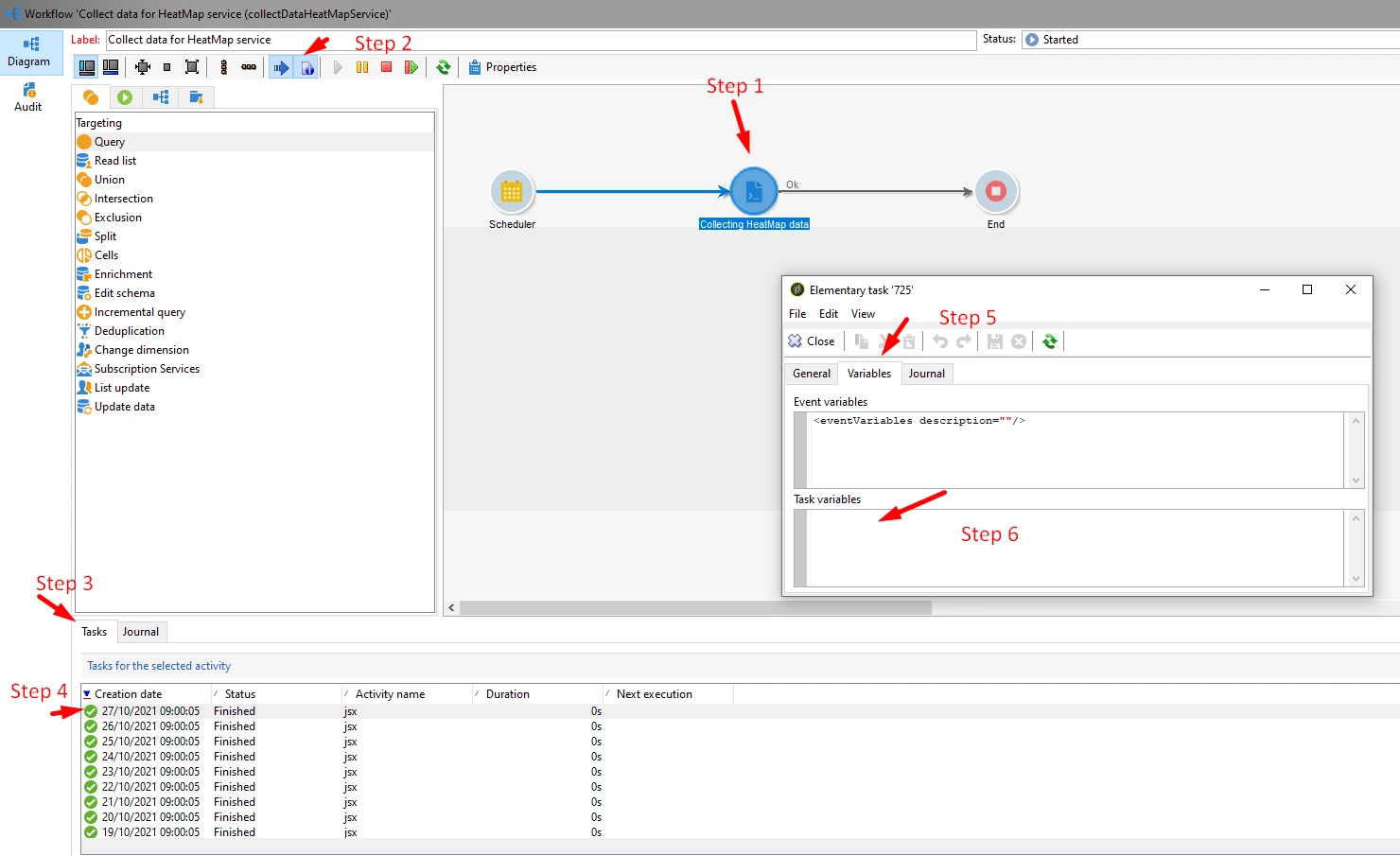
Try to follow the below steps in your workflow:

Step 1: Select the activity where the task variable is allocated.

Step 2: Click on the 'Display the task an logs' icon.

Step 3: Select 'Tasks' tab.

Step 4: Select the transition for which you need to see the task details.  

Step 5: From Elementary task click on 'Variables'.

Step 6: Here under the 'Task Variables' field you will see the task variable data.

Adding screenshot of all the above steps.


Br,
Shubham

2 replies

Krishnanunni
Level 4
October 27, 2021

Hi @xliu ,


As per my understanding, task variables are like a local variable itself. It is used by an activity for temporary storage of data. I don't think it would be accessible in next activities. Also, advanced script executes prior to the update action. So the variable wouldn't have been set at the time of advanced script execution. Honestly, I haven't used a task variable at all. But if you wanted to use it, then may be inside the update operation (in the expression) would be a possibility.

xliuAuthor
Level 3
October 27, 2021

Hi Krishnanunni,


Thanks for your reply!


The reason I want to use task variable is there is a value indicate the number of records which have no change. So we need that variable to do reconciliation. By the way, what do you mean by inside the update operation?


Thanks again for your help!

_Shubham_Goyal
Adobe Employee
_Shubham_GoyalAdobe EmployeeAccepted solution
Adobe Employee
October 27, 2021

Hi @xliu 


Try to follow the below steps in your workflow:

Step 1: Select the activity where the task variable is allocated.

Step 2: Click on the 'Display the task an logs' icon.

Step 3: Select 'Tasks' tab.

Step 4: Select the transition for which you need to see the task details.  

Step 5: From Elementary task click on 'Variables'.

Step 6: Here under the 'Task Variables' field you will see the task variable data.

Adding screenshot of all the above steps.


Br,
Shubham

xliuAuthor
Level 3
October 27, 2021

Hi Shubham,


Thanks very much for your reply!


And yes, that's the way I found this variable. But I'm wondering if there is a way to read that value in the next activity? For example, get task variable in the End activity in your example.


Thanks again for your help!


_Shubham_Goyal
Adobe Employee
Adobe Employee
October 27, 2021

Hi @xliu 

That's a good ask 🙂 but unfortunately the 'Task variables' are like local variables and can only be used by the current task. (task.vars.xyz) 
Instance variables on the other hand are like global variables and are shared by all activities in a workflow.

The only way I can suggest is you can use logInfo(<task_variable_name>), and extract the value of the task variable in the output of the workflow logs.

Br,
Shubham