
How to find out all active profiles in adobe campaign classic | Community
Skip to main content
abhinav99
Level 4
October 19, 2022
Solved

How to find out all active profiles in adobe campaign classic

  • October 19, 2022
  • 2 replies
  • 3410 views

Hi team,


How do I identify all the active profiles in adobe campaign classic?

I know I can see this on the campaign control pannel ->Performance monitoring


But how do I verify this in my instance?


This post is no longer active and is closed to new replies. Need help? Start a new post to ask your question.
Best answer by Shubham_Goyal__

Hi @abhinav99 ,


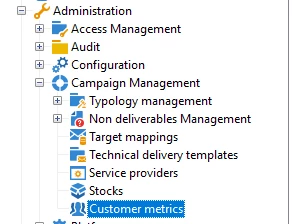
You can find that info in 'Customer Metrics'.
Go to Administration>Campaign Management>Customer Metrics.


Br,

Shubham


2 replies

Shubham_Goyal__
Shubham_Goyal__Accepted solution
Level 6
October 19, 2022

Hi @abhinav99 ,


You can find that info in 'Customer Metrics'.
Go to Administration>Campaign Management>Customer Metrics.


Br,

Shubham


abhinav99
abhinav99Author
Level 4
October 19, 2022

Hi @shubham_goyal__ 

thanks for the response

The Customer Metrics. is not updated since last year in my console.

Is there any other way around to figure out this?


Regards

Abhinav

Shubham_Goyal__
Level 6
October 19, 2022

Hi @abhinav99 ,

Check if the  “Number of active billing profiles” workflow in Admin>Production>Technical Wkf's is running if not try restarting it and once the execution is completed then it may give you results in the 'Customer Metrics'/Control Panel.
Else the other way around is to create a custom workflow and query all broadLog* tables (delivery, mobile apps, visitor, operator, etc) for the last 6 months (as per the retention period set in deployment wiz) and then use deduplication on this data and you will get unique (active) profiles. Now, as the Default retention period for broadLogs is usually 180d so this data might be not the actual number of Active Profiles for the year but it might give you some idea of the active profiles in the system.

If nothing works then reach out to Adobe support to get this OOTB 'Billing wkf' corrected.  


Br,

Shubham

Level 2
October 19, 2022

Hi @abhinav99 ,

To check in the AC instance, you can query the operator schema with condition on acount and login type.

Thanks