
How to exclude records without using Exclusion activity | Community
Skip to main content
LakshmiPravallika
Community Advisor
Community Advisor
May 7, 2024
Question

How to exclude records without using Exclusion activity

  • May 7, 2024
  • 4 replies
  • 1518 views

Hi Team,


We have a requirement based on a Boolean Flag we are excluding few records and in the Query conditions there are many links after which we query based on the Boolean's Flag Value.


In our current approach, there are 2 query activities with one having the condition  [Schema1/Schema2/@Flag] equal to "Yes" and the other query having the condition  [Schema1/Schema2/@Flag] equal to "No", then we are using an Exclusion activity and taking primary set as    [Schema1/Schema2/@Flag] equal to "Yes" (1st query's Data) and excluding the 2nd query's records.


Example WF for 1 schema
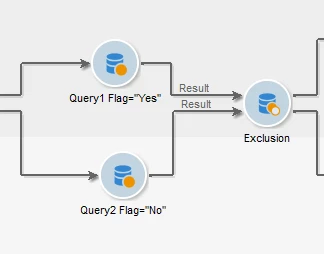
 

This approach is done for nearly 40 schemas , which is causing issues and we are required to Optimize the Workflow and reduce the number of activities being used.


Could you Please suggest us the approach to use the single query instead of multiple query's and Exclusion activities


Regards,

Pravallika.


This post is no longer active and is closed to new replies. Need help? Start a new post to ask your question.

4 replies

Heku_
Level 5
May 7, 2024

Hello @lakshmipravallika, as the schema you are querying is the same, you can put in the same query both conditions, but with  [Schema1/Schema2/@Flag] not equal to "No".

Hope this helps.

Regards,

Heku

LakshmiPravallika
Community Advisor
Community Advisor
May 7, 2024

Hi @heku_ ,


We already tried this and its not working. We even tried using Except operator also, still no luck.


Regards,

Pravallika.


Manoj_Kumar
Community Advisor
Community Advisor
May 8, 2024

@lakshmipravallika  Try querying to schema2 directly and then change the dimension to schema 1 when you have the expected results.


Manoj     Find me on LinkedIn
LakshmiPravallika
Community Advisor
Community Advisor
May 8, 2024

Hi @_manoj_kumar_ ,


We tried to query Schema 2 directly by changing the Filtering dimension to schema2 and used the Change dimension activity to change data back to schema1, still its not working.


Regards,

Pravallika.

AkshayAnand
Community Advisor
Community Advisor
May 9, 2024

Hi Lakshmi

Could you try using the targeting dimension as Schema 1 but filtering dimension as schema 2.


Kindly let me know if you were able to resolve the issue.


Regards

Akshay

LakshmiPravallika
Community Advisor
Community Advisor
May 9, 2024

Hi @akshayanand ,


Yes tried this approach also, and used Change dimension activity as Manoj said, afterwards to change data back to Schema1, still not working.


Regards,

Pravallika.

Sukrity_Wadhwa
Community Manager
Community Manager
May 23, 2024

Hi @lakshmipravallika,

Were you able to resolve this query on your own or do you still need help here? Do let us know.

Thanks!

Sukrity Wadhwa
LakshmiPravallika
Community Advisor
Community Advisor
May 23, 2024

Hi @sukrity_wadhwa ,


Still the issue persists and Its not optimized. We have tried all the approaches mentioned in the thread.


Regards,

Pravallika.

Sukrity_Wadhwa
Community Manager
Community Manager
May 23, 2024

Thanks for sharing. I will escalate it among Adobe SMEs. 

Sukrity Wadhwa