How to do stagger the data? | Community
Skip to main content
Level 2
February 4, 2025
Solved

How to do stagger the data?

  • February 4, 2025
  • 2 replies
  • 625 views

Dear community leaders!

@parthasarathy 


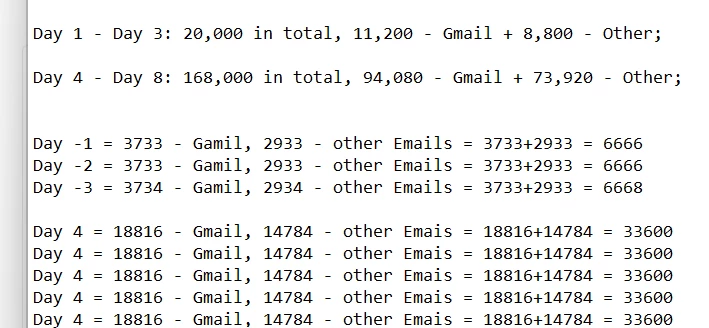
Around 188,000 recipients are coming from inbound transition. From these recipients, we should target 20,000 recipients on Day 1 to Day 3 (3 days), and 168,000 recipients on Day 4 to Day 8 (5 days). From Day 1 to Day 3, the data for 20,000 recipients should be sent—11,200 to Gmail users and 8,800 to other email users. From Day 4 to Day 8, the data for 168,000 recipients should be sent—94,080 to Gmail users and 73,920 to other email users.


Please help to resolve this issue. 
 

Best answer by ParthaSarathy

Hi @chandanasa ,

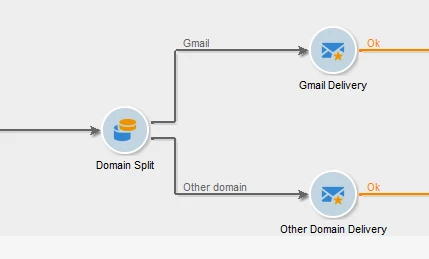
Have a split in your workflow to segregate the input records into 2 - Gmail and other domains

Lower(@domain) contains gmail

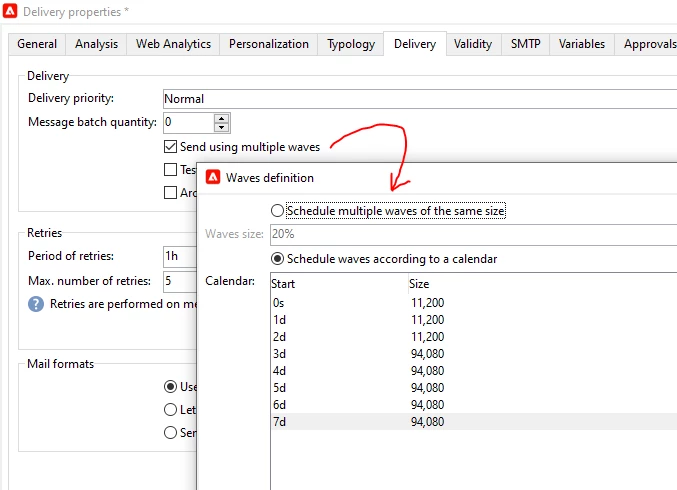
In Gmail's Delivery > Property > Delivery tab > Enable 'Send using multiple waves' > and configure as below,

Repeat the same with other domain's delivery and set the wave as per your counts criteria.

2 replies

ParthaSarathy
Community Advisor
ParthaSarathyCommunity AdvisorAccepted solution
Community Advisor
February 4, 2025

Hi @chandanasa ,

Have a split in your workflow to segregate the input records into 2 - Gmail and other domains

Lower(@domain) contains gmail

In Gmail's Delivery > Property > Delivery tab > Enable 'Send using multiple waves' > and configure as below,

Repeat the same with other domain's delivery and set the wave as per your counts criteria.

 ~  ParthaSarathy S~  Click here to join ADOBE CAMPAIGN USER GROUP for Quarterly In-person | Hybrid | Virtual Meetups
DavidKangni
Community Advisor
Community Advisor
February 4, 2025

Hi @chandanasa,


Reading the requirement, it looks like you're doing an IP warmup.

Please confirm are the ask seems different from the screenshot

Day 1 - Day 3: send 6,6 k each day --> 3.7k Gmail and 2.9k other

Day 4 - Day 8: send 33.6k each day --> 18.8k Gmail and 14.7k  other


I will suggest to create lists and use these lists in your different workflows or deliveries (I will recommend to go with standalone deliveries, in case any issues happen you don't need lot of rework)


Thanks,

David

David Kangni
Level 2
February 4, 2025

Hi @15477368,

If possible, Can you please share package of above mentioned workflow.  I think, it is bit complex. I need this workflow. 


Thanks,

Satya