How to display Campaign sent data each recipient in HTML table for email template | Community
Skip to main content
Level 2
May 30, 2024
Solved

How to display Campaign sent data each recipient in HTML table for email template

  • May 30, 2024
  • 1 reply
  • 1140 views

Hi Everyone,


I have requirement to display Campaign sent data each user in table.

I have prepare below script using workflow data.


Workflow Data:
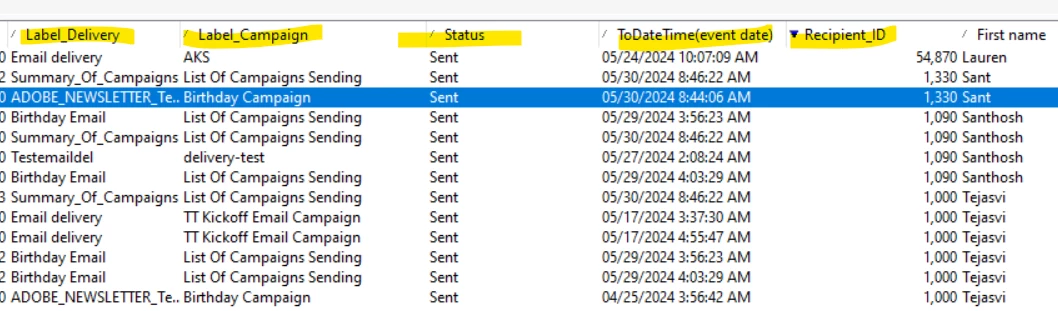


JS Code:

vars.content = '<TABLE style="border: 1px solid black; border-image: none; width: 100%;"><TBODY><TR><TH style="border: 1px solid black; border-image: none; width: auto;">Event Date</TH> <TH style="border: 1px solid black; border-image: none; width: auto;">RCP ID</TH><TH style="border: 1px solid black; border-image: none; width: auto;">Name</TH><TH style="border: 1px solid black; border-image: none; width: auto;">Campaign</TH><TH style="border: 1px solid black; border-image: none; width: auto;">Delivery</TH><TH style="border: 1px solid black; border-image: none; width: auto;">Status</TH></TR>';


var query = NLWS.xtkQueryDef.create(
{queryDef: { schema: vars.targetSchema, operation: "select",
select: {
node: [ {expr: "@rcpId"},
{expr: "@name"},
{expr: "@date"},
{expr: "@campaign"},
{expr: "@delivery"},
{expr: "@status"}]
},

orderBy: {
node: {expr: "@date", sortDesc: "true"}
}

}})

var res = query.ExecuteQuery()

var records = res.getElementsByTagName("*")

for each (var w in records)
{ vars.content += '<TR>';
vars.content += '<TD style="border: 1px solid black; border-image: none;">'+ formatDate((w.getAttribute("date")), "%4Y/%2M/%2D %2H:%2M:%2S")+'</TD>';
vars.content += '<TD style="border: 1px solid black; border-image: none;">'+ w.getAttribute("rcpId")+'</TD>';
vars.content += '<TD style="border: 1px solid black; border-image: none;">'+ w.getAttribute("name")+'</TD>';
vars.content += '<TD style="border: 1px solid black; border-image: none;">'+ w.getAttribute("campaign")+'</TD>';
vars.content += '<TD style="border: 1px solid black; border-image: none;">'+ w.getAttribute("delivery")+'</TD>';
vars.content += '<TD style="border: 1px solid black; border-image: none;">'+ w.getAttribute("status")+'</TD>';
vars.content += '</TR>';
}

vars.content += '</TBODY></TABLE>';


here storing table content into a variable as content and calling into Email template like below.
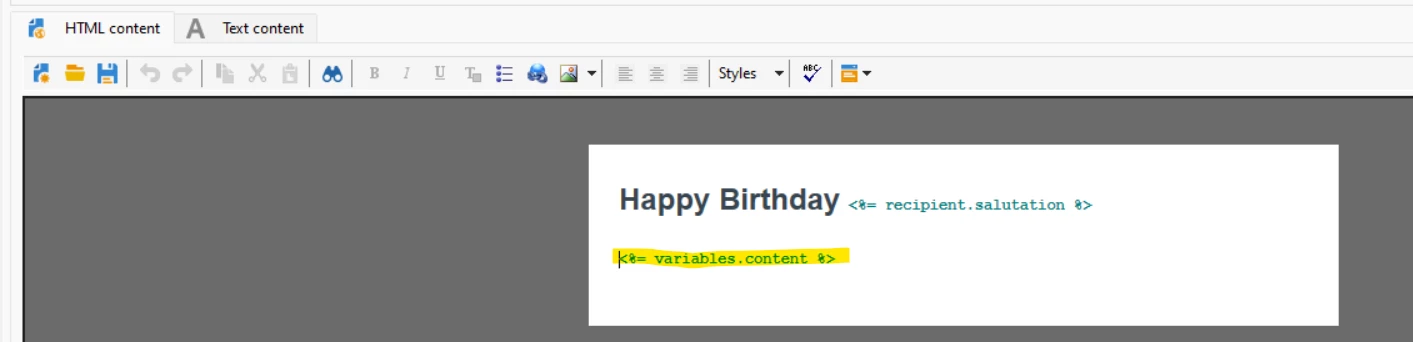


Note: But output displaying all all the users same table content like below
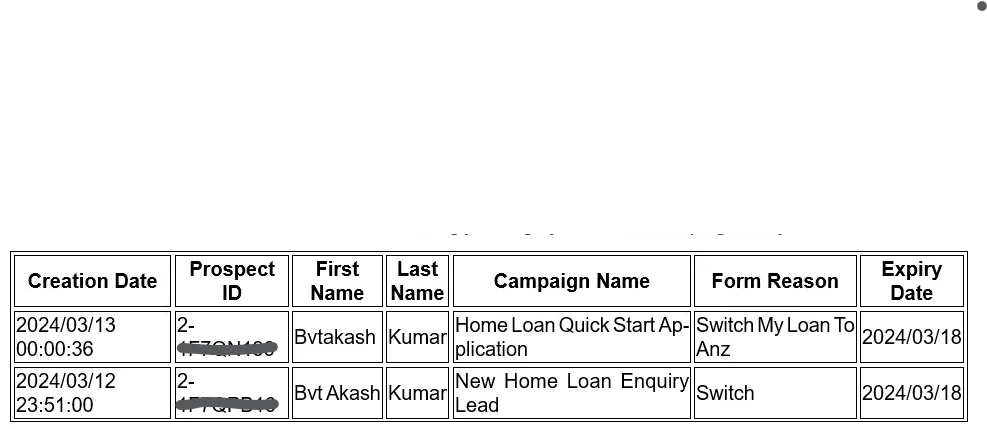


Need to restrict data each recipient in table.


Please share your solution approach for this Case.


Best Regards,

Santosh


This post is no longer active and is closed to new replies. Need help? Start a new post to ask your question.
Best answer by ALangridge

Hmm, this gets a little more fiddly then if there are lots of table rows which need to be aggregated for single end result recipients.


I would do something like....

  • Add an empty string field to each record to store table code
  • Run a JS Code activity in your workflow before your delivery. 
  • In your code, I'd use a similar xtkQueryDef setup access the target
  • Loop through the output and record the rcpID + field values to a storage library, something like: 


var library = {} for each (var w in records){ if(!library[w.rcpID]){ library[w.rcpID] = { rcpId : w.rcpID, content : w.value } }else{ library[w.rcpID].content += w.value } }

but add in a bunch of <tr><td> stuff around it like you did in your code. 

Finally, you can loop again, based on the ID, and then write the table values back using some SQL like: 

var sql = "UPDATE " + vars.tableName + " SET stableContent=" + newVariable + " WHERE iId='" + row.@rcpId + "'"; sqlExec(sql);


Does that make sense? You're already like 85% there with your current code

1 reply

ALangridge
Level 4
May 30, 2024

Hey Santosh, 

You've probably overcomplicated this one a bit if it's just a matter of "each recipient needs to see their own data".

Once you've got the values enriched to the target, you can access them directly in the email itself in a very similar manner to the recipient.salutation you have in use. 

From the "variable" dropdown, head to "recipient" and then "other". 


Scroll down until you find the "additional data" section, expand it and you should be able to find all the fields you have enriched and add them in directly! 


The code you've put together works great for a report email or something to be sent to business users however!


Alex 


iSantoshkAuthor
Level 2
May 31, 2024

Hi @alangridge,

Thanks for the response on this.

I will include the additional data as you suggested, this is I know.

But what if any recipient has more than one records, how we can display multiple records in the table. Like below:

Label_DeliveryLabel_CampaignSatusEvent Date
Delivery 1Campaign 1Sentdate
Delivery 2Campaign 2Sentdate
    

Should we use for each loop for this additional data?

ALangridge
ALangridgeAccepted solution
Level 4
May 31, 2024

Hmm, this gets a little more fiddly then if there are lots of table rows which need to be aggregated for single end result recipients.


I would do something like....

  • Add an empty string field to each record to store table code
  • Run a JS Code activity in your workflow before your delivery. 
  • In your code, I'd use a similar xtkQueryDef setup access the target
  • Loop through the output and record the rcpID + field values to a storage library, something like: 


var library = {} for each (var w in records){ if(!library[w.rcpID]){ library[w.rcpID] = { rcpId : w.rcpID, content : w.value } }else{ library[w.rcpID].content += w.value } }

but add in a bunch of <tr><td> stuff around it like you did in your code. 

Finally, you can loop again, based on the ID, and then write the table values back using some SQL like: 

var sql = "UPDATE " + vars.tableName + " SET stableContent=" + newVariable + " WHERE iId='" + row.@rcpId + "'"; sqlExec(sql);


Does that make sense? You're already like 85% there with your current code