How to create an adobe campaign List using a json array of objects in a workflow | Community
Skip to main content
Level 2
January 14, 2021
Solved

How to create an adobe campaign List using a json array of objects in a workflow

  • January 14, 2021
  • 1 reply
  • 3696 views

Hello,

i have a workflow where i create a json array using javascript activity and i want to  create a new adobe campaign list (using js code) and add to it all the data in my json array  using "javascipt acitivity" or "update list" activity.

can you please show me how i can achieve this operation in my workflow. 


this is the code of my Js activity :


var arrayOfObjects = [{
  "id": 28,
  "Title": "Sweden"
}, {
  "id": 56,
  "Title": "USA"
}, {
  "id": 89,
  "Title": "England"
}];


vars.arrayOfObjects = JSON.stringify(arrayOfObjects); 

 Regards !
This post is no longer active and is closed to new replies. Need help? Start a new post to ask your question.
Best answer by _Manoj_Kumar_

Hello @jamesalio 


All adobe lists create a table in the DB. You can directly update that table with a SQl statement and execute that SQL statement with sqlExec.


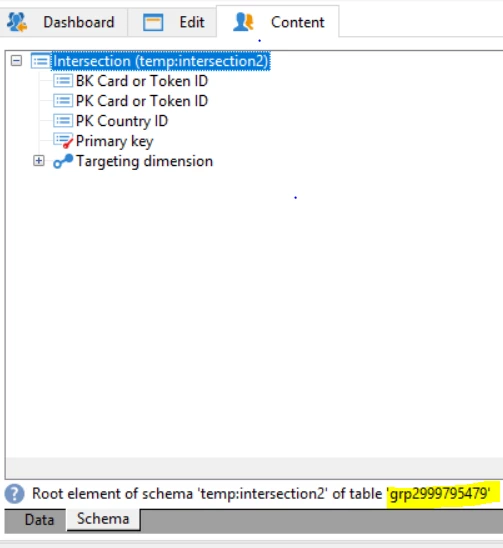
You can get the list table name from the schema table as shown in this screenshot


Now all you have to do iterate your object and do a sqlExec for each item.


Thanks,

Manoj


1 reply

_Manoj_Kumar_
Community Advisor
_Manoj_Kumar_Community AdvisorAccepted solution
Community Advisor
January 14, 2021

Hello @jamesalio 


All adobe lists create a table in the DB. You can directly update that table with a SQl statement and execute that SQL statement with sqlExec.


You can get the list table name from the schema table as shown in this screenshot


Now all you have to do iterate your object and do a sqlExec for each item.


Thanks,

Manoj


     Manoj     Find me on LinkedIn
_Manoj_Kumar_
Community Advisor
Community Advisor
January 14, 2021
Go to Profiles & targets > Lists and create a list. This will automatically create a list and the table in database.
     Manoj     Find me on LinkedIn
RajeshBhat
Level 3
December 19, 2024

@_manoj_kumar_  - Is there a way to create a custom list using the script? I need to upload a file with 250+ columns into a list. But I can't use the column name as is from the file and need to alias. I could do this using enrichment but it will be time consuming. I tried couple of options but none of them worked.

1. I tried renaming the temp table column name after data load activity in the workflow using sqlExec command but it's throwing error at create list activity saying the old column name doesn't exists. Not sure why it still refers to old column name.

2. I created the list with same column names as in file but then tried to rename the column in list using sqlExec command. The workflow ran successfully but when I use the list in read list actiivty it throws error and again refers to old column name. 


Is there any other options which I can try?


Thanks!