
How can we calculate number of user logged for a particular Instance in AC? | Community
Skip to main content
kapilKochar
Level 6
August 20, 2019
Solved

How can we calculate number of user logged for a particular Instance in AC?

  • August 20, 2019
  • 7 replies
  • 5783 views

Hi ,

I wanted to make a report hourly bases to calculate no of User logged in and working. Please let me know any efficient way.

Thanks,

Kapil

This post is no longer active and is closed to new replies. Need help? Start a new post to ask your question.
Best answer by Adhiyan

Hi Kapil,

This is from my local instance with internal login
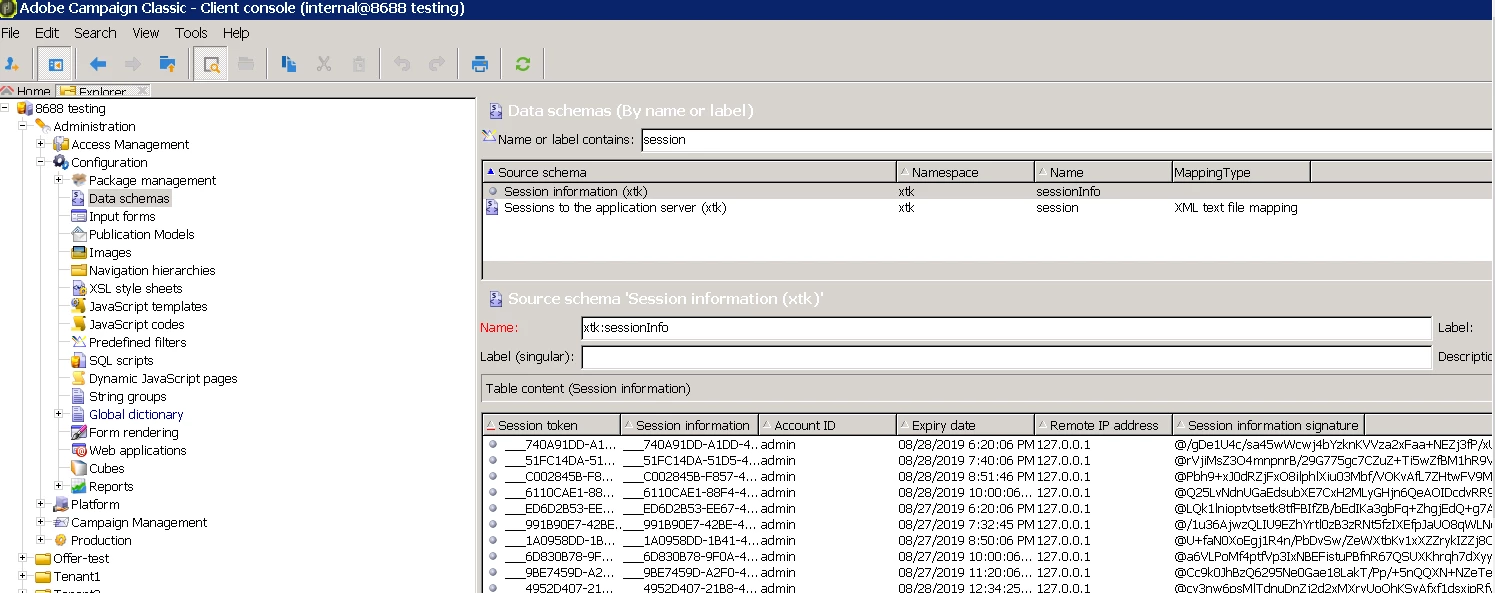
I can see the stored session information from the schema.

My sysfilter in schema definition for xtk:sessionInfo is :
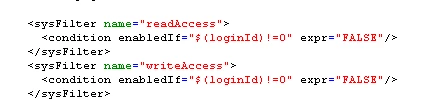
If this is the same as yours , then the alternate process can be to simply run a JS code to query the information from the database directly

var cnx = application.getConnection()

var stmt = cnx.query("select * from xtksessioninfo;")

for each(var row in stmt)

logInfo(row);

cnx.dispose();

and then manipulate the logs to extract information required and create the report

Regards,
Adhiyan

7 replies

Jonathon_wodnicki
Community Advisor
Community Advisor
August 20, 2019

Hi,

Sessions are tracked in xtksessioninfo.

Thanks,

-Jon

kapilKochar
Level 6
August 21, 2019

Thanks Jon for your response.

I have checked this Schema and there are no records present. I logged in and checked it to my local instance.

Do I need to enable something in config file to have records in this schema?

Thanks,

Kapil

Adhiyan
Adobe Employee
Adobe Employee
August 21, 2019

Hi Kapscool,

You are probably logging in as the 'admin' user . Try logging in with the 'internal' user instead.

This schema has restrictions based on the login to view the data.


Regards,

Adhiyan

kapilKochar
Level 6
August 22, 2019

Hi Adhiyan,

Thanks for your reply.

I Tried with internal as well but same result. Is there any particular operator group i should assign to user for this?

kapilKochar
Level 6
August 26, 2019

Hi @adhiyan​,

Can you please advise for this.

Thanks,

Kapil

Adhiyan
Adobe Employee
AdhiyanAdobe EmployeeAccepted solution
Adobe Employee
August 27, 2019

Hi Kapil,

This is from my local instance with internal login

I can see the stored session information from the schema.

My sysfilter in schema definition for xtk:sessionInfo is :

If this is the same as yours , then the alternate process can be to simply run a JS code to query the information from the database directly

var cnx = application.getConnection()

var stmt = cnx.query("select * from xtksessioninfo;")

for each(var row in stmt)

logInfo(row);

cnx.dispose();

and then manipulate the logs to extract information required and create the report

Regards,
Adhiyan

kapilKochar
Level 6
August 28, 2019

Thanks Adhiyan.

Using JS  I am able to check the records. Just one more question, As you can see in your screenshot shared above. There are multiple admin Session records in this schema is it means this schema store all the connection even if that account is not login currently?

As I wanted to check who all logged in when my reports Run.

Thanks a lot for your help so far .