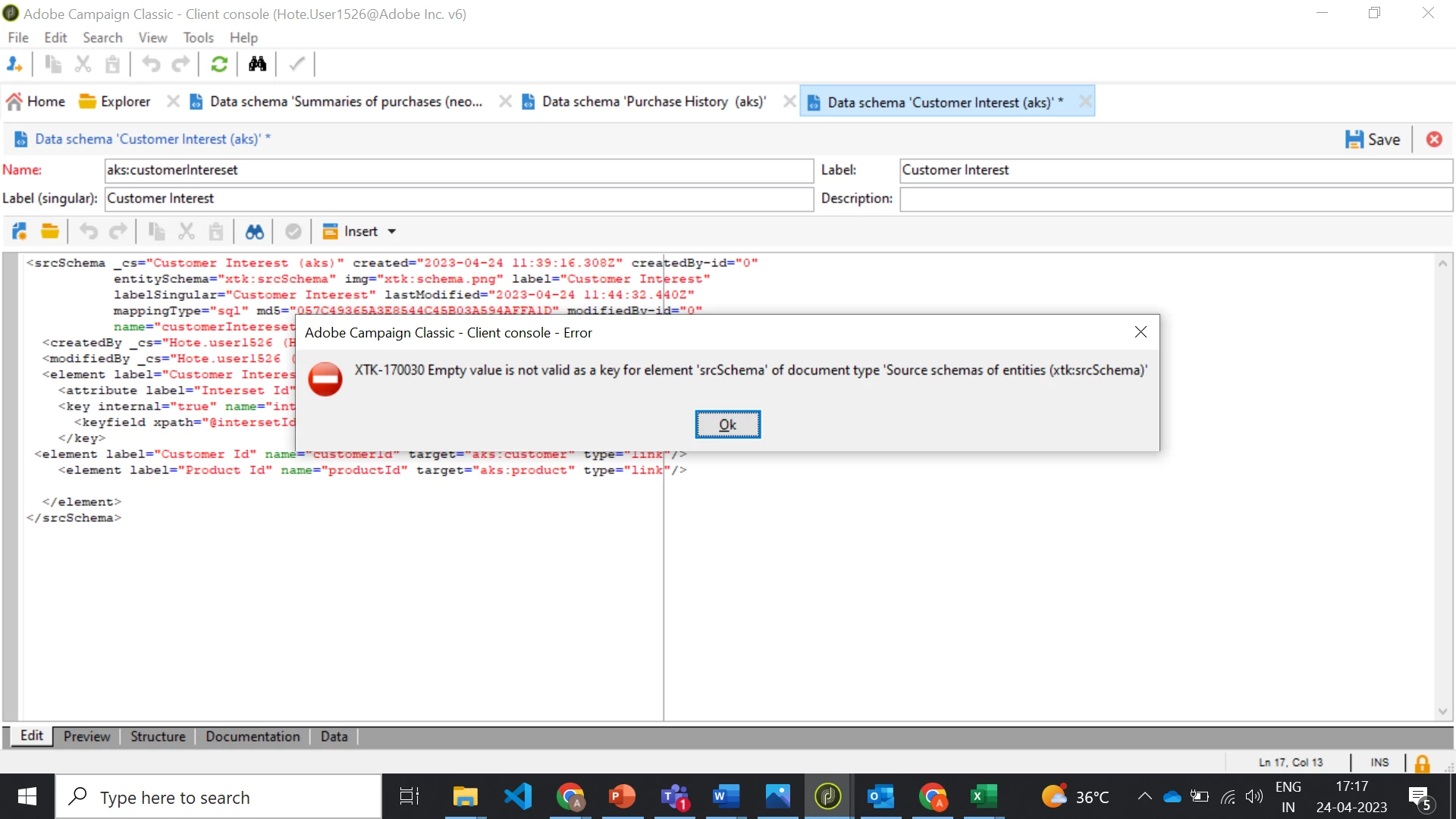
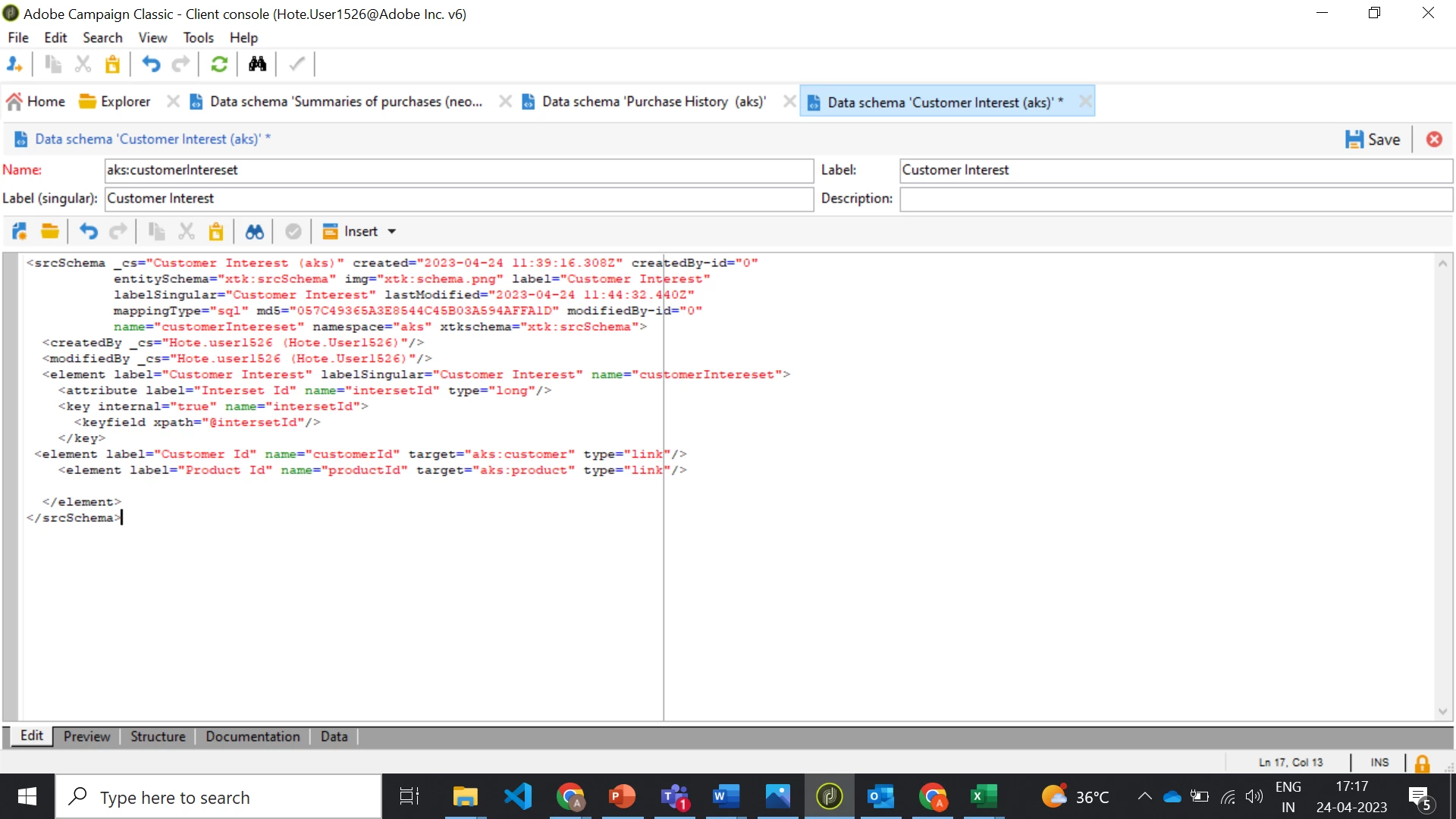
Hi i am creating a schema and getting this error , i have created schemas before but did not encountered this error, it would very helpful if anybody can help me out thank you | Community
Skip to main content
Level 2
April 24, 2023
Solved

Hi i am creating a schema and getting this error , i have created schemas before but did not encountered this error, it would very helpful if anybody can help me out thank you
  • April 24, 2023
  • 8 replies
  • 1683 views

This post is no longer active and is closed to new replies. Need help? Start a new post to ask your question.
Best answer by david--garcia

You almost got it, here it is


<srcSchema _cs="Intersets (aks)" created="2023-04-24 12:34:44.410Z" createdBy-id="0" entitySchema="xtk:srcSchema" img="xtk:schema.png" label="Intersets" labelSingular="Interest" lastModified="2023-04-24 12:35:39.963Z" mappingType="sql" md5="1920390063D80ACF0C51EA5D183AE180" modifiedBy-id="0" name="interest" namespace="aks" xtkschema="xtk:srcSchema"> <createdBy _cs="Hote.user1526 (Hote.User1526)"/> <modifiedBy _cs="Hote.user1526 (Hote.User1526)"/> <element autopk="true" label="Intersets" labelSingular="Interest" name="interest"> <key internal="true" name="productBrands"> <keyfield xpath="@productBrands"/> </key> <attribute label="Product Categories" length="80" name="productCategories" type="string"/> <attribute label="Product Brands" length="80" name="productBrands" type="string"/> <attribute label="Product Sizes" length="40" name="productSizes" type="long"/> <attribute label="Gender" length="40" name="gender" type="string"/> <attribute label="Intersets" labelSingular="Interest" name="interest"/> <attribute label="Product Categories" length="80" name="productCategories" type="string"/> </element> </srcSchema>

8 replies

david--garcia
Level 10
April 24, 2023

The error is clear


Akash_SMAuthor
Level 2
April 24, 2023

I am getting different error after doing it 

david--garcia
Level 10
April 24, 2023

Remove the first line called Element and just copy the attribute, in the schema structure you can only have one wrapper called element with all the attributes inside of it.


Here is the schema structure documentation https://experienceleague.adobe.com/docs/campaign-classic/using/configuring-campaign-classic/schema-reference/schema-structure.html?lang=en


<srcSchema> <enumeration> ... //definition of enumerations </enumeration> <element> //definition of the root <element> (mandatory) <compute-string/> //definition of a compute-string <dbindex> ... //definition of indexes </dbindex> <key> ... //definition of keys </key> <sysFilter> ... //definition of filters </sysFilter> <attribute> ... //definition of fields </attribute> <element> //definition of sub-<element> <attribute> //(collection, links or XML) ... //and additional fields </attribute> ... </element> </element> <methods> //definition of SOAP methods <method> ... </method> ... </methods> </srcSchema>


Akash_SMAuthor
Level 2
April 24, 2023

means not use element tag and use them as attributes?

david--garcia
Level 10
April 24, 2023

Copy and paste your code here after making the changes I mentioned and I'll amend the code.

Akash_SMAuthor
Level 2
April 24, 2023

<srcSchema _cs="Intersets (aks)" created="2023-04-24 12:34:44.410Z" createdBy-id="0"
entitySchema="xtk:srcSchema" img="xtk:schema.png" label="Intersets" labelSingular="Interest"
lastModified="2023-04-24 12:35:39.963Z" mappingType="sql" md5="1920390063D80ACF0C51EA5D183AE180"
modifiedBy-id="0" name="interest" namespace="aks" xtkschema="xtk:srcSchema">
<createdBy _cs="Hote.user1526 (Hote.User1526)"/>
<modifiedBy _cs="Hote.user1526 (Hote.User1526)"/>
<element label="Intersets" labelSingular="Interest" name="interest">

<attribute label="Product Categories" length="80" name="productCategories" type="string"/>
<attribute label="Product Brands" length="80" name="productBrands" type="string"/>
<key internal="true" name="productBrands">
<keyfield xpath="@productBrands"/>
</key>
<attribute label="Product Sizes" length="40" name="productSizes" type="long"/>
<attribute label="Gender" length="40" name="gender" type="string"/>
<attribute label="Intersets" labelSingular="Interest" name="interest"/>

<attribute label="Product Categories" length="80" name="productCategories" type="string"/>
</element>

</srcSchema>

david--garcia
david--garciaAccepted solution
Level 10
April 24, 2023

You almost got it, here it is


<srcSchema _cs="Intersets (aks)" created="2023-04-24 12:34:44.410Z" createdBy-id="0" entitySchema="xtk:srcSchema" img="xtk:schema.png" label="Intersets" labelSingular="Interest" lastModified="2023-04-24 12:35:39.963Z" mappingType="sql" md5="1920390063D80ACF0C51EA5D183AE180" modifiedBy-id="0" name="interest" namespace="aks" xtkschema="xtk:srcSchema"> <createdBy _cs="Hote.user1526 (Hote.User1526)"/> <modifiedBy _cs="Hote.user1526 (Hote.User1526)"/> <element autopk="true" label="Intersets" labelSingular="Interest" name="interest"> <key internal="true" name="productBrands"> <keyfield xpath="@productBrands"/> </key> <attribute label="Product Categories" length="80" name="productCategories" type="string"/> <attribute label="Product Brands" length="80" name="productBrands" type="string"/> <attribute label="Product Sizes" length="40" name="productSizes" type="long"/> <attribute label="Gender" length="40" name="gender" type="string"/> <attribute label="Intersets" labelSingular="Interest" name="interest"/> <attribute label="Product Categories" length="80" name="productCategories" type="string"/> </element> </srcSchema>
AkshayAnand
Community Advisor
Community Advisor
April 24, 2023

Hi @akash_sm 


Could try once moving the defined key at the beginning of attributes or after the definition of attributes.


Regards

A

AkshayAnand
Community Advisor
Community Advisor
April 24, 2023

Something like below

<element label="interest" name="Intersets"> <!-- Begining the defination of attributes <key internal="true" name="productBrands"> <keyfield xpath="@productBrands"/> </key> --> <attribute label="Product Categories" length="80" name="productCategories" type="string"/> <attribute label="Product Brands" length="80" name="productBrands" type="string"/> <attribute label="Product Sizes" length="40" name="productSizes" type="long"/> <attribute label="Gender" length="40" name="gender" type="string"/> <attribute label="Intersets" name="interest"/> <attribute label="Product Categories" length="80" name="productCategories" type="string"/> <!-- After the defination of attributes <key internal="true" name="productBrands"> <keyfield xpath="@productBrands"/> </key> --> </element>