Help to Integrate SDK for Push notification | Community
Skip to main content
Level 2
April 24, 2023
Solved

Help to Integrate SDK for Push notification

  • April 24, 2023
  • 4 replies
  • 2063 views

Hi All,


We have recently got Adobe Campaign classic V8 and we want to start push notification. As mention in the Adobe Documents below we have to integrate the sdk, we have to install Adobe campaign classic in Data collection UI.  it is mentioned under 'Integrate SDK' of the link   https://experienceleague.adobe.com/docs/campaign/campaign-v8/campaigns/send/push.html?lang=en#push-sdk  

Can someone guide me on where we will access the Data collection UI and install Adobe campaign on it.


This post is no longer active and is closed to new replies. Need help? Start a new post to ask your question.
Best answer by david--garcia

The link to the guides are there,

https://developer.adobe.com/client-sdks/documentation/adobe-campaign-classic/

https://experienceleague.adobe.com/docs/experience-platform/sources/connectors/adobe-applications/data-collection.html?lang=en


Data collection is available on the Adobe Experience Platform portal, you need the Adobe Campaign Classic extension, look at the documentation above in detail.


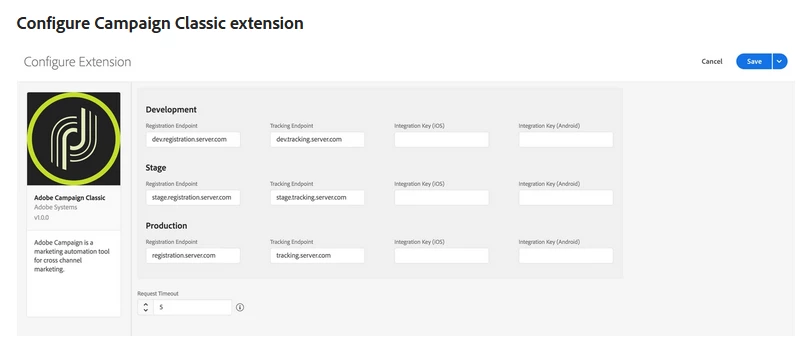
Configure Campaign Classic extension in the Data Collection UI


  1. In the Data Collection UI, select the Extensions tab.

  2. On the Catalog tab, locate the Adobe Campaign Classic extension, and select Install.

  3. Type in the settings for your extension.

  4. Select Save.

  5. Complete the publishing process to update the SDK configuration.

    For more information about publishing, see the publishing overview.


4 replies

david--garcia
david--garciaAccepted solution
Level 10
April 24, 2023

The link to the guides are there,

https://developer.adobe.com/client-sdks/documentation/adobe-campaign-classic/

https://experienceleague.adobe.com/docs/experience-platform/sources/connectors/adobe-applications/data-collection.html?lang=en


Data collection is available on the Adobe Experience Platform portal, you need the Adobe Campaign Classic extension, look at the documentation above in detail.


Configure Campaign Classic extension in the Data Collection UI


  1. In the Data Collection UI, select the Extensions tab.

  2. On the Catalog tab, locate the Adobe Campaign Classic extension, and select Install.

  3. Type in the settings for your extension.

  4. Select Save.

  5. Complete the publishing process to update the SDK configuration.

    For more information about publishing, see the publishing overview.


BhaskarJCAuthor
Level 2
April 28, 2023

Thank You @david--garcia ,


Can you also guide me on where can I Find the integration Keys for iOS and Android? Should those keys be created on the mobile App side?


Regards

Bhaskar 

david--garcia
Level 10
April 28, 2023


Integration key (iOS)

You can specify up to three unique iOS integration keys for your development, staging, and production environments. iOS integration keys are generated after creating a service that contains iOS applications using the Campaign Classic client console. For more information on where to find the integration key, see the tutorial on configuring the mobile application in Adobe Campaign.


Integration key (Android)

You can specify up to three unique Android integration keys for your development, staging, and production environments. Android integration keys are generated after creating a service that contains Android applications using the Campaign Classic client console. For more information on where to find the integration key, see the tutorial on configuring the mobile application in Adobe Campaign.

BhaskarJCAuthor
Level 2
May 2, 2023

Hi @david--garcia 


Thank you for being patient and helping me out. I really appreciate it.

But in the documents, It is not mentioned where we will get the integration key. Should we create a key ourselves and use it or it will be auto generated somewhere. Please help.


regards

Bhaskar

david--garcia
Level 10
May 2, 2023

Please read documentation carefully, watch the following video https://experienceleague.adobe.com/docs/campaign-classic-learn/getting-started-with-push-notifications-for-android/configuring-an-android-service-in-campaign.html?lang=en#configuring-an-android-service-and-creating-an-android-mobile-application-in-campaign


You need to create a new service of mobile type (service and subscriptions)

Then click on add and select android or iOS

The system generates the integration key.


BhaskarJCAuthor
Level 2
May 2, 2023

Hi @david--garcia ,


Thanks a lot for you constant help and Guidance. Just a final query, In the screenshot you shared, I have to use the registration endpoint and Tracking endpoint. Can you please guide on where in deployment wizard I can find the endpoint. I could not determine which of the URLs in the deployment wizard should be used.


Thanks once again for your help


Regards

Bhaskar Choudhury

September 3, 2023

Refer to the following link hat has more details


https://experienceleague.adobe.com/docs/campaign-classic/using/sending-messages/sending-push-notifications/configure-the-mobile-app/configuring-the-mobile-application-android.html#configuring-external-account-android


Hello David , could you please let me know we created services and published SDK , now can you please assist next steps what we need to perform thanks in advance