Getting data via a loop in Email delivery
Hi,
I have been having a little bit of difficulty in order to get dynamic data in the loop. Let me explain.
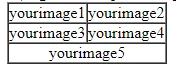
The idea is to print images using <tr><td>. Example: if there are 4 (even) images, then first two will be in a row and the remaining two will be in the second row.
If there are 5 (odd) images, then first two will be in a row, the next two will be in the second row, and the 5th image will be place at the center on the third row.
I check for images based on the store-stock data.
So, for image1, there will be a checker. Lets call it chk1. If there is stock for image1, then chk1=1. Similarly for image2, if there is stock, then chk2=1.
I have got 6 images in total. Therefore, I have 6 checkers too. I add all the checkers and add it to a variable called as DispItemCount. The logic behind this is that, if DispItemCount=6, that means all the images are there. If DispItemCount=5, then only 5 images are there but we do not know which one is not there. In order to solve this issues I am using a for loop and checking for DispItemCount and chk[i].
Here is the code:
<% for(int i=1, j=1; i<= targetData.dispItemCnt; i++) { %>
<!-- If targetData.dispItemCnt == i and if it is odd, then the last image must be printed in the middle.
Example, if targetData.dispItemCnt=5, then the 5th product image but be in the center. The rest (4 items) will be arramged in a row. -->
<% if (targetData.dispItemCnt==i && targetData.dispItemCnt % 2==1 ) { %>
<tr>
<td align="center" valign="top"
style=" padding: 40px 0px 35px; font-size: 0px; background-color: #ffffff;">
<div class="stack-column pb20 nopad"
style=" margin :0px; width: 100%; vertical-align: top; display: inline-block; min-width: 150px; max-width: 350px;">
<a href="https://www.onitsukatiger.com/<%= targetData.link1 %>&utm_campaign=<%= targetData.utmCampaign %>&utm_content=<%= targetData.paramDate %>_<%= message.delivery_id %>_product1_<%= targetData.paramCountry %>&utm_medium=email&utm_source=ac"
target="_blank">
<table role="presentation" style="width: 100%;" border="0"
cellspacing="0" cellpadding="0">
<tbody>
<tr>
<td style="padding: 0px; border-image: none;">
<table role="presentation" style="width: 100%;"
border="0" cellspacing="0" cellpadding="0">
<tbody>
<tr>
<td align="center" valign="middle">
<img class="center-on-narrow nlui-widget"
style="background: #dddddd; width: auto; color: #555555; line-height: 20px; font-family: sans-serif; font-size: 15px; width: 250px; max-width: 100%;"
alt="product1"
src="img\Mexico.png"
border="0"
unselectable="on" />
</td>
</tr>
</tbody>
</table>
</td>
</tr>
</tbody>
</table>
<div align="center" valign="middle"
style="color: black; font-family: 'Manrope',sans-serif, Arial, Helvetica; font-weight:bold; font-size: 15px;">
<%= targetData.name1 %>
</div>
</a>
</div>
</td>
</tr>
<% } %>
<!-- End of first if -->
<!-- If j is a odd number, then we will print the item image on the left. We check if chk[i] is not zero. If it is zero, that means that there is no stock.
If chk[i]==0, then we will surely no print the item and we will not increment j. j is only incremented if the stock is there. -->
<% else if(j%2==1) {
if (targetData.chk[i]!=0) { %>
<tr>
<td align="left" valign="top"
style=" padding: 40px 0px 35px; font-size: 0px; background-color: #ffffff;">
<div class="stack-column pb20 nopad"
style=" margin :0px; width: 100%; vertical-align: top; display: inline-block; min-width: 150px; max-width: 350px;">
<a href="https://www.onitsukatiger.com/<%= targetData.link1 %>&utm_campaign=<%= targetData.utmCampaign %>&utm_content=<%= targetData.paramDate %>_<%= message.delivery_id %>_product1_<%= targetData.paramCountry %>&utm_medium=email&utm_source=ac"
target="_blank">
<table role="presentation" style="width: 100%;" border="0"
cellspacing="0" cellpadding="0">
<tbody>
<tr>
<td style="padding: 0px; border-image: none;">
<table role="presentation" style="width: 100%;"
border="0" cellspacing="0" cellpadding="0">
<tbody>
<tr>
<td align="center" valign="middle">
<img class="center-on-narrow nlui-widget"
style="background: #dddddd; width: auto; color: #555555; line-height: 20px; font-family: sans-serif; font-size: 15px; width: 250px; max-width: 100%;"
alt="product1"
src="img\Mexico.png"
border="0"
unselectable="on" />
</td>
</tr>
</tbody>
</table>
</td>
</tr>
</tbody>
</table>
<div align="center" valign="middle"
style="color: black; font-family: 'Manrope',sans-serif, Arial, Helvetica; font-weight:bold; font-size: 15px;">
<%= targetData.name1 %>
</div>
</a>
</div>
</td>
</tr>
<% j++; } %>
<% } %>
<!-- End of else if -->
<!-- If j is even, then we repeat the checks and will print the item on the right. -->
<% else {
if (targetData.chk[i]!=0) { %>
<tr>
<td align="right" valign="top"
style=" padding: 40px 0px 35px; font-size: 0px; background-color: #ffffff;">
<div class="stack-column pb20 nopad"
style=" margin :0px; width: 100%; vertical-align: top; display: inline-block; min-width: 150px; max-width: 350px;">
<a href="https://www.onitsukatiger.com/<%= targetData.link1 %>&utm_campaign=<%= targetData.utmCampaign %>&utm_content=<%= targetData.paramDate %>_<%= message.delivery_id %>_product1_<%= targetData.paramCountry %>&utm_medium=email&utm_source=ac"
target="_blank">
<table role="presentation" style="width: 100%;" border="0"
cellspacing="0" cellpadding="0">
<tbody>
<tr>
<td style="padding: 0px; border-image: none;">
<table role="presentation" style="width: 100%;"
border="0" cellspacing="0" cellpadding="0">
<tbody>
<tr>
<td align="center" valign="middle">
<img class="center-on-narrow nlui-widget"
style="background: #dddddd; width: auto; color: #555555; line-height: 20px; font-family: sans-serif; font-size: 15px; width: 250px; max-width: 100%;"
alt="product1"
src="img\Mexico.png"
border="0"
unselectable="on" />
</td>
</tr>
</tbody>
</table>
</td>
</tr>
</tbody>
</table>
<div align="center" valign="middle"
style="color: black; font-family: 'Manrope',sans-serif, Arial, Helvetica; font-weight:bold; font-size: 15px;">
<%= targetData.name1 %>
</div>
</a>
</div>
</td>
</tr>
<% j++; } %>
<% } %>
<!-- End of else -->
<% } %>
What I want to know is how to loop the images and names. That is, generally we five it as targetData.image[i] to get the images. But that is not possible in this case.
Sorry for the long explanation. Kindly check and help me figure it out.