Facing error while sending an calculated attachment in the delivery? | Community
Skip to main content
Level 6
April 13, 2019
Solved

Facing error while sending an calculated attachment in the delivery?

  • April 13, 2019
  • 6 replies
  • 4681 views

Hello Folks,

I am trying to send an file present over server location as an attachment in recurring delivery, but facing an error. Below are the activities that i configured in workflow:

Scheduler -> Query (Get Required Information) -> Data Extraction (Extracting to Server Location) -> Delivery Activity (Chosen a delivery template) -> End

I created a template with some content, target population specified and configured an attachment (Calculated Attachment). Provided the same server path where the file resides. But seems like it is not working as expected, do we need to provide some permissions to campaign on the directory. Because this directory has some access restrictions.

Please help!

Regards,

Sri Bhargav
This post is no longer active and is closed to new replies. Need help? Start a new post to ask your question.
Best answer by DavidKangni

Hi Sri,

If i understand you want to send to an operator the bounced email?

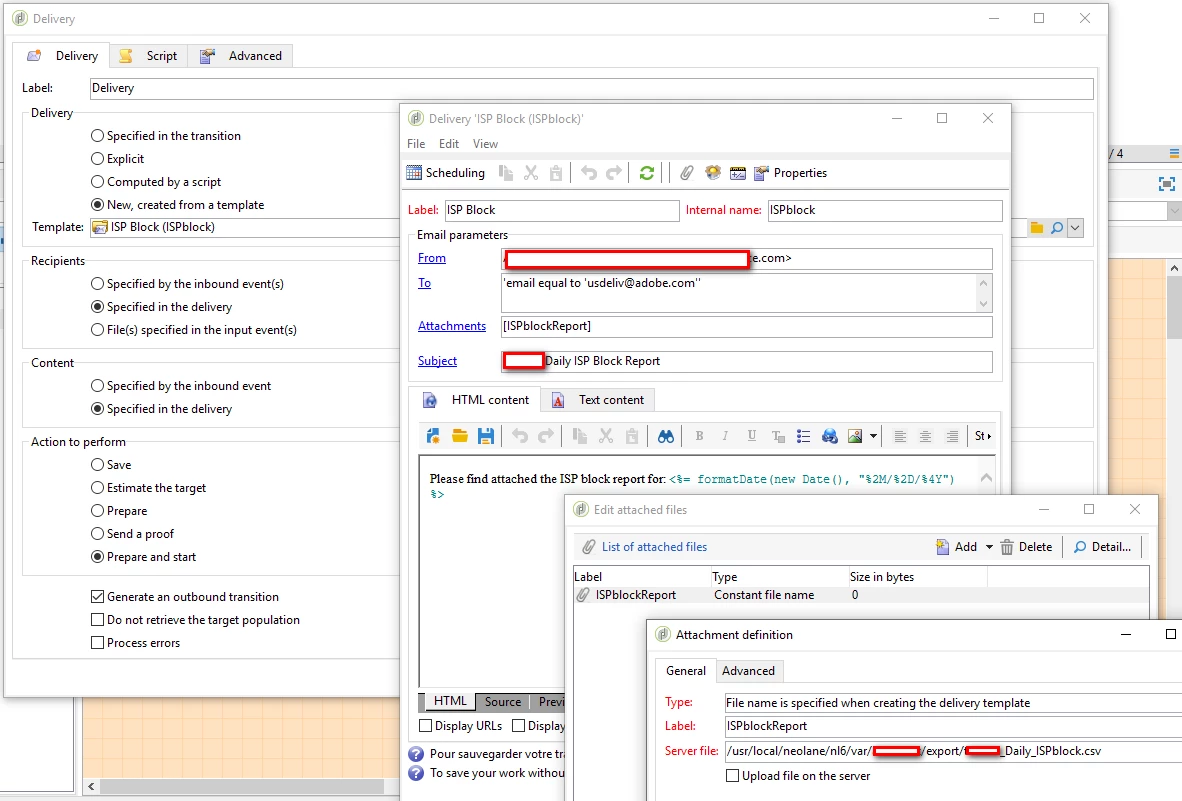
  • If yes, i recommend to use a constant file name and add your personalization in the subject line or content (see screenshot below)

  • otherwise you can add attachment in delivery with the code below if you want the filename with the date

delivery.attachment.add(

  <attachment compressMode="print" filterActive="false" label="YOUR FILENAME"

              nameScriptActive="false" type="normal" upload="false">

      <name>{vars.filename}</name>

  </attachment>)


delivery.hasAttachments = true

Thanks

David

6 replies

Venu_Reddy
Level 6
April 13, 2019
Level 6
April 15, 2019

Thanks Venu, seems like same issue i am facing.

Will try out the possibilities present in the link shared.

Regards,

Sri Bhargav

DavidKangni
Community Advisor
Community Advisor
April 16, 2019

Hi,

For the calculated attachment, your sample need to be on the MTA server plus you need to have the rights to Read, Write Delete on the server otherwise the process will error out.

The work around is to generate the attachment on a server exposed publicly and append the url in your delivery. Campaign will the download the attachment during the email preparation.

Thanks

David Kangni
Level 6
April 16, 2019

Hi David,

Thanks for your input!

Yes seems like there are some restrictions imposed where campaign couldn't able to access the particular location and get the file during delivery analysis.

Could you please help me how to configure the server URL is it directly giving the URL along with file name or do we need to do any amendments to it?

I am trying to provide this path:

\\prod-ac-mailing-server....com\var\AC\outbound\BounceBackInformation\Email_Bounce_Report_<%= formatDate(new Date(), "%4Y-%2M-%2D %2H%2N%2S") %>.csv

Regards,

Sri Bhargav

DavidKangni
Community Advisor
DavidKangniCommunity AdvisorAccepted solution
Community Advisor
April 16, 2019

Hi Sri,

If i understand you want to send to an operator the bounced email?

  • If yes, i recommend to use a constant file name and add your personalization in the subject line or content (see screenshot below)

  • otherwise you can add attachment in delivery with the code below if you want the filename with the date

delivery.attachment.add(

  <attachment compressMode="print" filterActive="false" label="YOUR FILENAME"

              nameScriptActive="false" type="normal" upload="false">

      <name>{vars.filename}</name>

  </attachment>)


delivery.hasAttachments = true

Thanks

David

David Kangni
Level 6
May 15, 2019

Thanks David for Inputs. Will try this way and let know

Regards,

Sri Bhargav