Exporting variable values of javascript into a excel file through a workflow | Community
Skip to main content
Level 4
June 4, 2020
Solved

Exporting variable values of javascript into a excel file through a workflow

  • June 4, 2020
  • 2 replies
  • 5775 views

Hi Team, 


Can we export a calculated variable value in javascript to an excel file through a workflow - 


Export can be like on a local laptop OR adobe folders inside explorer. 


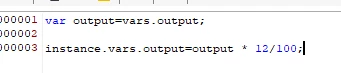
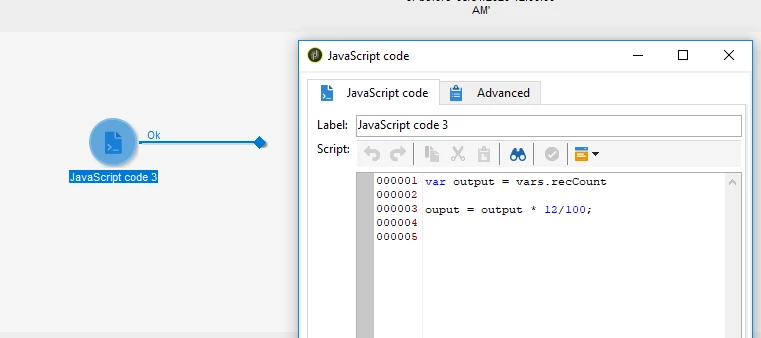
For example : In the below ss we have a javascript and inside javascript we have some variable or some sql query result 


This post is no longer active and is closed to new replies. Need help? Start a new post to ask your question.
Best answer by Manoj_Kumar

Hello @ramaswami ,

Yes, you can export the JS variables in a CSV file.


You will have to use the enrichment activity to do so. But you can not use enrichment activity because there is only one javascript activity in your workflow. To make it work you will have to change the workflow to something like this.

JS Activity:


Enrichment activity:


Since you want to automate this. There are 2 ways to get the files with automation.

1) Use data extraction and create the file in Adobe server itself.

2) If you want to receive it on your emails then you can add the delivery activity. (Note to do this you will have to use the file attachment by computation)


i have added the additional activities for your reference.


2 replies

Jyoti_Yadav
Level 8
June 5, 2020

Hi,


Yes you can export local variable value in your export file.

In your JS, define variable as:

vars.output=vars.recCount


And then file configuring columns of your export file. Add column using edit the expression and give value as: 

$(vars/@output)


Thanks.

RamaswamiAuthor
Level 4
June 5, 2020
Thanks Jyo, initially it didn't worked for me because i only have javascript node and no query activity. we need to have a query activity with some test record in order to export such variables to files. Now i can be able to upload the files to S3 bucket. But i want the files to be exported to a folder in adobe explorer. How can i confiugre my file upload activity to point to adobe explorer file ?
Manoj_Kumar
Community Advisor
Manoj_KumarCommunity AdvisorAccepted solution
Community Advisor
June 5, 2020

Hello @ramaswami ,

Yes, you can export the JS variables in a CSV file.


You will have to use the enrichment activity to do so. But you can not use enrichment activity because there is only one javascript activity in your workflow. To make it work you will have to change the workflow to something like this.

JS Activity:


Enrichment activity:


Since you want to automate this. There are 2 ways to get the files with automation.

1) Use data extraction and create the file in Adobe server itself.

2) If you want to receive it on your emails then you can add the delivery activity. (Note to do this you will have to use the file attachment by computation)


i have added the additional activities for your reference.


Manoj  | https://themartech.pro
RamaswamiAuthor
Level 4
June 5, 2020
Hi @2237655, Awesome, thanks for the workflow and suggestion it worked fine. Currently now i am exporting the file to S3 bucket through file upload activity. How can i export to Adobe explorer if i make a folder in adobe explorer and i want the file generated from the workflow to be stored in that file. How can i configure the file upload component to point to adobe folder. can you please suggest