Exporting Campaign Management Nested Folder Structure | Community
Skip to main content
Level 3
March 6, 2025
Solved

Exporting Campaign Management Nested Folder Structure

  • March 6, 2025
  • 1 reply
  • 563 views

Hello,


Is it possible to export/import from one ACC instance to another the structure of folders in the explorer. E.g., we have a Campaign Management Folder with 10 subfolders, and each subfolder has an additional 3 subfolders beneath it. Can we export all 40 of these folders as a package and import the nested folders into another instance of Adobe Campaign?

Best answer by ParthaSarathy

Hi @skylerqu2 ,

Create a new package defination in Administration > Configuration > Package management > Package definitions.

Select entities to export as 'xtk:folder,'

Provide filtering condition as,

Full name contains '/your_patent_folder/'

So this parent folder and along with all its sub-folder will be migrated using this package.

1 reply

ParthaSarathy
Community Advisor
ParthaSarathyCommunity AdvisorAccepted solution
Community Advisor
March 6, 2025

Hi @skylerqu2 ,

Create a new package defination in Administration > Configuration > Package management > Package definitions.

Select entities to export as 'xtk:folder,'

Provide filtering condition as,

Full name contains '/your_patent_folder/'

So this parent folder and along with all its sub-folder will be migrated using this package.

 ~  ParthaSarathy S~  Click here to join ADOBE CAMPAIGN USER GROUP for Quarterly In-person | Hybrid | Virtual Meetups
SkylerQu2Author
Level 3
March 6, 2025

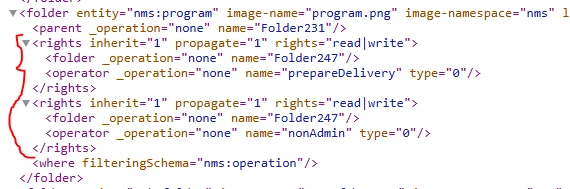
Hi @parthasarathy is it possible to export these folders without the rights/operator groups configurations?

ParthaSarathy
Community Advisor
Community Advisor
March 8, 2025

@skylerqu2 , After exporting as a xml package, open it in notepad and remove the <rights> from the XML manually which you want to remove,

 ~  ParthaSarathy S~  Click here to join ADOBE CAMPAIGN USER GROUP for Quarterly In-person | Hybrid | Virtual Meetups