Error in making SOAP call from SOAP UI to Adobe Campagn | Community
Skip to main content
Level 6
December 31, 2018
Solved

Error in making SOAP call from SOAP UI to Adobe Campagn

  • December 31, 2018
  • 11 replies
  • 13233 views

Hi Team,

I am making a SOAP call to Adobe from SOAP UI using the following message and getting error. Any help would be appreciated.

Request

<soapenv:Envelope xmlns:soapenv="http://schemas.xmlsoap.org/soap/envelope/" xmlns:urn="urn:xtk:queryDef">

   <soapenv:Header/>

   <soapenv:Body>

      <urn:ExecuteQuery>

         <urn:sessiontoken>*****/******</urn:sessiontoken>

         <urn:entity>

            <!--You may enter ANY elements at this point-->

          <?xml version='1.0'?>

         <queryDef operation="select" schema="nms:recipient">

          <select>

            <node expr="@email"/>

            <node expr="@lastName"/>

            <node expr="@firstName"/>

          </select>

          <where>

            <condition expr="@email = '*******'"/>

          </where>

        </queryDef>

         </urn:entity>

      </urn:ExecuteQuery>

   </soapenv:Body>

</soapenv:Envelope>

Response

<SOAP-ENV:Envelope xmlns:xsd="http://www.w3.org/2001/XMLSchema" xmlns:xsi="http://www.w3.org/2001/XMLSchema-instance" xmlns:SOAP-ENV="http://schemas.xmlsoap.org/soap/envelope/">

   <SOAP-ENV:Body>

      <SOAP-ENV:Fault>

         <faultcode>SOAP-ENV:Error</faultcode>

         <faultstring xsi:type="xsd:string">SOP-330023 An error occurred during the SOAP call. You don't have the required rights to view the detail.</faultstring>

      </SOAP-ENV:Fault>

   </SOAP-ENV:Body>

</SOAP-ENV:Envelope>
This post is no longer active and is closed to new replies. Need help? Start a new post to ask your question.
Best answer by Adhiyan

Hi Deba,

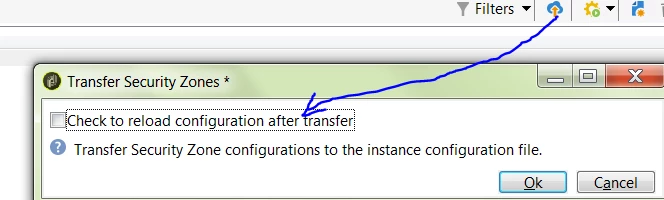
Did you transfer the changes from security zone by clicking the button on the top ?

Regards,
Adhiyan

11 replies

asish_kumarp599
Level 4
December 31, 2018

please remove these 2 lines and try again

<!--You may enter ANY elements at this point-->

          <?xml version='1.0'?>

asish_kumarp599
Level 4
December 31, 2018

hope you are using session token calling logon method

DebTrAuthor
Level 6
January 1, 2019

Hi Asish,

Thanks for your Input.

For session toke I am using username/password.

After removing the mentioned part from the request getting the following raw response.

Am I still missing anything?

Response

HTTP/1.1 403 Forbidden

Server: nginx

Date: Tue, 01 Jan 2019 20:16:12 GMT

Content-Type: text/plain; charset=utf-8

Content-Length: 25

Connection: keep-alive

Pragma: no-cache

Cache-Control: no-cache

Expires: Tue, 01 Jan 2019 20:16:12 GMT

X-UA-Compatible: IE=edge

X-XSS-Protection: 1; mode=block

Vary: Accept-Encoding

Content-Encoding: gzip

null

DebTrAuthor
Level 6
January 2, 2019
Adhiyan
Adobe Employee
Adobe Employee
January 2, 2019

Hi Debabrata,

The 403 error comes mainly because of two reasons.

1>. Username / password is incorrect

2>. IP address not authorized.

To rule out issues with username /password , can you generate a session token using the logon method of xtk:session schema. If you are able to successfully generate a sessionToken your user password is valid.

After that add the public IP from which you are making the SOAP call in the security zone. If it's hosted , raise a ticket to Adobe.

If it's hosted just add it in the config file.

Regards,
Adhiyan

DebTrAuthor
Level 6
January 2, 2019

Hi Adhiyan​,

Thanks much for your input. It gives more insight.

Now I could make SOAP call from another IP. It means the issue was related to IP authorization not security token.

Is it possible to achieve it using Administration->Configuration->Security Zones settings instead of serverconfig.xml ?

It is hosted in cloud.

Regards,

Deb

Jonathon_wodnicki
Community Advisor
Community Advisor
January 2, 2019

Hi,

Security Zones is a custom package Adobe installs on their fully-hosted instances.

It modifies the instance conf file, which overrides serverConf.xml.

Thanks,

-Jon

Amit_Kumar
Level 10
January 3, 2019

Hi Deb,

Security Zones settings would be able to solve your purpose. Do something like this and add the ip address you were trying to add. do not forget to select the webservice checkbox as you only want a webservice only access.

DebTrAuthor
Level 6
January 3, 2019

Hi Amit,

I tried the same. Added my Public IP to Administration->Configuration->Security Zones with webservice checked

But no luck. It is giving following response as before.

HTTP/1.1 403 Forbidden

Server: nginx

Date: Thu, 03 Jan 2019 11:27:36 GMT

Content-Type: text/plain; charset=utf-8

Content-Length: 25

Connection: keep-alive

Pragma: no-cache

Cache-Control: no-cache

Expires: Thu, 03 Jan 2019 11:27:36 GMT

X-UA-Compatible: IE=edge

X-XSS-Protection: 1; mode=block

Vary: Accept-Encoding

Content-Encoding: gzip

null

Adhiyan
Adobe Employee
AdhiyanAdobe EmployeeAccepted solution
Adobe Employee
January 4, 2019

Hi Deba,

Did you transfer the changes from security zone by clicking the button on the top ?

Regards,
Adhiyan