Error- Document is empty- while created via WSDL- adobe campaign classic | Community
Skip to main content
Level 4
October 13, 2022
Solved

Error- Document is empty- while created via WSDL- adobe campaign classic

  • October 13, 2022
  • 1 reply
  • 3409 views

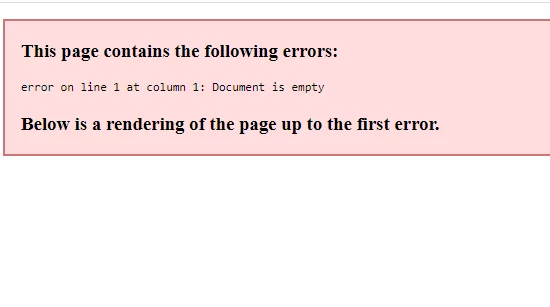
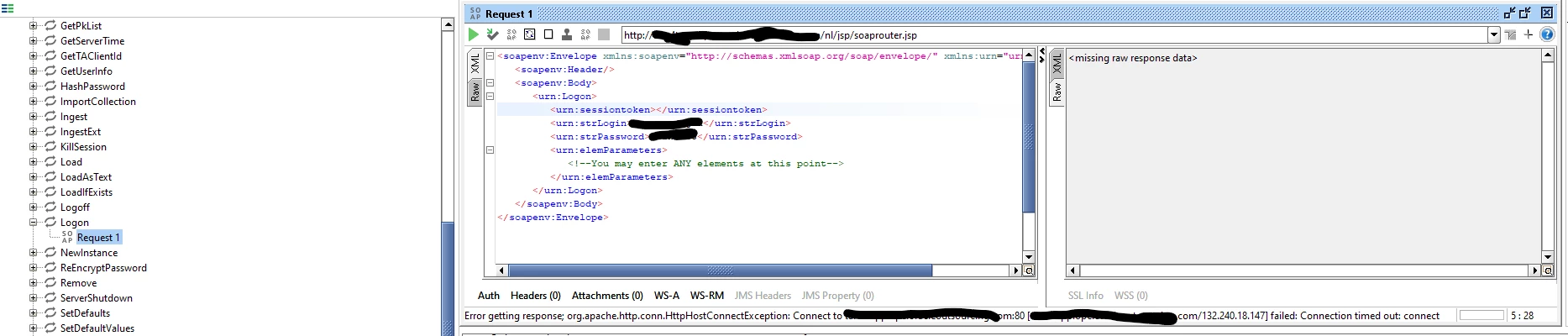
While Calling a schema wsdl [xtk:session] for adobe campaign classic I am getting below error after entering creds. Am I missing a small step?


May I know where to check this and how to fix this error.


Thanks in advance!


This post is no longer active and is closed to new replies. Need help? Start a new post to ask your question.
Best answer by Shubham_Goyal__

Hi @poonam_dogra,


Logon SOAP function is a very simple function and it should be working if everything I said have had been followed.

We can connect and discuss this issue further if you like: 

https://www.linkedin.com/in/shubham-goyal-205037128/


Br,

Shubham


Hi @poonam_dogra,


To document the correct answer for any future reference:

In our further discussion, the issue was found with the endpoint Url of the campaign server which was missing 's' in http:// ,  post correcting which the Logon call was successful.


Br,

Shubham 

1 reply

DavidKangni
Community Advisor
Community Advisor
October 13, 2022

Hi @poonam_dogra,


You may need to save the WSDL correctly

To save the WSDL file:

  • Right click on the page
  • Select view source
  • Copy and paste the text into a text editor
  • Save the file with the extension .wsdl

Thanks,

David

David Kangni
Level 4
October 13, 2022

HI @davidkangni ,

Thank you for responding, I am able to load the sessions now but when I am hitting it with user id password to get the session token, its throwing connection time out error. It will be helpful if you could please guide me how can I get the session token.


Level 4
October 20, 2022

Hi @poonam_dogra ,

Yes, sure you can use SOAP methods for your own instance too, I was just assuming that you testing the connection for the 'message center'.
Also, the remedies I suggested will still be the same and you may ignore the access rights suggestion for 'message center' which will not apply to your case.
For your case, you check if your operator is able to log in to the instance via the client console or at least has access rights to the Thin client.
Also, if everything is fine just try to make this test from some other machine to rule out issues with the SOAP UI application or security settings of your PC.

Br,

Shubham


Hi @shubham_goyal__ ,

I tried with other pc but still no luck! I am able to login to client console with the same operator's user id password.

Kindly let me know if you feel I might have missed anything or if anything else as a workaround I can try.

Thanks!