Empty List | Community
Skip to main content
October 16, 2020
Solved

Empty List

  • October 16, 2020
  • 4 replies
  • 2935 views

Hi Team,


Please let me know how can we empty the List after delivery activity.

We are updating the list with 3 days record so "Purge and re-use the list" checkbox is unchecked. 

Our goal is to empty the records in the list once delivery is performed.


Please help me with this.

Thanks in advance. 🙂

This post is no longer active and is closed to new replies. Need help? Start a new post to ask your question.
Best answer by Darren_Bowers

So am posting up the answer that helped @ritu21 

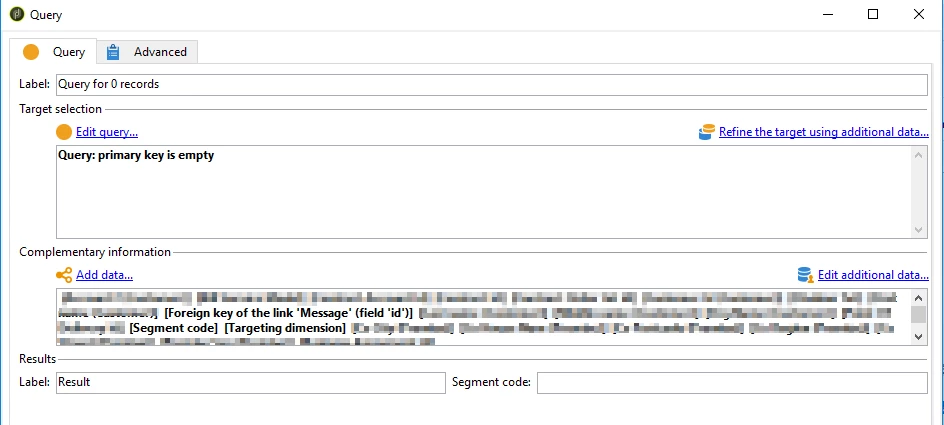
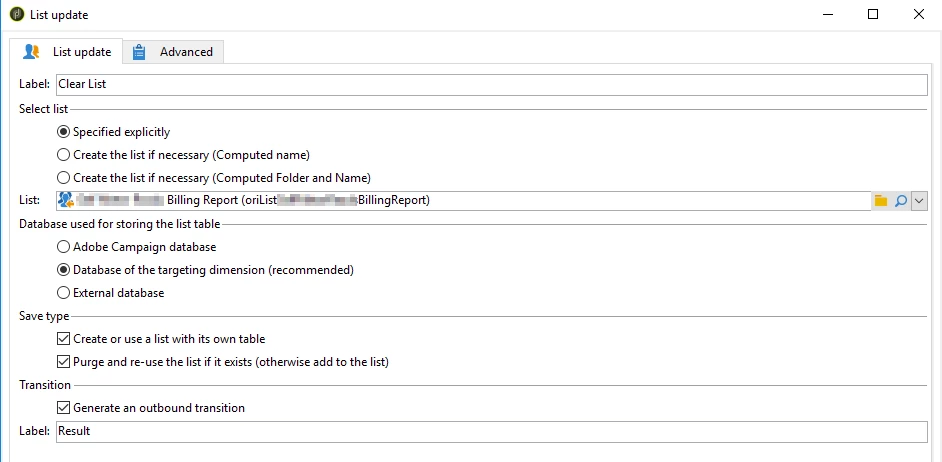
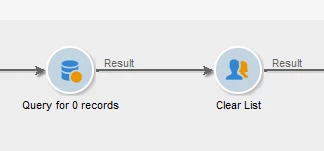
This is my actual workflow that does this:

The first two steps are self-explanatory. The query is just querying the same record set for 0 records, but I also put all the additional data onto the schema that came off the schema when I first loaded it. I think this is so the new List has the exact same structure as the old list. Make sure you put the targeting dimension on there too.

Then I just save the new list as the same name as the old list

Cheers

Darren

4 replies

Jonathon_wodnicki
Community Advisor
Community Advisor
October 16, 2020

Hi,


Follow these steps:

  1. Create a workflow with external signal pointing to a js activity pointing to an end block
  2. In the js:
    1. Use nms.delivery.get(vars.deliveryId) to get the delivery contents
    2. Parse the contents for the target population's group id(s)
    3. Delete all the rows for group(s)
  3. Set the external account of the deliveries to use that workflow for post-processing


Might also be able to accomplish above without js, using $long(vars/@deliveryId) in a query activity; not so sure about parsing the target for the group id(s) without js though.


Thanks,

-Jon

Darren_Bowers
Level 9
October 19, 2020

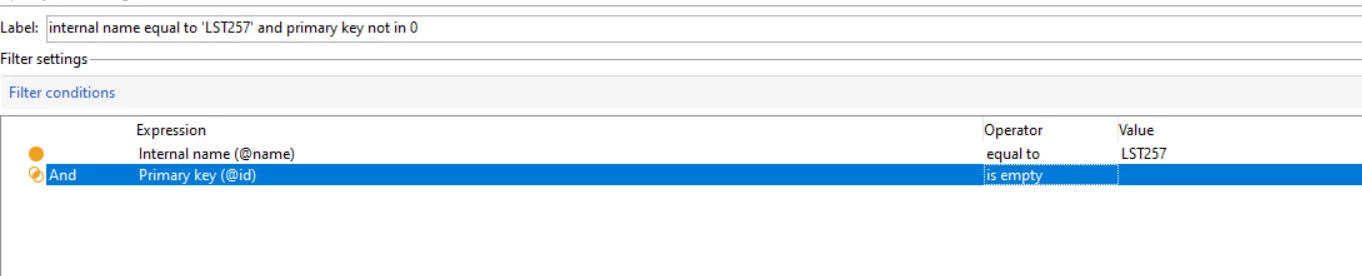
Hi @ritu21 - the answer that @jonathon_wodnicki gave is definitely one way to do it. I found another easy way to do it - just query the List for 0 records then save the List again. It preserves the List schema and purges the list by saving 0 records to it. The query just asks for records where the primary key is empty and the Update List just has the Purge List checkbox ticked.


Ritu21Author
October 20, 2020

Hi Darren,

Thank you for the reply.


I tried to do that but getting 0 record.

filtered List internal name  and then added query primary key is empty. I am getting 0 records and didn't worked. Could you please let me know where I'm going wrong


Sukrity_Wadhwa
Community Manager
Community Manager
October 26, 2020

Hi @ritu21,

Were you able to resolve this query with any of the given solutions? Do let us know.

Thanks!

Sukrity Wadhwa
Ritu21Author
October 28, 2020

Hi Sukrity,

Thank you for your concern.
I was unable to solve that.

Have asked for the same again.


Darren_Bowers
Darren_BowersAccepted solution
Level 9
November 3, 2020

So am posting up the answer that helped @ritu21 

This is my actual workflow that does this:

The first two steps are self-explanatory. The query is just querying the same record set for 0 records, but I also put all the additional data onto the schema that came off the schema when I first loaded it. I think this is so the new List has the exact same structure as the old list. Make sure you put the targeting dimension on there too.

Then I just save the new list as the same name as the old list

Cheers

Darren