Easily copying logic from query or filter to a split? | Community
Skip to main content
August 12, 2024
Solved

Easily copying logic from query or filter to a split?

  • August 12, 2024
  • 2 replies
  • 681 views

We will create some complex logic in a query or filter with multiple lines and rules. Sometimes we will want to replicate some or all of these rules in a split. At the moment I will do this all manually, a line at a time, which can be extremely hard and time consuming.


Is there an easy way I can copy all of the logic used and paste into a split? I saw there is an option for "Generated SQL Query" that can be copied out, but I can't see how to copy this into anything.


Any help would be greatly appreciated!
This post is no longer active and is closed to new replies. Need help? Start a new post to ask your question.
Best answer by ParthaSarathy

Hi @chrised1 ,

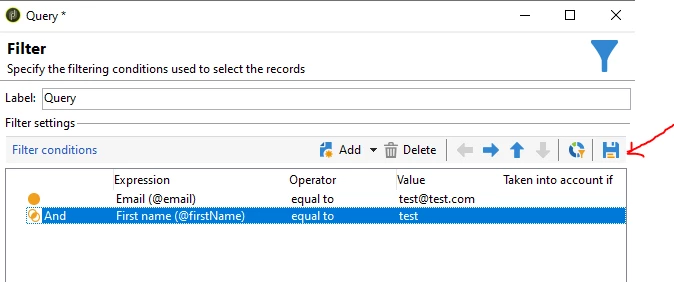
In your query you can save the query conditions as 'Predefined filters' by click on Save button.


Or you can directly create pre-defined filter in its folder and call it in Query / Split.

Refer this document to create predefined filters

2 replies

ParthaSarathy
Community Advisor
ParthaSarathyCommunity AdvisorAccepted solution
Community Advisor
August 12, 2024

Hi @chrised1 ,

In your query you can save the query conditions as 'Predefined filters' by click on Save button.


Or you can directly create pre-defined filter in its folder and call it in Query / Split.

Refer this document to create predefined filters

~  ParthaSarathy S~  Click here to join ADOBE CAMPAIGN USER GROUP for Quarterly In-person | Hybrid | Virtual Meetups
Rch_
Level 3
August 12, 2024

Hi @chrised1 ,


Try selecting the queries 1 by 1 and then perform the copy paste to your destined place. (Do not use ctrl+A)