Display logs of each Javascript activity in workflow show consolidated logs of all the multiple javascripts activities present in the single workflow | Community
Skip to main content
Level 2
May 16, 2024
Solved

Display logs of each Javascript activity in workflow show consolidated logs of all the multiple javascripts activities present in the single workflow

  • May 16, 2024
  • 3 replies
  • 1087 views

Hi,


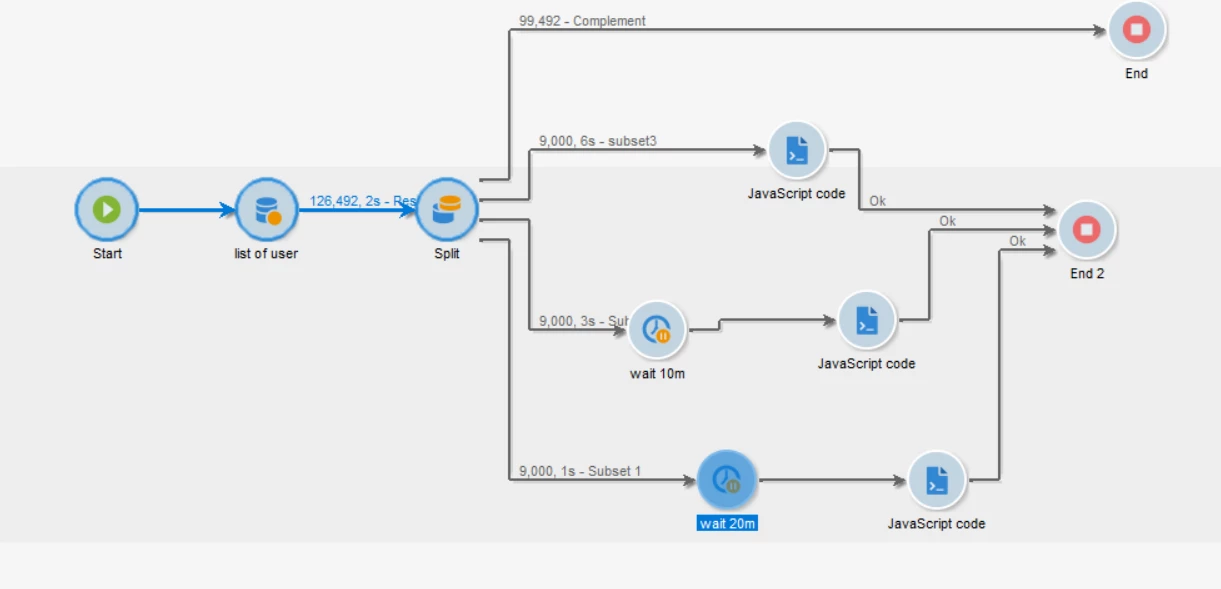
I am making an API call  to users using querydef inside the JS activity of workflow. Since Querydef can handle 10k records at a time, we split the entire records into 9k each and used multiple javascripts as show below. We created one JS activity and copy pasted the same for the other two. I am using 'logInfo' inside the JS activity to print the users the the API call has been made.


The issue is, when right click on The JS activity and do display logs, I see the entire consolidated logs of the 3 JavaScript activities inside each java script activity . For example: in the below case, I see 27k user data inside each JavaScript activity when I do 'Display logs' instead of the 9k API call each JS activity has performed individually. Is it an expected behavior? How can I be sure that Multiple API calls are not made to the same user?  Please help


This post is no longer active and is closed to new replies. Need help? Start a new post to ask your question.
Best answer by Manoj_Kumar

Hello @bhaskarjc 


Display the target only work with activites which generates a temporary schema on execution. JavaScript activity does not create a temp schema and the temp schema from previous activity is used and that is why you see all records in the display target.

3 replies

ALangridge
Level 4
May 20, 2024

I've noticed that in workflows where I copy and paste code activities, they often seem to retain the logs of the copied activity and I end up needing to check the timestamps to see whats actually happening. 

I often like to wrap easy to spot headers around my code (with the name of the activity at the bottom as the logs display newest to oldest, so it'll be at the top).

logInfo('/////////////////////') -CODE TO PRINT USERS- logInfo('NAME OF MY ACTIVITY') logInfo(new Date()) logInfo('////////////')


You could even drop the code to print out the specific users and it'll let you confirm 100% WHAT is being executed there.

I also wrote a quick example up on how I've overcome the 10k queryDef limit by ordering the records in my query and putting everything within a loop HERE

Manoj_Kumar
Community Advisor
Manoj_KumarCommunity AdvisorAccepted solution
Community Advisor
May 20, 2024

Hello @bhaskarjc 


Display the target only work with activites which generates a temporary schema on execution. JavaScript activity does not create a temp schema and the temp schema from previous activity is used and that is why you see all records in the display target.

Manoj     Find me on LinkedIn
Sukrity_Wadhwa
Community Manager
Community Manager
May 30, 2024

Hi @bhaskarjc,

Were you able to resolve this query with the help of the given solutions or do you still need more help here? Do let us know. In case the given solutions were helpful, then kindly choose the one that helped you the most as the 'Correct Reply'.
Thanks!

Sukrity Wadhwa